I’m developing a logarithmic graph as shown below:
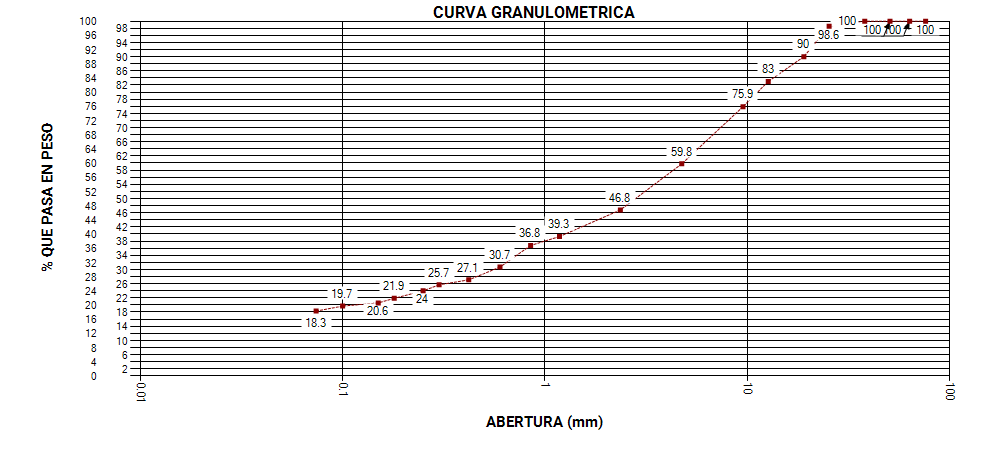
The labels of each point are located right next to the point, and this is what I do not want, because what I am looking for is that the labels are located at the bottom of the graph, just in the direction on the x axis that corresponds to it.
Its encoding with hard code is as follows:
Series series = Chart1.Series["Series1"];
Series seriesPuntos = new Series();
seriesPuntos.Points.AddXY(76.20, 100.0);
seriesPuntos.Points.AddXY(63.50, 100.0);
seriesPuntos.Points.AddXY(50.80, 100.0);
seriesPuntos.Points.AddXY(38.10, 100.0);
seriesPuntos.Points.AddXY(25.40, 98.6);
seriesPuntos.Points.AddXY(19.05, 90.0);
seriesPuntos.Points.AddXY(12.70, 83.0);
seriesPuntos.Points.AddXY(9.53, 75.9);
seriesPuntos.Points.AddXY(4.75, 59.8);
seriesPuntos.Points.AddXY(2.36, 46.8);
seriesPuntos.Points.AddXY(1.18, 39.3);
seriesPuntos.Points.AddXY(0.85, 36.8);
seriesPuntos.Points.AddXY(0.60, 30.7);
seriesPuntos.Points.AddXY(0.42, 27.1);
seriesPuntos.Points.AddXY(0.30, 25.7);
seriesPuntos.Points.AddXY(0.25, 24.0);
seriesPuntos.Points.AddXY(0.18, 21.9);
seriesPuntos.Points.AddXY(0.15, 20.6);
seriesPuntos.Points.AddXY(0.10, 19.7);
seriesPuntos.Points.AddXY(0.074, 18.3);
Chart1.Series.Add(seriesPuntos);

Chart1.Series[1].XValueType = ChartValueType.Double;
Chart1.Series[1].YValueType = ChartValueType.Double;

Chart1.Series[0].ChartType = SeriesChartType.Line;
Chart1.Series[1].ChartType = SeriesChartType.Point;

Chart1.Series[0].Color = Color.DarkRed;
Chart1.Series[0].BorderWidth = 1;
Chart1.Series[0].BorderDashStyle = ChartDashStyle.Dash;

Chart1.Series[1].Color = Color.DarkRed;
Chart1.Series[1].BorderWidth = 15;

Chart1.ChartAreas[0].BorderWidth = 1;
Chart1.ChartAreas[0].BorderDashStyle = ChartDashStyle.Solid;
Chart1.ChartAreas[0].AxisY.Interval = 2;
Chart1.ChartAreas[0].AxisX.Interval = 1;
Chart1.ChartAreas[0].AxisY.Minimum = 0;
Chart1.ChartAreas[0].AxisY.Maximum = 100;

Chart1.ChartAreas[0].AxisX.LabelStyle.Angle = 90;

series.Points.AddXY(76.20, 100.0);
series.Points.AddXY(63.50, 100.0);
series.Points.AddXY(50.80, 100.0);
series.Points.AddXY(38.10, 100.0);
series.Points.AddXY(25.40, 98.6);
series.Points.AddXY(19.05, 90.0);
series.Points.AddXY(12.70, 83.0);
series.Points.AddXY(9.53, 75.9);
series.Points.AddXY(4.75, 59.8);
series.Points.AddXY(2.36, 46.8);
series.Points.AddXY(1.18, 39.3);
series.Points.AddXY(0.85, 36.8);
series.Points.AddXY(0.60, 30.7);
series.Points.AddXY(0.42, 27.1);
series.Points.AddXY(0.30, 25.7);
series.Points.AddXY(0.25, 24.0);
series.Points.AddXY(0.18, 21.9);
series.Points.AddXY(0.15, 20.6);
series.Points.AddXY(0.10, 19.7);
series.Points.AddXY(0.074, 18.3);

Chart1.Series[0].XValueType = ChartValueType.Double;
Chart1.Series[0].YValueType = ChartValueType.Double;

Chart1.ChartAreas[0].AxisX.LabelStyle.Angle = 90;
Chart1.ChartAreas[0].AxisX.LabelAutoFitStyle = LabelAutoFitStyles.LabelsAngleStep90;
Chart1.ChartAreas[0].AxisX.IsLogarithmic = true;

Chart1.ChartAreas[0].AxisY.Title = "% QUE PASA EN PESO";
Chart1.ChartAreas[0].AxisY.TitleFont = new Font("Roboto", 11, FontStyle.Bold);

Chart1.ChartAreas[0].AxisX.Title = "ABERTURA (mm)";
Chart1.ChartAreas[0].AxisX.TitleFont = new Font("Roboto", 11, FontStyle.Bold);


Chart1.Series[0].IsValueShownAsLabel = true;
Chart1.Series[0].LabelBackColor = Color.White;
Chart1.Series[0].LabelAngle = 90;

Chart1.Series[0].IsXValueIndexed = true;
Chart1.Series[1].IsXValueIndexed = true;
View:
<asp:Chart ID="Chart1" runat="server" BorderlineWidth="14" Width="990px" Height="450" class="card-img-top" Style="width: auto; !important">
            <Series>
                <asp:Series Name="Series1" ChartType="Line"></asp:Series>
            </Series>
            <ChartAreas>
                <asp:ChartArea Name="ChartArea1"></asp:ChartArea>
            </ChartAreas>
            <Titles>
                <asp:Title Font="Roboto, 12pt, style=Bold" Name="Title1" Text="CURVA GRANULOMÉTRICA">
                    <Position Height="3.862135" Width="92" X="8" Y="1" />
                </asp:Title>
            </Titles>
        </asp:Chart>
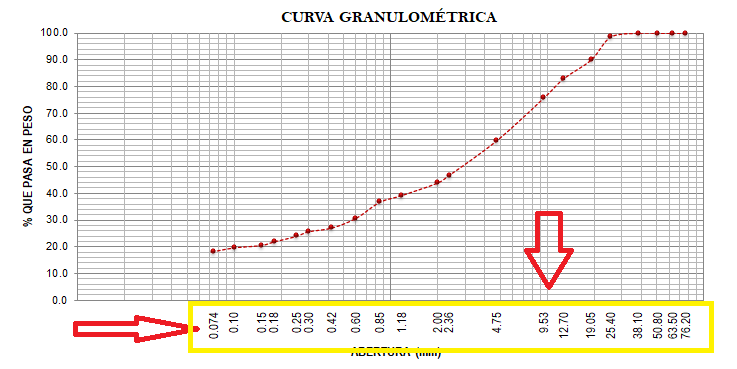
What I’m looking for is that the labels of each point are located at the bottom of the graph as shown below:
Answers:
Thank you for visiting the Q&A section on Magenaut. Please note that all the answers may not help you solve the issue immediately. So please treat them as advisements. If you found the post helpful (or not), leave a comment & I’ll get back to you as soon as possible.
Method 1
- Your example don’t seem to work, at least in my machine (and I found some indications online as well). You can’t use AxisX.IsLogarithmic with Series.IsXValueIndexed.
-
I don’t know why your code has two series with the same values.
If you want to use a line and highlight the points you should use the MarkerXXX properties:
series.ChartType = SeriesChartType.Line;
series.MarkerColor = Color.Red;
series.MarkerStyle = MarkerStyle.Circle;
series.MarkerSize = 4;
- I don’t think there is any way of doing what you want “off the shelf”.
You have to use AxisX.CustomLabels. Something like:
var series = Chart1.Series["Series1"];
series.Points.AddXY(76.20, 100.0);
series.Points.AddXY(63.50, 100.0);
series.Points.AddXY(50.80, 100.0);
series.Points.AddXY(38.10, 100.0);
series.Points.AddXY(25.40, 98.6);
series.Points.AddXY(19.05, 90.0);
series.Points.AddXY(12.70, 83.0);
series.Points.AddXY(9.53, 75.9);
series.Points.AddXY(4.75, 59.8);
series.Points.AddXY(2.36, 46.8);
series.Points.AddXY(1.18, 39.3);
series.Points.AddXY(0.85, 36.8);
series.Points.AddXY(0.60, 30.7);
series.Points.AddXY(0.42, 27.1);
series.Points.AddXY(0.30, 25.7);
series.Points.AddXY(0.25, 24.0);
series.Points.AddXY(0.18, 21.9);
series.Points.AddXY(0.15, 20.6);
series.Points.AddXY(0.10, 19.7);
series.Points.AddXY(0.074, 18.3);

series.XValueType = ChartValueType.Double;
series.YValueType = ChartValueType.Double;
series.ChartType = SeriesChartType.Line;
series.Color = Color.DarkRed;
series.BorderWidth = 1;
series.BorderDashStyle = ChartDashStyle.Dash;
series.MarkerColor = Color.Red;
series.MarkerStyle = MarkerStyle.Circle;
series.MarkerSize = 4;

var chartArea = Chart1.ChartAreas[0];
chartArea.BorderWidth = 1;
chartArea.BorderDashStyle = ChartDashStyle.Solid;

chartArea.AxisY.Interval = 2;
chartArea.AxisY.Minimum = 0;
chartArea.AxisY.Maximum = 100;
chartArea.AxisY.Title = "% QUE PASA EN PESO";
chartArea.AxisY.TitleFont = new Font("Roboto", 11, FontStyle.Bold);

chartArea.AxisX.LabelStyle.Angle = -90;
chartArea.AxisX.Title = "ABERTURA (mm)";
chartArea.AxisX.TitleFont = new Font("Roboto", 11, FontStyle.Bold);

chartArea.AxisX.IsLogarithmic = true;
chartArea.AxisX.MinorGrid.Interval = 1;
chartArea.AxisX.MinorGrid.Enabled = true;

//Axis is in log, so the CustomLabels fromPosition and toPosition should be as well - This gave me a small headache
var logBase = Chart1.ChartAreas[0].AxisX.LogarithmBase;
//Define the interval to show the text
var customLabelInterval = Math.Log(0.01, logBase);
foreach (var seriesPoint in series.Points)
{
    chartArea.AxisX.CustomLabels.Add(Math.Log(seriesPoint.XValue, logBase) - customLabelInterval, Math.Log(seriesPoint.XValue, logBase) + customLabelInterval, seriesPoint.XValue.ToString(CultureInfo.CurrentCulture));
}
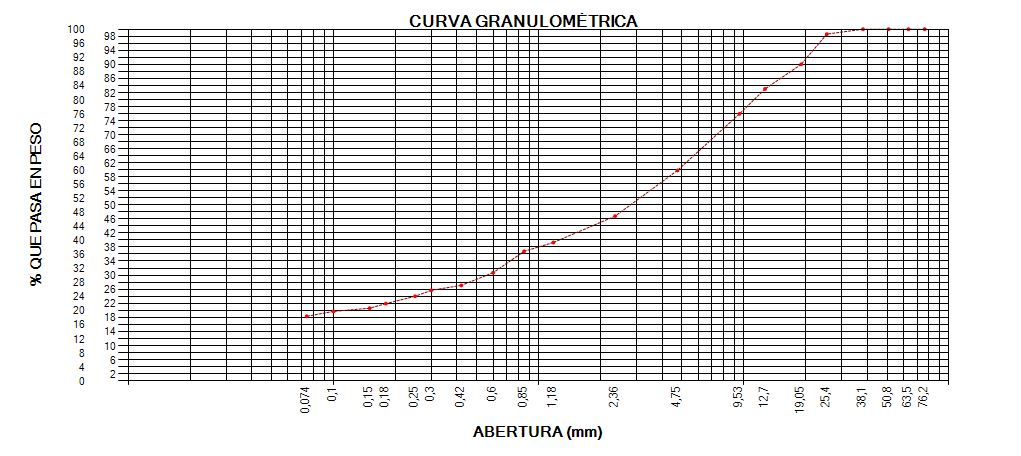
Resulting in
All methods was sourced from stackoverflow.com or stackexchange.com, is licensed under cc by-sa 2.5, cc by-sa 3.0 and cc by-sa 4.0