How to register .Net 4.5.1 with IIS8 on windows 10 machine?
it used to be simple as running command “aspnet_regiis -i”…but not anymore. if try to run this command i get error
This option is not supported on this version of the operating system.
Administrators should instead install/uninstall ASP.NET 4.5 with IIS8
using the “Turn Windows Features On/Off” dialog, the Server Manager
management tool, or the dism.exe command line tool. For more details
please see http://go.microsoft.com/fwlink/?LinkID=216771. Finished
installing ASP.NET (4.0.30319.0).
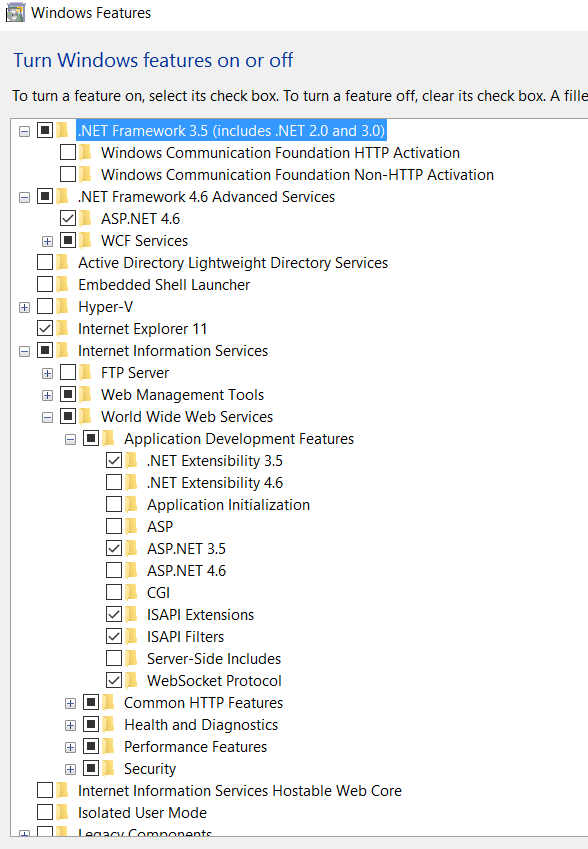
Also in windows 10 under “Turn windows feature on & off” windows why i dont see .net 4.5 or 4.5.1? i do see 4.6 though. Is it same as 4.5.1?
(note i am sure 4.5.1 is installed on my machine because visual studio allows me to set target framework 4.5.1 on web applications and i have several applications which runs on 4.5.1 without any issue)
Answers:
Thank you for visiting the Q&A section on Magenaut. Please note that all the answers may not help you solve the issue immediately. So please treat them as advisements. If you found the post helpful (or not), leave a comment & I’ll get back to you as soon as possible.
Method 1
You can use the dism tool to enable features built into Windows. To install .NET 4.5 (or 4.6, they’re the same since it’s the same CLR4 underneath) into IIS, I think this will work:
dism /online /enable-feature /featurename:IIS-ASPNET45 /all
The /all flag will include any dependencies so you don’t have to figure them all out.
You can also see all of the available features by running:
dism /online /get-features
As an aside, aspnet_regiis was used when you needed to install a version of the CLR into IIS. Since all versions of .NET since 4.0 use the same CLR versions, this is now built into the Windows features. So you use DISM to enable the feature instead.
Method 2
i do see 4.6 though. Is it same as 4.5.1?
.NET 4.6 is a drop in replacement over 4.5.1. Meaning, your 4.5.1 applications will run on 4.6. So you could say that 4.6 “includes” 4.5.1.
Method 3
If you’re ASP.NET version agnostic and just want the ASP.NET State Service running, Go to IIS -> Web Server (IIS) -> Web Server -> Application Development and choose the latest ASP.NET. This will create ASP.NET State Service in Services.msc which you can then configure to run.
All methods was sourced from stackoverflow.com or stackexchange.com, is licensed under cc by-sa 2.5, cc by-sa 3.0 and cc by-sa 4.0