I recently installed Rankmath, I am using different Page Builder, Where the content not readable by the Plugin. So I disabled SEO Analysis from Setting. Now I wonder if we can remove this Table from Daba via functions.php. I think removing this table will improve load time.
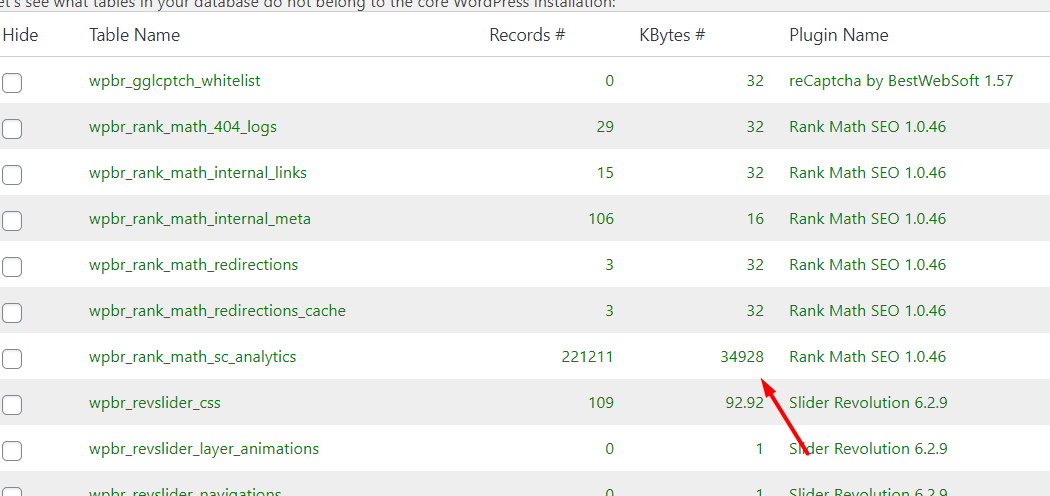
Table Name : “wpbr_rank_math_sc_analytics”
Answers:
Thank you for visiting the Q&A section on Magenaut. Please note that all the answers may not help you solve the issue immediately. So please treat them as advisements. If you found the post helpful (or not), leave a comment & I’ll get back to you as soon as possible.
Method 1
Add this to functions.php
function delete_wpbr_rank_math_sc_analytics() {
    if ( ! isset( $_GET['delete_wpbr_rank_math_sc_analytics'] ) ) {
        return;
    }

    global $wpdb;
    $wpdb->query( "DROP TABLE IF EXISTS wpbr_rank_math_sc_analytics" );
}
add_action( 'admin_init', 'delete_wpbr_rank_math_sc_analytics' );
Visit this URL: https://yoursite.com/wp-admin/?delete_wpbr_rank_math_sc_analytics
Obviously change “yoursite.com” to your actual domain.
I made it so you have to visit a specific URL so it doesn’t run every time.
All methods was sourced from stackoverflow.com or stackexchange.com, is licensed under cc by-sa 2.5, cc by-sa 3.0 and cc by-sa 4.0