How to respect “Serve static content from a cookieless domain” page speed rule in IIS6?
Answers:
Thank you for visiting the Q&A section on Magenaut. Please note that all the answers may not help you solve the issue immediately. So please treat them as advisements. If you found the post helpful (or not), leave a comment & I’ll get back to you as soon as possible.
Method 1
To create a cookieless site (or subdomain, which is a very common best-practice) in IIS6/IIS7/IIS7.5 is simple : you need to tell the website that you are not to use cookies 🙂 Which means in IIS terms, not to use a session.
This can be achieved in IIS6/IIS7 via two ways.
- Modifying the Web.config file (my personal recommendation)
- Using the IIS Manager GUI to find the setting and changing it.
IMPORTANT
Before you do any testing, you must must must clear all cookies (or all cookies for the domain u are testing) otherwise, they will get passed along even if u have done all the steps.
1. Via Config File
You need to define the session state to off.
<system.web>
        <sessionState cookieName="What_ever" mode="Off" />
</system.web>
NOTE: Please note that the attribute cookieless (true|false) does NOT mean ‘send cookies/do not sent cookies). That’s for using sessions with/without cookies … and passes some cookie guid into the url instead (if set to true).
2. Via Gui
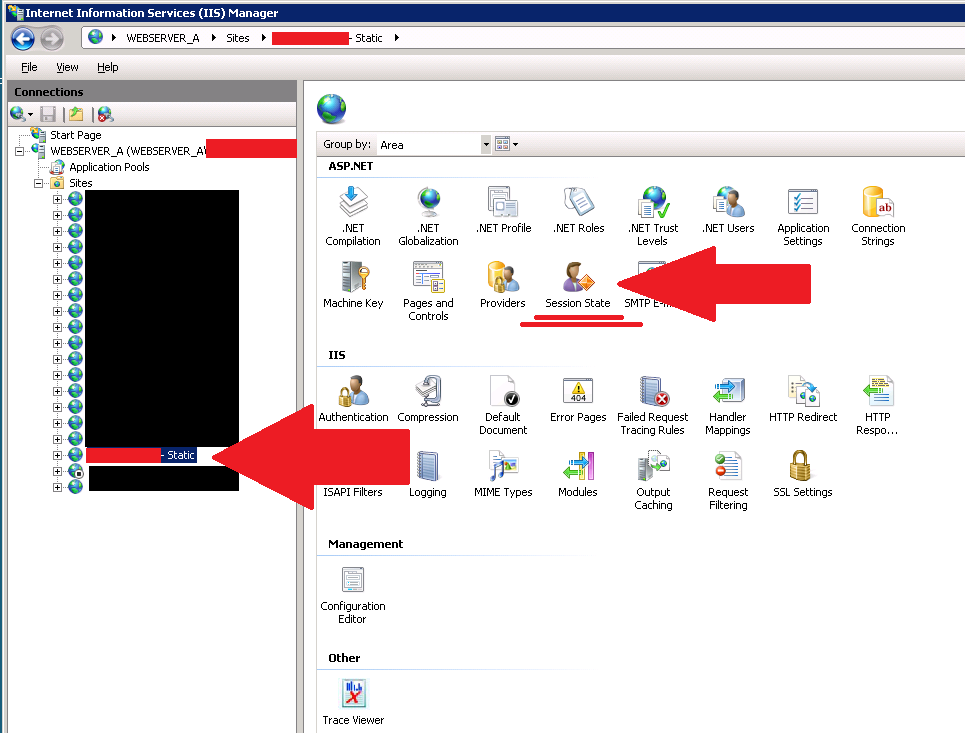
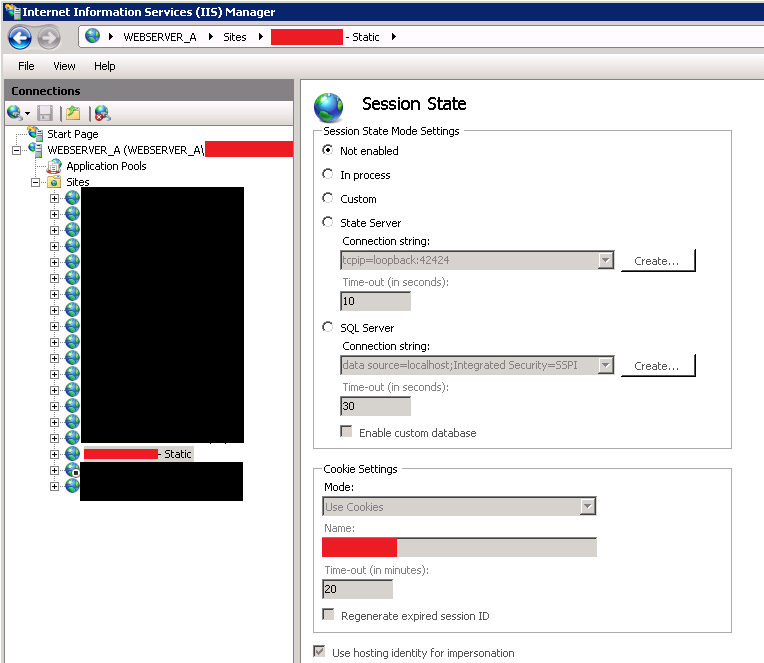
Hope this Helps (i assume u know how to test that no cookies are working/not working…)
Method 2
What this means is that your content needs to come from a domain that has no cookies attached to it. StackOverflow.com is an example of a site that does this. You will notice that all SO’s static content comes from a domain called sstatic.net.
http://sstatic.net/stackoverflow/all.css
http://sstatic.net/js/master.js
This is so that the client and the server don’t have to waste resources on actually parsing and handling cookie data. The good news is, you can use a sub-domain, assuming that you set your cookie path correctly.
Yahoo Best Practices for Speeding Up
Your Web Site
Use Cookie-free Domains for Components
When the browser makes a request for a
static image and sends cookies
together with the request, the server
doesn’t have any use for those
cookies. So they only create network
traffic for no good reason. You should
make sure static components are
requested with cookie-free requests.
Create a subdomain and host all your
static components there. If your
domain is www.example.org, you can
host your static components on
static.example.org. However, if you’ve
already set cookies on the top-level
domain example.org as opposed to
www.example.org, then all the requests
to static.example.org will include
those cookies. In this case, you can
buy a whole new domain, host your
static components there, and keep this
domain cookie-free. Yahoo! uses
yimg.com, YouTube uses ytimg.com,
Amazon uses images-amazon.com and so
on.Another benefit of hosting static
components on a cookie-free domain is
that some proxies might refuse to
cache the components that are
requested with cookies. On a related
note, if you wonder if you should use
example.org or www.example.org for
your home page, consider the cookie
impact. Omitting www leaves you no
choice but to write cookies to
*.example.org, so for performance reasons it’s best to use the www
subdomain and write the cookies to
that subdomain.
Method 3
create subdomain ( for example static.example.com ) and store all static content(images, css, js) here
All methods was sourced from stackoverflow.com or stackexchange.com, is licensed under cc by-sa 2.5, cc by-sa 3.0 and cc by-sa 4.0