As I understand, Python 2.7.9 comes with Pip installed, however when I try to execute a Pip command from CMD (Windows) I get the following error:
'pip' is not recognized as an internal or external command, operable program or batch file.
When I type python I do get the following, which suggests it has been installed correctly:
Python 2.7.9 (default, Dec 10 2014, 12:24:55) [MSC v.1500 32 bit (Intel)] on win32
Type "help", "copyright", "credits" or "license" for more information.
I did however need to add some environmental variables to get the python part working on CMD:
-
Add to the environment variable
PATH:"C:Python27" -
Define the system variable
PYTHONPATH:"C:Python27"
I cannot find a Pip folder within the Python directory, however there is a folder called “ensurepip” in C:Python27Lib.
Does anybody know how can I get Pip commands to start working in CMD?
Answers:
Thank you for visiting the Q&A section on Magenaut. Please note that all the answers may not help you solve the issue immediately. So please treat them as advisements. If you found the post helpful (or not), leave a comment & I’ll get back to you as soon as possible.
Method 1
Little side note for anyone new to Python who didn’t figure it out by theirself: this should be automatic when installing Python, but just in case, note that to run Python using the python command in Windows’ CMD you must first add it to the PATH environment variable, as explained here.
To execute Pip, first of all make sure you have it installed, so type in your CMD:
> python
>>> import pip
>>>
And it should proceed with no error. Otherwise, if this fails, you can look here to see how to install it. Now that you are sure you’ve got Pip, you can run it from CMD with Python using the -m (module) parameter, like this:
> python -m pip <command> <args>
Where <command> is any Pip command you want to run, and <args> are its relative arguments, separated by spaces.
For example, to install a package:
> python -m pip install <package-name>
Method 2
Newer versions of Python come with py, the Python Launcher, which is always in the PATH.
Here is how to invoke pip via py:
py -m pip install <packagename>
py allows having several versions of Python on the same machine.
As an example, here is how to invoke the pip from Python 2.7:
py -2.7 -m pip install <packagename>
Method 3
Make sure to also add “C:Python27Scripts” to your path. pip.exe should be in that folder. Then you can just run:
C:> pip install modulename
Method 4
Go to the folder where Python is installed .. and go to Scripts folder .
Do all this in CMD and then type :
pip
to check whether its there or not .
As soon as it shows some list it means that it is there .
Then type
pip install <package name you want to install>
Method 5
Simple solution that worked for me is, set the path of python in environment variables,it is done as follows
- Go to My Computer
- Open properties
- Open Advanced Settings
- Open Environment Variables
- Select path
- Edit it
In the edit option click add and add following two paths to it one by one:
C:Python27

C:Python27Scripts
and now close cmd and run it as administrator, by that pip will start working.
Method 6
Firstly make sure that you have installed python 2.7 or higher
Open Command Prompt as administrator and change directory to python and then change directory to Scripts by typing cd Scripts then type pip.exe and now you can install modules
Step by Step:
- Open Cmd
- type in “cd ” and then enter
- type in “cd python2.7” and then enter
Note that my python version is 2.7 so my directory is that so use your python folder here…
- type in “cd Scripts” and enter
- Now enter this “pip.exe”
- Now it prompts you to install modules
Method 7
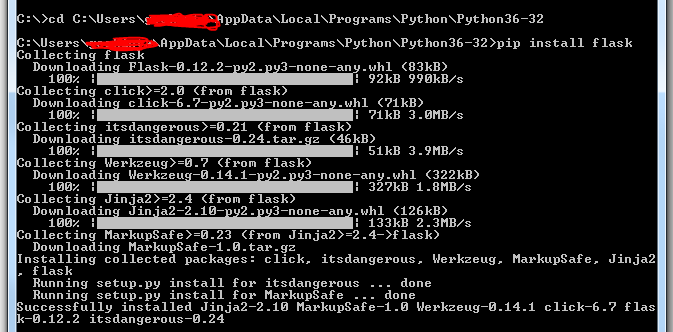
In my case I was trying to install Flask. I wanted to run pip install Flask command. But when I open command prompt it I goes to C:Users>. If you give here it will say pip is not recognized. I did below steps
On your desktop right click Computer and select Properties
Select Advanced Systems Settings
In popup which you see select Advanced tab and then click Environment Variables
In popup double click PATH and from popup copy variable value for variable name PATH and paste the variable value in notepad or so and look for an entry for Python.
In my case it was C:Users\AppDataLocalProgramsPythonPython36-32
Now in my command prompt i moved to above location and gave
pip install Flask
Method 8
This is the simplest way.
Within Command Prompt:
py -m pip install <ModuleNameGoesHere>
This will run anywhere as long as you have python installed.
Breakdown:
pyis a universal python command for most versions of Python. Which is nice because you don’t have to find and navigate to a specific or complex path.-mstands for modulepipis the package management system used to install and manage software packages written in Pythoninstallis the Pip command for installationModuleName...is the placeholder for the module/package object you wish to download into python.
Example:
py -m pip install requests
orpy -m pip install pandas
All methods was sourced from stackoverflow.com or stackexchange.com, is licensed under cc by-sa 2.5, cc by-sa 3.0 and cc by-sa 4.0