In a WordPress powered news portal, they need to upload many news at a time on a certain period of a day, in most of the cases, after 10pm (today). But they are actually inserting news for the next day (tomorrow). So in WordPress way they need to schedule the news (post) each time when publishing.
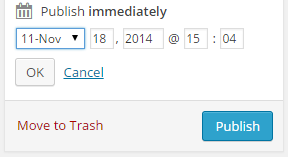
The same repeating job – edit the time, change the date to the upcoming date (i.e. 19), change the Hour to 12, and Minute to 01. That’s time consuming and a bit of disturbing too.
Is there a way I can make a common thing for them so that they can set it once and upload all the posts to the newly set time? And can reset the timing anytime?
Answers:
Thank you for visiting the Q&A section on Magenaut. Please note that all the answers may not help you solve the issue immediately. So please treat them as advisements. If you found the post helpful (or not), leave a comment & I’ll get back to you as soon as possible.
Method 1
Here’s a sketch of another idea, where we create scheduling shortcuts to make it easier for the users:
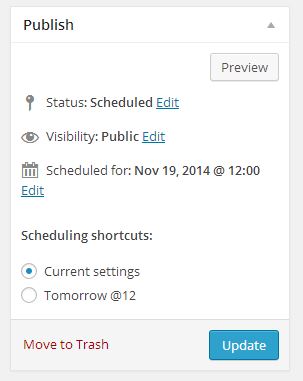
We can use the post_submitbox_misc_actions to add extra fields to the submit box:
/**
 * Scheduling-Shortcuts fields.
 *
 * @see http://wordpress.stackexchange.com/a/168748/26350
 */

add_action( 'post_submitbox_misc_actions', function() {

    if( ! current_user_can( 'publish_posts' ) )
        return;
?>
    <div style="padding: 2px 10px;">
        <h4><?php _e( 'Scheduling shortcuts:' ); ?></h4>
        <ul class="schedule-shortcuts">
            <li>
                <input type="radio" value="current"
                       name="wpse_schedule_shortcut"
                       id="shcedule-shortcut-0" checked="checked" />
                <label for="shcedule-shortcut-0"><?php _e( 'Current settings' );?></label>
            </li>
            <li>
                <input type="radio" value="tomorrow_at_12"
                       name="wpse_schedule_shortcut" id="shcedule-shortcut-1" />
                <label for="shcedule-shortcut-1"><?php _e( 'Tomorrow @12' );?></label>
            </li>
        </ul>
        <?php wp_nonce_field( 'schedule_shortcut_action','schedule_shortcut_field'); ?>
    </div>
<?php
});
where we can then modify the insert post data accordingly via the wp_insert_post_data filter:
/**
 * Scheduling-Shortcuts post data handling.
 *
 * @see http://wordpress.stackexchange.com/a/168748/26350
 */

add_filter( 'wp_insert_post_data', function( $data, $postarr ) {

    if( defined( 'DOING_AUTOSAVE' ) && DOING_AUTOSAVE )
        return $data;

    if( ! current_user_can( 'publish_posts' ) )
        return $data;

    if( ! isset( $postarr['post_type'] ) || 'post' !== $postarr['post_type'] )
        return $data;

    if( ! isset( $postarr['action'] ) || 'editpost' !== $postarr['action'] )
        return $data;

    if ( ! isset( $postarr['schedule_shortcut_field'] )
         || !wp_verify_nonce($postarr['schedule_shortcut_field'],'schedule_shortcut_action')
    )
        return $data;

    if( isset( $postarr['wpse_schedule_shortcut'] )
        && 'tomorrow_at_12' === $postarr['wpse_schedule_shortcut']
    )
    {
        $data['post_status']     = 'future';
        $data['post_date']       = date( 'Y-m-d H:i:s',   strtotime( "+1 day 00:00" ) );
        $data['post_date_gmt']   = gmdate( 'Y-m-d H:i:s', strtotime( "+1 day 00:00" ) );
    }
    return $data;
}, 10, 2 );
Hopefully you can adjust this further to your needs.
Method 2
Okay, got a temporary solution, suggested by one of my non-WP colleague, Mr. Shamim. And tested in WP 4.0 with success — It’s the bulk publish from drafts.
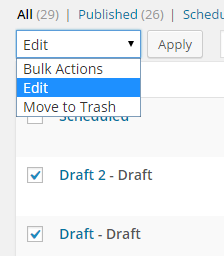
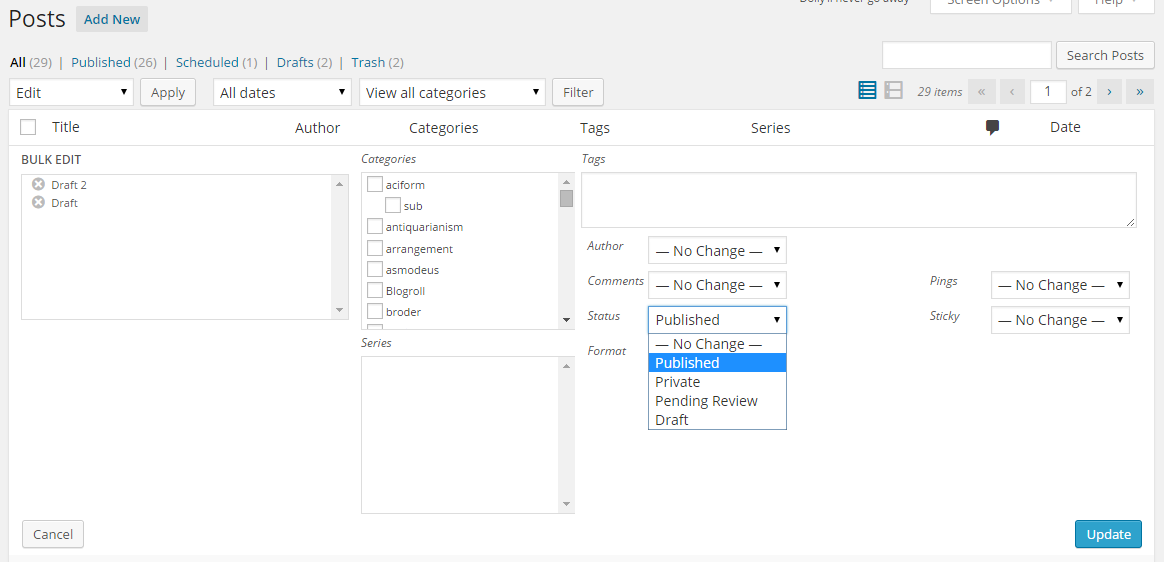
The idea is, whatever the series of posts or bunch of posts are to publish, first save ’em as a draft. Then on the time, when it’s time, check all of them in a bunch, choose Edit from the Bulk Actions dropdown menu, and then on the expanded panel, choose “Published” from the status, and finally hit Update.
But it has one drawback, you have to come back to the post list when you want to publish them all.
All methods was sourced from stackoverflow.com or stackexchange.com, is licensed under cc by-sa 2.5, cc by-sa 3.0 and cc by-sa 4.0