I’m trying to send a image and text fields to an API endpoint but I’m received
Unsupported content type ‘multipart/form-data;
boundary=—————————81801171514357
This is a ASP.NET Core 2.1 Web API. I have this:
[HttpPost("/api/account"), Authorize]
public void SaveUser(UserModel info)
And my model:
    [JsonProperty(PropertyName = "avatar")]
    [DataType(DataType.Upload)]
    public IFormFile Avatar { get; set; }

    [JsonProperty(PropertyName = "name")]
    [DataType(DataType.Text)]
    public string Name { get; set; }
Then I use axios:
    var formData = new FormData();
    formData.append("avatar", imageFile);
    formData.append("name", name);
    axios.post("/api/account", formData);
I expected this method to run, not throw an exception. But how? I have tried to add:
[Consumes("application/json", "multipart/form-data")]
But no success.
Then I tried:
[HttpPost("/api/account"), Authorize]
public void SaveUser([FromForm]UserModel info)
The method runs, but the properties is empty on info object 🙁
UPDATE:
Solution, don’t use JsonProperty PropertyName. Use the variable name.
Answers:
Thank you for visiting the Q&A section on Magenaut. Please note that all the answers may not help you solve the issue immediately. So please treat them as advisements. If you found the post helpful (or not), leave a comment & I’ll get back to you as soon as possible.
Method 1
Maybe you should try decorate controller input and model with [FromForm] attribute?
See more info here: web api parameters binding.
In given example your controller action should look like this:
[HttpPost("/api/account"), Authorize]
public void SaveUser([FromForm]UserModel info)
In model:
[FromForm(Name="avatar")]
public IFormFile Avatar { get; set; }

[FromForm(Name="name")]
public string Name { get; set; }
Method 2
1-send multi part file
            [HttpPost, Route("postimagenews")]
            public IActionResult PostImageNews([FromForm] IFormFile file)
            {
                try
                {
                    if (file == null || file.Length == 0)
                    {
                        return BadRequest("Please send a photo");
                    }
                    //create unique name for file
                    var fileName = Guid.NewGuid().ToString() + Path.GetExtension(file.FileName);

                    //set file url
                    var savePath = Path.Combine(Directory.GetCurrentDirectory(), "wwwroot/images/news", fileName);

                    using (var stream = new FileStream(savePath, FileMode.Create))
                    {
                        file.CopyTo(stream);
                    }

                    return Ok(fileName);
                }
                catch
                {
                    return BadRequest("error in upload image");
                }
            }
2-recive multi part file
            public static async Task<string> PostImage(string apiendpoint, IFormFile data)
            {
                using (var httpClient = new HttpClient())
                {
                    var multipartContent = new MultipartFormDataContent();
                    var fileContent = new ByteArrayContent(GetFileArray(data));
                    fileContent.Headers.ContentType = MediaTypeHeaderValue.Parse("image/jpeg");
                    multipartContent.Add(fileContent, "file",data.FileName);
                    var resultUploadImage= await httpClient.PostAsync(apiendpoint, multipartContent);
                    if (resultUploadImage.IsSuccessStatusCode)
                    {
                        var fileName=(await resultUploadImage.Content.ReadAsStringAsync()).Replace(""", "");
                        return fileName;
                    }
                    return "";
                }
            }

            public static byte[] GetFileArray(IFormFile file)
            {
                using (var ms = new MemoryStream())
                {
                    file.CopyTo(ms);
                    return ms.ToArray();
                }
            }
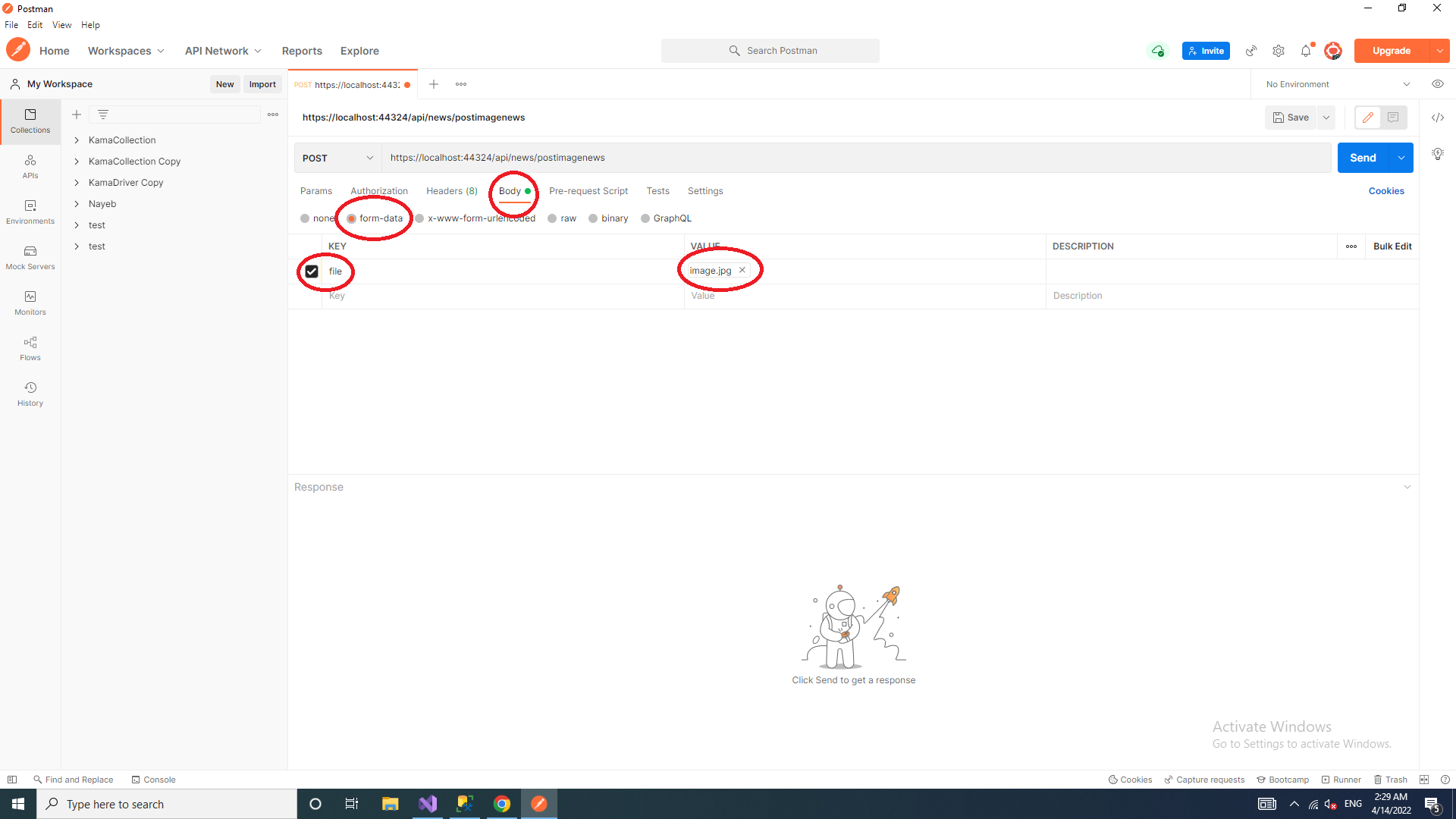
3-send file multi part with postman
Method 3
Here is a working example for what you are looking for
Controller:
[HttpPost]
public async Task<IActionResult> SaveFile([FromForm] IFormFile file) {
  // Your code here
}
And inside your model:
public IFormFile File { get; set; }
Change async Task<IActionResult> if you don’t need it…
All methods was sourced from stackoverflow.com or stackexchange.com, is licensed under cc by-sa 2.5, cc by-sa 3.0 and cc by-sa 4.0