How do I set Default Controller for my ASP.NET MVC 4 project without making it HomeController?
How should I setup a default Area when the application starts?
Answers:
Thank you for visiting the Q&A section on Magenaut. Please note that all the answers may not help you solve the issue immediately. So please treat them as advisements. If you found the post helpful (or not), leave a comment & I’ll get back to you as soon as possible.
Method 1
the best way is to change your route. The default route (defined in your App_Start) sets /Home/Index
routes.MapRoute(
        "Default", // Route name
        "{controller}/{action}/{id}", // URL with parameters*
        new { controller = "Home", action = "Index",
        id = UrlParameter.Optional }
);
as the default landing page. You can change that to be any route you wish.
routes.MapRoute(
        "Default", // Route name
        "{controller}/{action}/{id}", // URL with parameters*
        new { controller = "Sales", action = "ProjectionReport",
        id = UrlParameter.Optional }
);
Method 2
Set below code in RouteConfig.cs in App_Start folder
public static void RegisterRoutes(RouteCollection routes)
{
 routes.IgnoreRoute("{resource}.axd/{*pathInfo}");
 routes.MapRoute(
 name: "Default",
 url: "{controller}/{action}/{id}",
 defaults: new { controller = "Account", action = "Login", id = UrlParameter.Optional });
}
IF still not working then do below steps
Second Way :
You simple follow below steps,
1) Right click on your Project
2) Select Properties
3) Select Web option and then Select Specific Page (Controller/View) and then set your login page
Here, Account is my controller and Login is my action method (saved in Account Controller)
Please take a look attached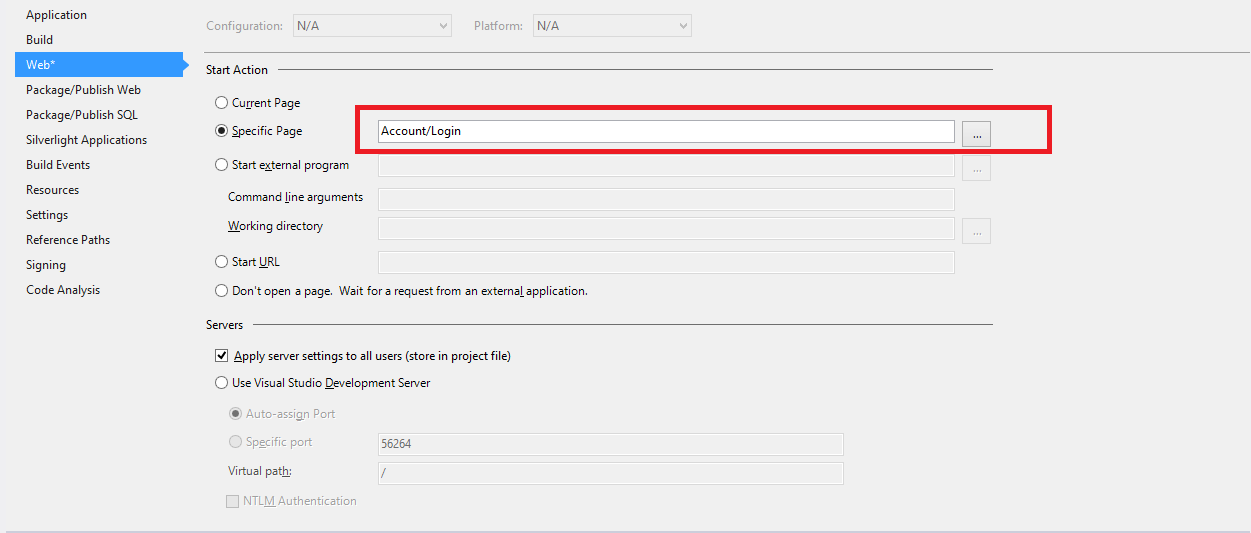 screenshot.
Method 3
I didnt see this question answered:
How should I setup a default Area when the application starts?
So, here is how you can set up a default Area:
var route = routes.MapRoute(
    name: "Default",
    url: "{controller}/{action}/{id}",
    defaults: new { controller = "Home", action = "Index", id = UrlParameter.Optional }
    ).DataTokens = new RouteValueDictionary(new { area = "MyArea" });
Method 4
In case you have only one controller and you want to access every action on root you can skip controller name like this
routes.MapRoute(
        "Default",
        "{action}/{id}",
        new { controller = "Home", action = "Index",
        id = UrlParameter.Optional }
);
All methods was sourced from stackoverflow.com or stackexchange.com, is licensed under cc by-sa 2.5, cc by-sa 3.0 and cc by-sa 4.0