How to set ellipses on a column data
I have the following BoundField in my GridView:
<asp:BoundField DataField="Provider" HeaderText="Provider" ItemStyle-VerticalAlign="Top" ItemStyle-CssClass="hideText" ItemStyle-Width="100" />
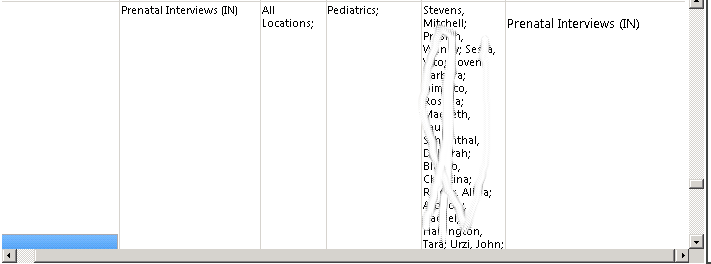
It is populated from a sql query and displays like this (the smudged out data is all the provider returned from the result):
I am populating the data from code-behind (partial code):
int rowcounter = 0;
SPListItemCollection collListItems = list.GetItems(oQuery);
foreach (SPListItem item in collListItems)
{
    try
    {
        rowcounter++;
        string decoded = HttpUtility.HtmlDecode(item["Guideline"].ToString());
        string location = item["Location"].ToString().Replace("#", "n").TrimStart(';');
        string specialty = item["Specialty"].ToString().Replace("#", "n").TrimStart(';');
        string topic = item["Topic"].ToString().Replace("#", "n").TrimStart(';');
        strTopNum = topic.Split(';')[0]; //gets the number for the topic index to display it in a button
        //MessageBox.Show(strTopNum);
        //var btn = (System.Web.UI.WebControls.IButtonControl)
        string provider = item["Provider"].ToString().Replace("#", "n").TrimStart(';');
        Results.Rows.Add(item["ID"], location.TrimEnd(';'), specialty.TrimEnd(';'), topic.Split(';')[1], provider.TrimEnd(';'), item["Summary"].ToString(), item["Guideline"].ToString());
        //.Split(';')[1] for topic
        //Results.Rows.Add(item["ID"], item["Location"].ToString().Replace("#", "n").TrimStart(';').TrimEnd(';'), item["Specialty"].ToString().Replace("#", "n").TrimStart(';').TrimEnd(';'), item["Topic"].ToString().Replace("#", "n"), item["Provider"].ToString().Replace("#", "n"), item["Summary"].ToString(), item["Guideline"].ToString());
        //strNum[item] = topic.Split(';')[0];

        Results.DefaultView.Sort = Results.Columns[3].ColumnName + " ASC";
        Results = Results.DefaultView.ToTable(true);


    }
    catch (Exception ex)
    {
        string error = ex.Message;
    }

}
How can I modify the code so for the PROVIDER column only the first 3 records are displayed, followed by ... if there are more records returned?
I used the following CSS but it didn’t work for me:
.hideText {
    overflow: hidden;
    text-overflow: ellipsis;
    white-space: nowrap;
}
Updated to this:
<asp:TemplateField>
    <HeaderTemplate>
        <asp:Label runat="server" ID="lblProvider" Text="Provider" />
    </HeaderTemplate>
    <ItemTemplate>
        <asp:Label runat="server" ID="lblPro" Text='<%#Eval("Provider")%>' ToolTip='<%#Eval("Provider")%>' CssClass="hideText" />
    </ItemTemplate>
</asp:TemplateField>

.hideText  {
    width:50px;
    overflow:hidden;
    text-overflow:ellipsis;
    white-space:nowrap;
 }
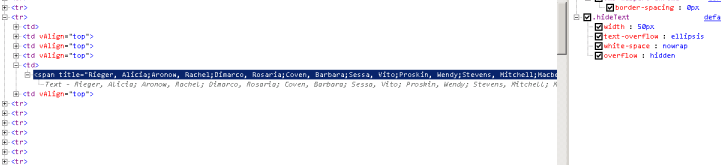
The TD expands out very long and the HTML source shows this:
Answers:
Thank you for visiting the Q&A section on Magenaut. Please note that all the answers may not help you solve the issue immediately. So please treat them as advisements. If you found the post helpful (or not), leave a comment & I’ll get back to you as soon as possible.
Method 1
text-overflow:ellipsis; only works if the the following properties are true:
The element’s width must be specified.
The element must have overflow:hidden and white-space:nowrap set. Change your css like below
.hideText  {
    width:120px;
    overflow:hidden;
    text-overflow:ellipsis;
    white-space:nowrap;
 }
Here is the working Demo
Update:
Here is your complete TemplateField definition. Define a div within the TemplateField and decorate with the css properties for ellipsis.
 <asp:TemplateField HeaderText="Provider Name">
     <ItemTemplate>
          <div style="width: 100px; overflow: hidden; text-overflow: ellipsis; white-space: nowrap;">
               <asp:Label ID="lblEllipsis" runat="server" Text='<%#Eval("Provider") %>' ToolTip='<%#Eval("Provider") %>'></asp:Label>
          </div>
      </ItemTemplate>
 </asp:TemplateField>
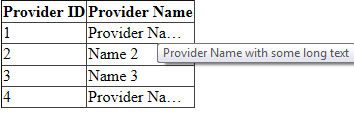
Here is how it looks like when I tried this in a gridview locally.
Method 2
You seem to be modifying this where you could not store it back to the database anyway so I would just handle it like this unless they need an option to then see the entirety of the data.
I did all this c# in this editor so there might be slight problems, lets call it psuedo code!
string provider = item["Provider"].ToString().Replace("#", "n").TrimStart(';');
string[] providerListing = provider.Split(new[]{";"}, StringSplitOptions.RemoveEmptyEntries));
if(providerListing.Length > 3)
{
    //Make an array of the first 3 providers
    string[] firstProviders = new string[3];
    Array.Copy(providerListing, firstProviders, 3);
    //Reconcatenate with ; and add ellipsis
    provider = String.Join(";",firstProviders)+"...";
}
If they do need to see the entirety of the data I would add another column called FullProviders or something like that to query.
All methods was sourced from stackoverflow.com or stackexchange.com, is licensed under cc by-sa 2.5, cc by-sa 3.0 and cc by-sa 4.0