I wrote System.Console.WriteLine("How can I see this debugging information in a browser"); in the model of my ASP.NET MVC4 project. How can I see this debugging string in the browser console, or at least in Visual Studio?. I can’t find it in the output window of Visual Studio. Maybe I need to install some plugin from NuGet?
Answers:
Thank you for visiting the Q&A section on Magenaut. Please note that all the answers may not help you solve the issue immediately. So please treat them as advisements. If you found the post helpful (or not), leave a comment & I’ll get back to you as soon as possible.
Method 1
Console.WriteLine(...) will not be displayed. If you absolutely need to see output in the debugger, you’ll have to use
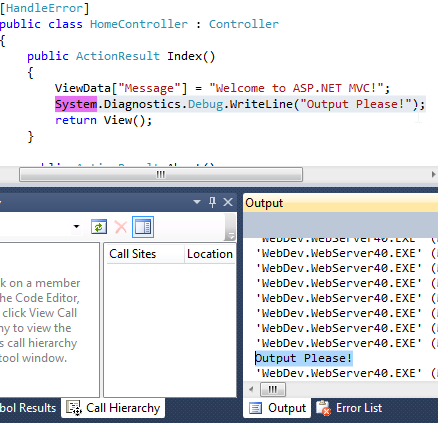
System.Diagnostics.Debug.WriteLine("This will be displayed in output window");
and view it in the Output window. You can open the output window by going to Debug -> Window -> Output:

Here’s an example of what this will all look like:
For further readings, check out this SO post.
Method 2
You can write to your Javascript console from your C# Code using the following class
using System.Web;

public static class Javascript
{
    static string scriptTag = "<script type="" language="">{0}</script>";
    public static void ConsoleLog(string message)
    {
        string function = "console.log('{0}');";
        string log = string.Format(GenerateCodeFromFunction(function), message);
        HttpContext.Current.Response.Write(log);
    }

    public static void Alert(string message)
    {
        string function = "alert('{0}');";
        string log = string.Format(GenerateCodeFromFunction(function), message);
        HttpContext.Current.Response.Write(log);
    }

    static string GenerateCodeFromFunction(string function)
    {
        return string.Format(scriptTag, function);
    }
}
Works just like its JS version, it actually converts your message to JS and injects it into the page.
Method 3
You can use Debug.Writeline("debug information"). It will be displayed in the Output window.
Method 4
In addition to Sam’s answer, you may find Response.Write useful. In some situations – for example, when you are supporting legacy inline .aspx pages – it’s more convenient to debug by writing out suspect values to the browser:
String myString = GetAStringFromSomewhere();

/* What did that method actually return, anyway?
   NB: Remove this once I know! */
Response.Write(myString);
This is less practical in ASP.Net MVC, however, as your controllers will be compiled. In this case, you might as well be writing out your debugging information to a log file, using something like log4net.
Method 5
Thanks +MichaelTaylor3D for the solution, I have further enhanced it a little bit to support the function during ajax partial postback. Remember to add reference to System.Web.Extension to support ScriptManager.
    public static class Javascript
    {
        static string scriptTag = "<script type="" language="">{0}</script>";
        public static void ConsoleLog(string message)
        {
            string function = "console.log('{0}');";
            string log = string.Format(GenerateCodeFromFunction(function), message);

            Page page = HttpContext.Current.Handler as Page;

            if (ScriptManager.GetCurrent(page).IsInAsyncPostBack)
            {
                ScriptManager.RegisterClientScriptBlock(page, page.GetType(), "log", "console.log('" + message + "')", true);
            }
            else
            {
                HttpContext.Current.Response.Write(log);
            }
        }

        public static void ConsoleError(string message)
        {
            string function = "console.error('{0}');";
            string log = string.Format(GenerateCodeFromFunction(function), message);

            Page page = HttpContext.Current.Handler as Page;

            if (ScriptManager.GetCurrent(page).IsInAsyncPostBack)
            {
                ScriptManager.RegisterClientScriptBlock(page, page.GetType(), "error", "console.error('" + message + "')", true);
            }
            else
            {
                HttpContext.Current.Response.Write(log);
            }
        }

        public static void Alert(string message)
        {
            string function = "alert('{0}');";
            string log = string.Format(GenerateCodeFromFunction(function), message);

            Page page = HttpContext.Current.Handler as Page;

            if (ScriptManager.GetCurrent(page).IsInAsyncPostBack)
            {
                ScriptManager.RegisterClientScriptBlock(page, page.GetType(), "alert", "alert('" + message + "')", true);
            }
            else
            {
                HttpContext.Current.Response.Write(log);
            }
        }

        static string GenerateCodeFromFunction(string function)
        {
            return string.Format(scriptTag, function);
        }
    }
All methods was sourced from stackoverflow.com or stackexchange.com, is licensed under cc by-sa 2.5, cc by-sa 3.0 and cc by-sa 4.0