Right now I use the following code to create a custom post type and assign a taxonomy to it:
// === CUSTOM TAXONOMIES === //
add_action('init', 'my_custom_taxonomies', 0);

function my_custom_taxonomies() {
 register_taxonomy(
  'section',  // internal name = machine-readable taxonomy name
  'static_content',  // object type = post, page, link, or custom post-type
  array(
   'hierarchical' => true,
   'labels' => array(
    'name' => __( 'Section' ),
    'singular_name' => __( 'Section' ),
    'add_new_item' => 'Add New Section',
    'edit_item' => 'Edit Section',
    'new_item' => 'New Section',
    'search_items' => 'Search Section',
    'not_found' => 'No Sections found',
    'not_found_in_trash' => 'No Sections found in trash',
    'all_items' => __( 'All Sections' ),
   ),
   'query_var' => true, // enable taxonomy-specific querying
   'rewrite' => array( 'slug' => 'section' ), // pretty permalinks for your taxonomy?
  )
 );
 wp_insert_term('Footer', 'section');
 wp_insert_term('Header', 'section');
 wp_insert_term('Front Page Intro', 'section');
 wp_insert_term('Front Page Content', 'section');
}

// === CUSTOM POST TYPES === //
add_action( 'init', 'create_my_post_types' );

function create_my_post_types() {
 register_post_type( 'static_content',
  array(
   'labels' => array(
    'name' => __( 'Static Content' ),
    'singular_name' => __( 'Static Content' ),
    'add_new_item' => 'Add New Static Content',
    'edit_item' => 'Edit Static Content',
    'new_item' => 'New Static Content',
    'search_items' => 'Search Static Content',
    'not_found' => 'No Static Content found',
    'not_found_in_trash' => 'No Static Content found in trash',
   ),
   '_builtin' => false,
   'public' => true,
   'hierarchical' => false,
   'taxonomies' => array( 'section'),
   'supports' => array(
    'title',
    'editor',
    'excerpt'
   ),
   'rewrite' => array( 'slug' => 'static_content', 'with_front' => false )
  )
 );
}
When I click the menu of the custom post type (in this case “Static Content”), I see in the table/column (where all the posts are displayed) the following information: Title, Author and Date. I would like to show the taxonomy assigned to that post (in this case the “Section”.)
How do I do that?
Answers:
Thank you for visiting the Q&A section on Magenaut. Please note that all the answers may not help you solve the issue immediately. So please treat them as advisements. If you found the post helpful (or not), leave a comment & I’ll get back to you as soon as possible.
Method 1
Using my test site and some test code this is what I think you were looking for?
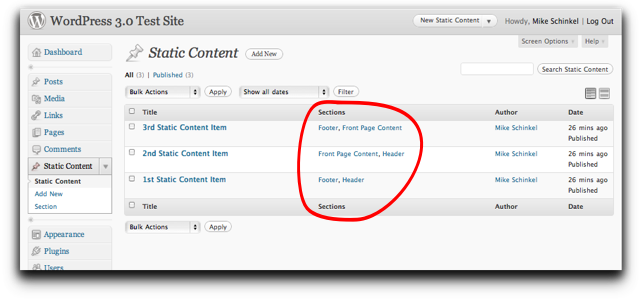
(source: mikeschinkel.com)
To achieve this you need to use two (2) hooks, one being specific to your post type: 'manage_static_content_posts_columns' and 'manage_posts_custom_column'. In order to make it work I took your code and packaged it in a class, and also made it a plugin (it doesn’t have to be a plugin; you could just take the code and put in in your theme’s functions.php file if you like.)
<?php
/*
Plugin name: Static Content
*/
if (!class_exists('YourSite_StaticContent')) {
  class YourSite_StaticContent {
    static function on_load() {
      add_action('init',array(__CLASS__,'init'));
      add_filter('manage_static_content_posts_columns',
          array(__CLASS__,'manage_static_content_posts_columns'));
      add_filter('manage_posts_custom_column',
          array(__CLASS__,'manage_posts_custom_column'));
    }
    function manage_static_content_posts_columns($columns){
      $new = array();
      foreach($columns as $key => $title) {
        if ($key=='author') // Put the Sections column before the Author column
          $new['sections'] = 'Sections';
        $new[$key] = $title;
      }
      return $new;
    }
    static function manage_posts_custom_column($column){
      global $post;
      switch ($column) {
        case "sections":
          echo get_the_term_list($post->ID, 'section', '', ', ','');
          break;
      }
    }
    static function init() {
      register_post_type('static_content',array(
        'labels' => array(
          'name' => __( 'Static Content' ),
          'singular_name' => __( 'Static Content' ),
          'add_new_item' => 'Add New Static Content',
          'edit_item' => 'Edit Static Content',
          'new_item' => 'New Static Content',
          'search_items' => 'Search Static Content',
          'not_found' => 'No Static Content found',
          'not_found_in_trash' => 'No Static Content found in trash',
        ),
        'public' => true,
        'hierarchical' => false,
        'taxonomies' => array( 'section'),
        'supports' => array('title','editor','excerpt'),
        'rewrite' => array('slug'=>'static_content','with_front'=>false),
      ));
      register_taxonomy('section','static_content',array(
        'hierarchical' => true,
        'labels' => array(
          'name' => __( 'Section' ),
          'singular_name' => __( 'Section' ),
          'add_new_item' => 'Add New Section',
          'edit_item' => 'Edit Section',
          'new_item' => 'New Section',
          'search_items' => 'Search Section',
          'not_found' => 'No Sections found',
          'not_found_in_trash' => 'No Sections found in trash',
          'all_items' => __( 'All Sections' ),
        ),
        'query_var' => true,
        'rewrite' => array( 'slug' => 'section' ),
        ));
      if (!get_option('yoursite-static-content-initialized')) {
        $terms = array(
          'Footer',
          'Header',
          'Front Page Intro',
          'Front Page Content',
          );
        foreach($terms as $term) {
          if (!get_term_by('name',$term,'section')) {
            wp_insert_term($term, 'section');
          }
        }
        update_option('yoursite-static-content-initialized',true);
      }
    }
  }
  YourSite_StaticContent::on_load();
}
All methods was sourced from stackoverflow.com or stackexchange.com, is licensed under cc by-sa 2.5, cc by-sa 3.0 and cc by-sa 4.0