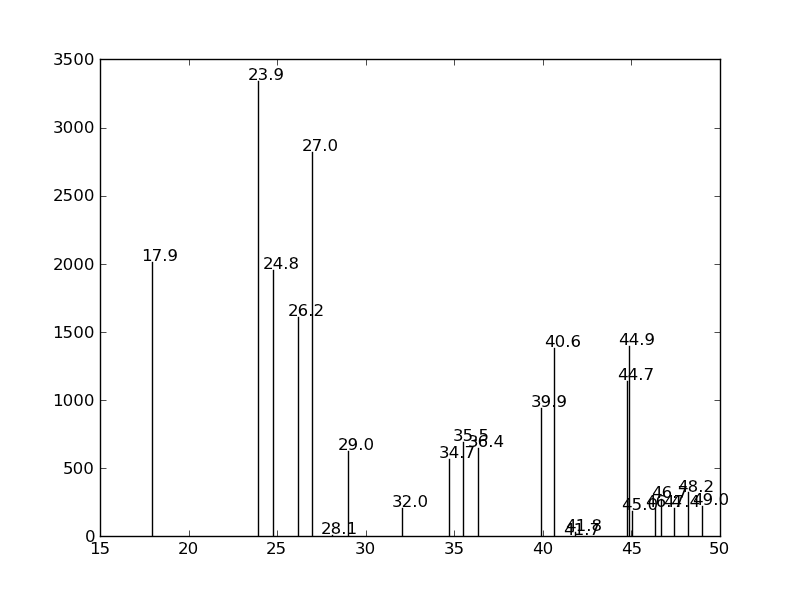
I want to annotate the bars in a graph with some text but if the bars are close together and have comparable height, the annotations are above ea. other and thus hard to read (the coordinates for the annotations were taken from the bar position and height).
Is there a way to shift one of them if there is a collision?
Edit: The bars are very thin and very close sometimes so just aligning vertically doesn’t solve the problem…
A picture might clarify things:
Answers:
Thank you for visiting the Q&A section on Magenaut. Please note that all the answers may not help you solve the issue immediately. So please treat them as advisements. If you found the post helpful (or not), leave a comment & I’ll get back to you as soon as possible.
Method 1
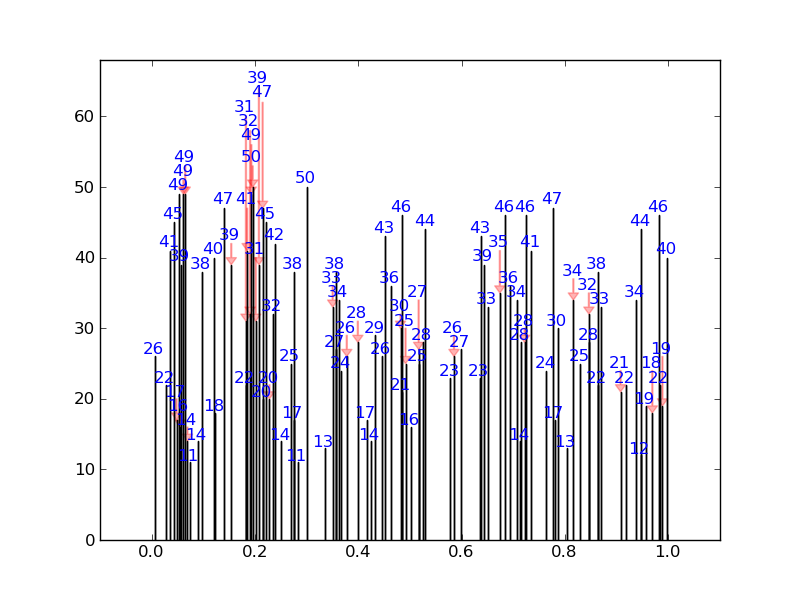
I’ve written a quick solution, which checks each annotation position against default bounding boxes for all the other annotations. If there is a collision it changes its position to the next available collision free place. It also puts in nice arrows.
For a fairly extreme example, it will produce this (none of the numbers overlap):
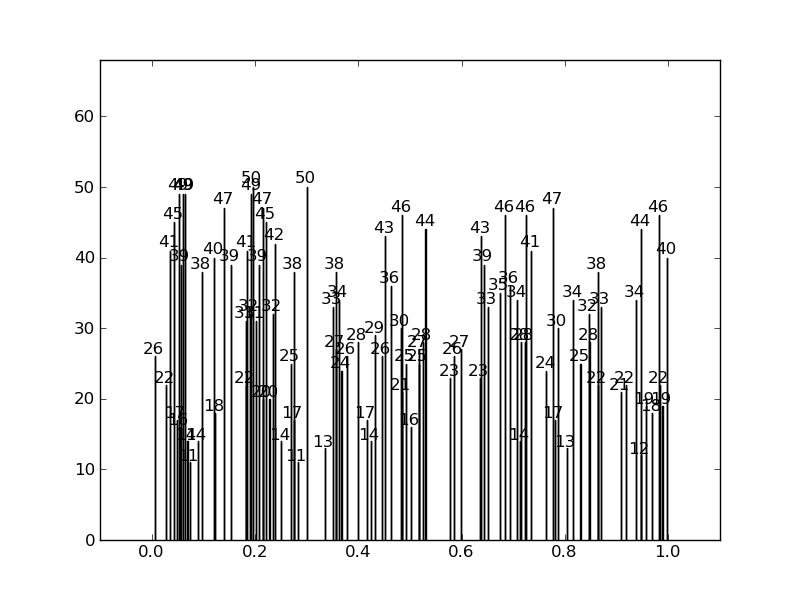
Instead of this:
Here is the code:
import numpy as np
import matplotlib.pyplot as plt
from numpy.random import *

def get_text_positions(x_data, y_data, txt_width, txt_height):
    a = zip(y_data, x_data)
    text_positions = y_data.copy()
    for index, (y, x) in enumerate(a):
        local_text_positions = [i for i in a if i[0] > (y - txt_height)
                            and (abs(i[1] - x) < txt_width * 2) and i != (y,x)]
        if local_text_positions:
            sorted_ltp = sorted(local_text_positions)
            if abs(sorted_ltp[0][0] - y) < txt_height: #True == collision
                differ = np.diff(sorted_ltp, axis=0)
                a[index] = (sorted_ltp[-1][0] + txt_height, a[index][1])
                text_positions[index] = sorted_ltp[-1][0] + txt_height
                for k, (j, m) in enumerate(differ):
                    #j is the vertical distance between words
                    if j > txt_height * 2: #if True then room to fit a word in
                        a[index] = (sorted_ltp[k][0] + txt_height, a[index][1])
                        text_positions[index] = sorted_ltp[k][0] + txt_height
                        break
    return text_positions

def text_plotter(x_data, y_data, text_positions, axis,txt_width,txt_height):
    for x,y,t in zip(x_data, y_data, text_positions):
        axis.text(x - txt_width, 1.01*t, '%d'%int(y),rotation=0, color='blue')
        if y != t:
            axis.arrow(x, t,0,y-t, color='red',alpha=0.3, width=txt_width*0.1,
                       head_width=txt_width, head_length=txt_height*0.5,
                       zorder=0,length_includes_head=True)
Here is the code producing these plots, showing the usage:
#random test data:
x_data = random_sample(100)
y_data = random_integers(10,50,(100))

#GOOD PLOT:
fig2 = plt.figure()
ax2 = fig2.add_subplot(111)
ax2.bar(x_data, y_data,width=0.00001)
#set the bbox for the text. Increase txt_width for wider text.
txt_height = 0.04*(plt.ylim()[1] - plt.ylim()[0])
txt_width = 0.02*(plt.xlim()[1] - plt.xlim()[0])
#Get the corrected text positions, then write the text.
text_positions = get_text_positions(x_data, y_data, txt_width, txt_height)
text_plotter(x_data, y_data, text_positions, ax2, txt_width, txt_height)

plt.ylim(0,max(text_positions)+2*txt_height)
plt.xlim(-0.1,1.1)

#BAD PLOT:
fig = plt.figure()
ax = fig.add_subplot(111)
ax.bar(x_data, y_data, width=0.0001)
#write the text:
for x,y in zip(x_data, y_data):
    ax.text(x - txt_width, 1.01*y, '%d'%int(y),rotation=0)
plt.ylim(0,max(text_positions)+2*txt_height)
plt.xlim(-0.1,1.1)

plt.show()
Method 2
Another option using my library adjustText, written specially for this purpose (https://github.com/Phlya/adjustText). I think it’s probably significantly slower that the accepted answer (it slows down considerably with a lot of bars), but much more general and configurable.
from adjustText import adjust_text
np.random.seed(2017)
x_data = np.random.random_sample(100)
y_data = np.random.random_integers(10,50,(100))

f, ax = plt.subplots(dpi=300)
bars = ax.bar(x_data, y_data, width=0.001, facecolor='k')
texts = []
for x, y in zip(x_data, y_data):
    texts.append(plt.text(x, y, y, horizontalalignment='center', color='b'))
adjust_text(texts, add_objects=bars, autoalign='y', expand_objects=(0.1, 1),
            only_move={'points':'', 'text':'y', 'objects':'y'}, force_text=0.75, force_objects=0.1,
            arrowprops=dict(arrowstyle="simple, head_width=0.25, tail_width=0.05", color='r', lw=0.5, alpha=0.5))
plt.show()
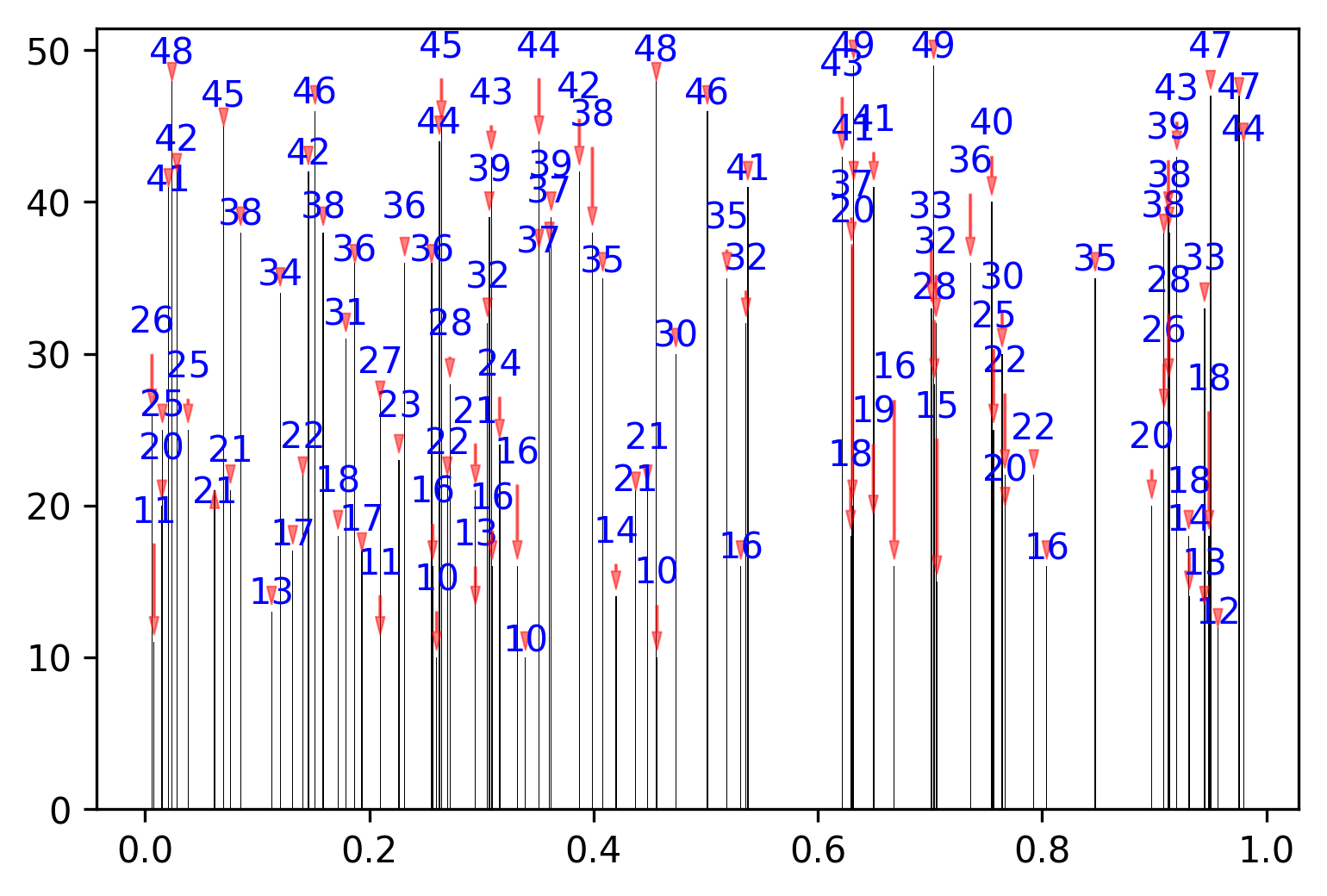
If we allow autoalignment along x axis, it gets even better (I just need to resolve a small issue that it doesn’t like putting labels above the points and not a bit to the side…).
np.random.seed(2017)
x_data = np.random.random_sample(100)
y_data = np.random.random_integers(10,50,(100))

f, ax = plt.subplots(dpi=300)
bars = ax.bar(x_data, y_data, width=0.001, facecolor='k')
texts = []
for x, y in zip(x_data, y_data):
    texts.append(plt.text(x, y, y, horizontalalignment='center', size=7, color='b'))
adjust_text(texts, add_objects=bars, autoalign='xy', expand_objects=(0.1, 1),
            only_move={'points':'', 'text':'y', 'objects':'y'}, force_text=0.75, force_objects=0.1,
            arrowprops=dict(arrowstyle="simple, head_width=0.25, tail_width=0.05", color='r', lw=0.5, alpha=0.5))
plt.show()
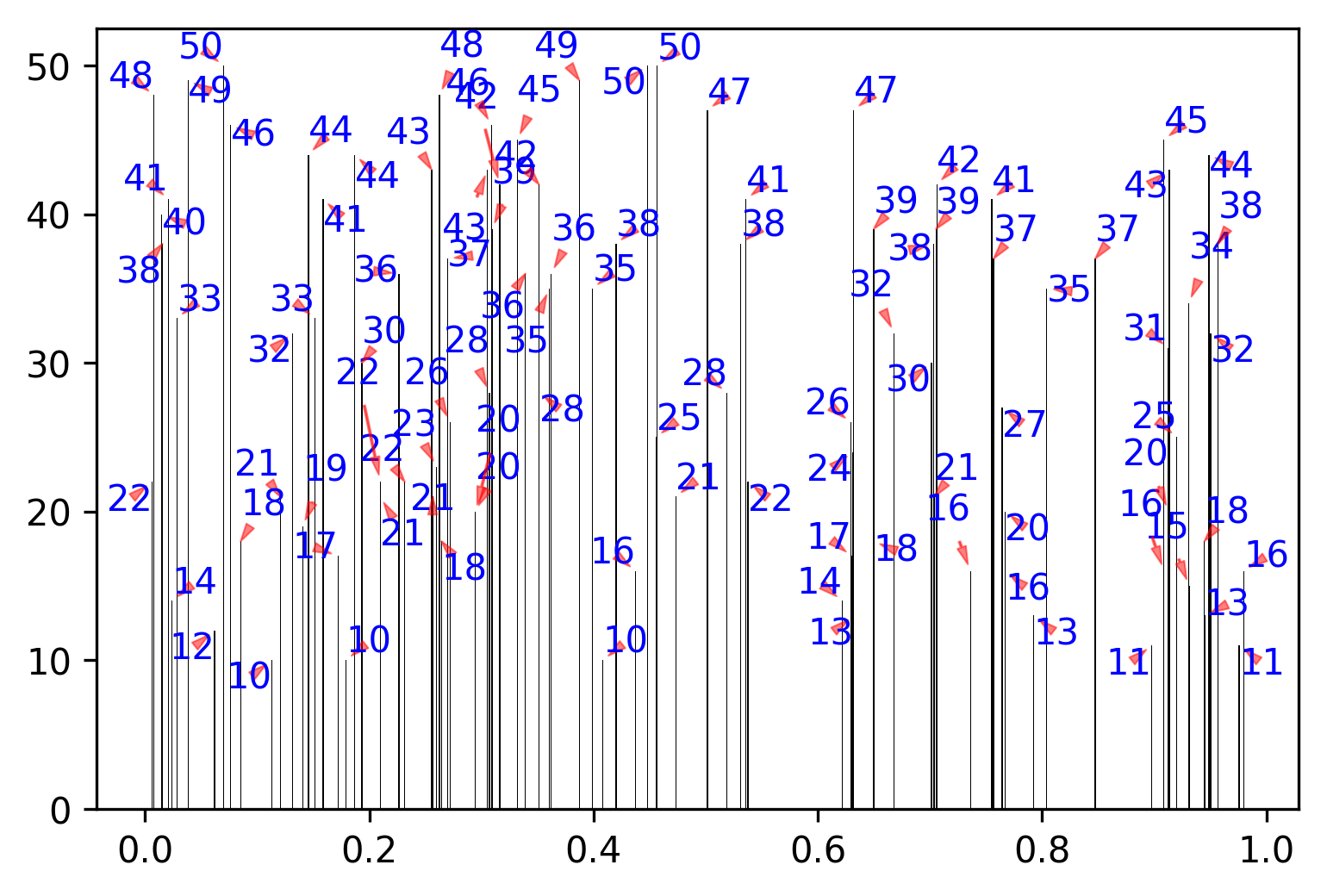
(I had to adjust some parameters here, of course)
Method 3
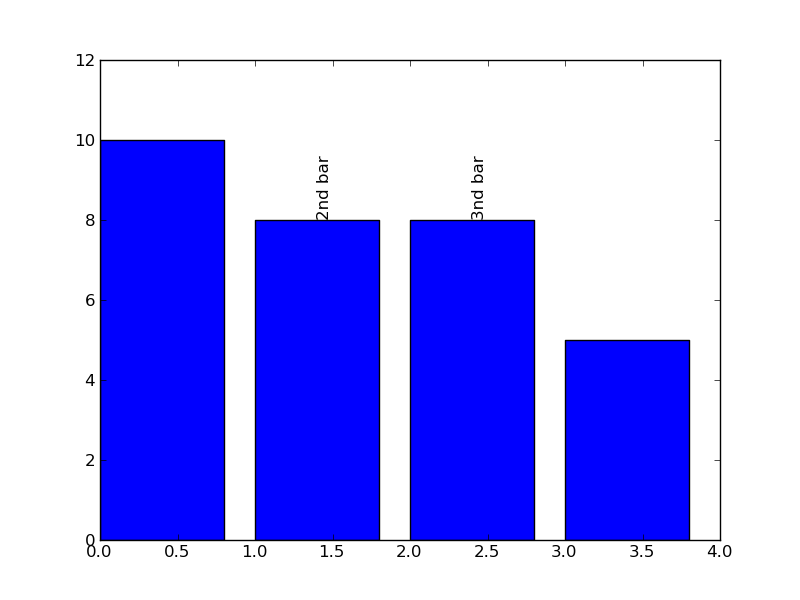
One option is to rotate the text/annotation, which is set by the rotation keyword/property. In the following example, I rotate the text 90 degrees to guarantee that it wont collide with the neighboring text. I also set the va (short for verticalalignment) keyword, so that the text is presented above the bar (above the point that I use to define the text):
import matplotlib.pyplot as plt

data = [10, 8, 8, 5]

fig = plt.figure()
ax = fig.add_subplot(111)
ax.bar(range(4),data)
ax.set_ylim(0,12)
# extra .4 is because it's half the default width (.8):
ax.text(1.4,8,"2nd bar",rotation=90,va='bottom')
ax.text(2.4,8,"3nd bar",rotation=90,va='bottom')

plt.show()
The result is the following figure:
Determining programmatically if there are collisions between various annotations is a trickier process. This might be worth a separate question: Matplotlib text dimensions.
All methods was sourced from stackoverflow.com or stackexchange.com, is licensed under cc by-sa 2.5, cc by-sa 3.0 and cc by-sa 4.0