I’m trying to split a photo into multiple pieces using PIL.
def crop(Path,input,height,width,i,k,x,y,page):
    im = Image.open(input)
    imgwidth = im.size[0]
    imgheight = im.size[1]
    for i in range(0,imgheight-height/2,height-2):
        print i
        for j in range(0,imgwidth-width/2,width-2):
            print j
            box = (j, i, j+width, i+height)
            a = im.crop(box)
            a.save(os.path.join(Path,"PNG","%s" % page,"IMG-%s.png" % k))
            k +=1
but it doesn’t seem to be working. It splits the photo but not in an exact way (you can try it).
Answers:
Thank you for visiting the Q&A section on Magenaut. Please note that all the answers may not help you solve the issue immediately. So please treat them as advisements. If you found the post helpful (or not), leave a comment & I’ll get back to you as soon as possible.
Method 1
Splitting image to tiles of MxN pixels (assuming im is numpy.ndarray):
tiles = [im[x:x+M,y:y+N] for x in range(0,im.shape[0],M) for y in range(0,im.shape[1],N)]
In the case you want to split the image to four pieces:
M = im.shape[0]//2
N = im.shape[1]//2
tiles[0] holds the upper left tile
Method 2
Edit: I believe this answer missed the intent to cut an image into rectangles in columns and rows. This answer cuts only into rows. It looks like other answers cut in columns and rows.
Simpler than all these is to use a wheel someone else invented 🙂 It may be more involved to set up, but then it’s a snap to use.
These instructions are for Windows 7; they may need to be adapted for other OSs.
Get and install pip from here.
Download the install archive, and extract it to your root Python installation directory. Open a console and type (if I recall correctly):
python get-pip.py install
Then get and install the image_slicer module via pip, by entering the following command at the console:
python -m pip install image_slicer
Copy the image you want to slice into the Python root directory, open a python shell (not the “command line”), and enter these commands:
import image_slicer
image_slicer.slice('huge_test_image.png', 14)
The beauty of this module is that it
- Is installed in python
- Can invoke an image split with two lines of code
- Accepts any even number as an image slice parameter (e.g. 14 in this example)
- Takes that parameter and automagically splits the given image into so many slices, and auto-saves the resultant numbered tiles in the same directory, and finally
- Has a function to stitch the image tiles back together (which I haven’t yet tested); files apparently must be named after the convention which you will see in the split files after testing the image_slicer.slice function.
Method 3
from PIL import Image

def crop(path, input, height, width, k, page, area):
    im = Image.open(input)
    imgwidth, imgheight = im.size
    for i in range(0,imgheight,height):
        for j in range(0,imgwidth,width):
            box = (j, i, j+width, i+height)
            a = im.crop(box)
            try:
                o = a.crop(area)
                o.save(os.path.join(path,"PNG","%s" % page,"IMG-%s.png" % k))
            except:
                pass
            k +=1
Method 4
As an alternative solution, we will construct the tiles by generating a grid of coordinates using itertools.product. We will ignore partial tiles on the edges, only iterating through the cartesian product between the two intervals, i.e. range(0, h-h%d, d) X range(0, w-w%d, d).
Given filename: the image file name, d: the tile size, dir_in: the path to the directory containing the image, and dir_out: the directory where tiles will be outputted:
from PIL import Image
from itertools import product
def tile(filename, dir_in, dir_out, d):
    name, ext = os.path.splitext(filename)
    img = Image.open(os.path.join(dir_in, filename))
    w, h = img.size

    grid = product(range(0, h-h%d, d), range(0, w-w%d, d))
    for i, j in grid:
        box = (j, i, j+d, i+d)
        out = os.path.join(dir_out, f'{name}_{i}_{j}{ext}')
        img.crop(box).save(out)
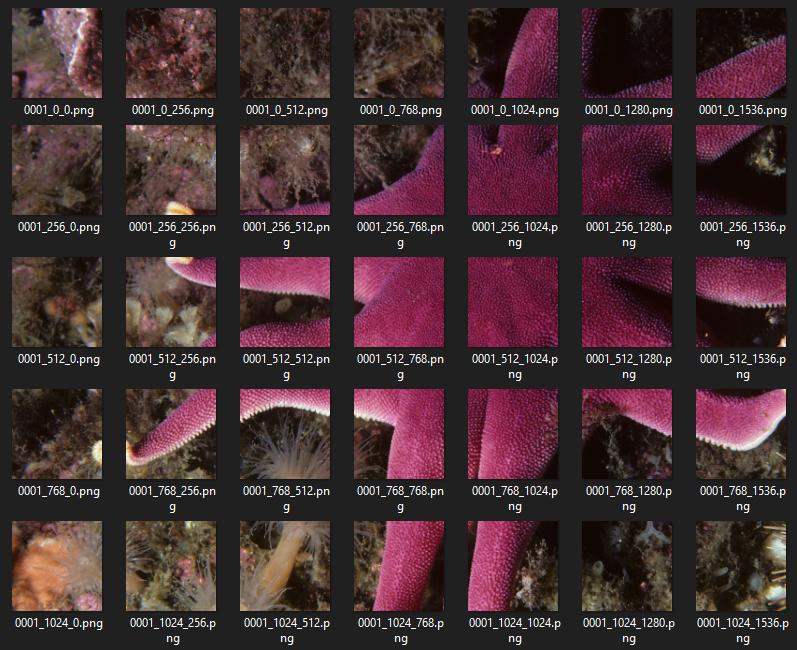
Method 5
cropwould be a more reusable
function if you separate the
cropping code from the
image saving
code. It would also make the call
signature simpler.im.cropreturns a
Image._ImageCropinstance. Such
instances do not have a save method.
Instead, you must paste the
Image._ImageCropinstance onto a
newImage.Image- Your ranges do not have the right
step sizes. (Whyheight-2and not
height? for example. Why stop at
imgheight-(height/2)?).
So, you might try instead something like this:
import Image
import os

def crop(infile,height,width):
    im = Image.open(infile)
    imgwidth, imgheight = im.size
    for i in range(imgheight//height):
        for j in range(imgwidth//width):
            box = (j*width, i*height, (j+1)*width, (i+1)*height)
            yield im.crop(box)

if __name__=='__main__':
    infile=...
    height=...
    width=...
    start_num=...
    for k,piece in enumerate(crop(infile,height,width),start_num):
        img=Image.new('RGB', (height,width), 255)
        img.paste(piece)
        path=os.path.join('/tmp',"IMG-%s.png" % k)
        img.save(path)
Method 6
Here is a concise, pure-python solution that works in both python 3 and 2:
from PIL import Image

infile = '20190206-135938.1273.Easy8thRunnersHopefully.jpg'
chopsize = 300

img = Image.open(infile)
width, height = img.size

# Save Chops of original image
for x0 in range(0, width, chopsize):
   for y0 in range(0, height, chopsize):
      box = (x0, y0,
             x0+chopsize if x0+chopsize <  width else  width - 1,
             y0+chopsize if y0+chopsize < height else height - 1)
      print('%s %s' % (infile, box))
      img.crop(box).save('zchop.%s.x%03d.y%03d.jpg' % (infile.replace('.jpg',''), x0, y0))
Notes:
Method 7
Not sure if this is the most efficient answer, but it works for me:
import os
import glob
from PIL import Image
Image.MAX_IMAGE_PIXELS = None # to avoid image size warning

imgdir = "/path/to/image/folder"
# if you want file of a specific extension (.png):
filelist = [f for f in glob.glob(imgdir + "**/*.png", recursive=True)]
savedir = "/path/to/image/folder/output"

start_pos = start_x, start_y = (0, 0)
cropped_image_size = w, h = (500, 500)

for file in filelist:
    img = Image.open(file)
    width, height = img.size

    frame_num = 1
    for col_i in range(0, width, w):
        for row_i in range(0, height, h):
            crop = img.crop((col_i, row_i, col_i + w, row_i + h))
            name = os.path.basename(file)
            name = os.path.splitext(name)[0]
            save_to= os.path.join(savedir, name+"_{:03}.png")
            crop.save(save_to.format(frame_num))
            frame_num += 1
This is mostly based on DataScienceGuy answer here
Method 8
Here is a late answer that works with Python 3
from PIL import Image
import os

def imgcrop(input, xPieces, yPieces):
    filename, file_extension = os.path.splitext(input)
    im = Image.open(input)
    imgwidth, imgheight = im.size
    height = imgheight // yPieces
    width = imgwidth // xPieces
    for i in range(0, yPieces):
        for j in range(0, xPieces):
            box = (j * width, i * height, (j + 1) * width, (i + 1) * height)
            a = im.crop(box)
            try:
                a.save("images/" + filename + "-" + str(i) + "-" + str(j) + file_extension)
            except:
                pass
Usage:
imgcrop("images/testing.jpg", 5, 5)
Then the images will be cropped into pieces according to the specified X and Y pieces, in my case 5 x 5 = 25 pieces
Method 9
Here is another solution, just using NumPy built-in np.array_split :
def divide_img_blocks(img, n_blocks=(5, 5)):
    horizontal = np.array_split(img, n_blocks[0])
    splitted_img = [np.array_split(block, n_blocks[1], axis=1) for block in horizontal]
    return np.asarray(splitted_img, dtype=np.ndarray).reshape(n_blocks)
It returns a NumPy array with the dimension passed as n_blocks.
Each element of the array is a block, so to access each block and save it as an image you should write something like the following:
result = divide_img_blocks(my_image)

for i in range(result.shape[0]):
    for j in range(result.shape[1]):
        cv2.imwrite(f"my_block_{i}_{j}.jpg", result[i,j])
This answer is very fast, faster than @Nir answer, which among the posted ones was the cleanest. Additionally is almost three orders of magnitude faster than the suggested package (i.e. image_slicer).
Time taken by divide_img_blocks: 0.0009832382202148438
Time taken by Nir answer: 0.002960681915283203
Time taken by image_slicer.slice: 0.4419238567352295
Hope it can still be useful.
Method 10
import os
import sys
from PIL import Image

savedir = r"E:new_mission _datatest"
filename = r"E:new_mission _datatesttesting1.png"
img = Image.open(filename)
width, height = img.size
start_pos = start_x, start_y = (0, 0)
cropped_image_size = w, h = (1024,1024)

frame_num = 1
for col_i in range(0, width, w):
    for row_i in range(0, height, h):
        crop = img.crop((col_i, row_i, col_i + w, row_i + h))
        save_to= os.path.join(savedir, "testing_{:02}.png")
        crop.save(save_to.format(frame_num))
        frame_num += 1
Method 11
I find it easier to skimage.util.view_as_windows or `skimage.util.view_as_blocks which also allows you to configure the step
Method 12
For anyone looking for a simple approach to this, here is a simple working function for splitting an image into NxN sections.
def slice_image(filename, N):

    i = Image.open(filename)

    width = i.width
    height = i.height

    for x in range(N):

        for y in range(N):

            index = (x * pieces) + 1 + y

            img = i.crop((x * width/N, y * height/N,
                          x * width/N+ width/N, y * height/N+ height/N))

            img.save(f"{filename}_sliced_{index}.jpeg")
Method 13
This is my script tools, it is very sample to splite css-sprit image into icons:
Usage: split_icons.py img dst_path width height
Example: python split_icons.py icon-48.png gtliu 48 48
Save code into split_icons.py :
#!/usr/bin/env python
# -*- coding:utf-8 -*-
import os
import sys
import glob
from PIL import Image

def Usage():
    print '%s img dst_path width height' % (sys.argv[0])
    sys.exit(1)

if len(sys.argv) != 5:
    Usage()

src_img = sys.argv[1]
dst_path = sys.argv[2]

if not os.path.exists(sys.argv[2]) or not os.path.isfile(sys.argv[1]):
    print 'Not exists', sys.argv[2], sys.argv[1]
    sys.exit(1)

w, h = int(sys.argv[3]), int(sys.argv[4])
im = Image.open(src_img)
im_w, im_h = im.size
print 'Image width:%d height:%d  will split into (%d %d) ' % (im_w, im_h, w, h)
w_num, h_num = int(im_w/w), int(im_h/h)

for wi in range(0, w_num):
    for hi in range(0, h_num):
        box = (wi*w, hi*h, (wi+1)*w, (hi+1)*h)
        piece = im.crop(box)
        tmp_img = Image.new('L', (w, h), 255)
        tmp_img.paste(piece)
        img_path = os.path.join(dst_path, "%d_%d.png" % (wi, hi))
        tmp_img.save(img_path)
Method 14
I tried the solutions above, but sometimes you just gotta do it yourself.
Might be off by a pixel in some cases but works fine in general.
import matplotlib.pyplot as plt
import numpy as np
def image_to_tiles(im, number_of_tiles = 4, plot=False):
    """
    Function that splits SINGLE channel images into tiles
    :param im: image: single channel image (NxN matrix)
    :param number_of_tiles: squared number
    :param plot:
    :return tiles:
    """
    n_slices = np.sqrt(number_of_tiles)
    assert int(n_slices + 0.5) ** 2 == number_of_tiles, "Number of tiles is not a perfect square"

    n_slices = n_slices.astype(np.int)
    [w, h] = cropped_npy.shape

    r = np.linspace(0, w, n_slices+1)
    r_tuples = [(np.int(r[i]), np.int(r[i+1])) for i in range(0, len(r)-1)]
    q = np.linspace(0, h, n_slices+1)
    q_tuples = [(np.int(q[i]), np.int(q[i+1])) for i in range(0, len(q)-1)]

    tiles = []
    for row in range(n_slices):
        for column in range(n_slices):
            [x1, y1, x2, y2] = *r_tuples<div class="su-row"></div>, *q_tuples<div class="su-column su-column-size-1-2"><div class="su-column-inner su-u-clearfix su-u-trim"></div></div>
            tiles.append(im[x1:y1, x2:y2])

    if plot:
        fig, axes = plt.subplots(n_slices, n_slices, figsize=(10,10))
        c = 0
        for row in range(n_slices):
            for column in range(n_slices):
                axes<div class="su-row"></div>.imshow(tiles[c])
                axes<div class="su-row"></div>.axis('off')
                c+=1

    return tiles
Hope it helps.
Method 15
I would suggest to use multiprocessing instead of a regular for loop as follows:
from PIL import Image
import os

def crop(infile,height,width):
    im = Image.open(infile)
    imgwidth, imgheight = im.size
    for i in range(imgheight//height):
        for j in range(imgwidth//width):
            box = (j*width, i*height, (j+1)*width, (i+1)*height)
            yield im.crop(box)

def til_image(infile):
    infile=...
    height=...
    width=...
    start_num=...
    for k,piece in enumerate(crop(infile,height,width),start_num):
        img=Image.new('RGB', (height,width), 255)
        img.paste(piece)
        path=os.path.join('/tmp',"IMG-%s.png" % k)
        img.save(path)

from multiprocessing import Pool, cpu_count
try:
    pool = Pool(cpu_count())
    pool.imap_unordered(tile_image, os.listdir(root), chunksize=4)
finally:
    pool.close()
Method 16
the easiest way:
import image_slicer
image_slicer.slice('/Address of image for exp/A1.png',16)
this command splits the image into 16 slices and saves them in the directory that the input image is there.
you should first install image_slicer:
pip install image_slicer
Method 17
import cv2

def crop_image(image_path, output_path):
    im =  cv2.imread(os.listdir()[2])
    imgheight=im.shape[0]
    imgwidth=im.shape[1]

    y1 = 0
    M = 2000
    N = 2000
    for y in range(0,imgheight,M):
        for x in range(0, imgwidth, N):
            y1 = y + M
            x1 = x + N
            tiles = im[y:y+M,x:x+N]
            if tiles.shape[0] < 100 or  tiles.shape[1]<100:
                continue

            cv2.rectangle(im, (x, y), (x1, y1), (0, 255, 0))
            cv2.imwrite(output_path +  str(x) + '_' + str(y)+"{}.png".format(image_path),tiles)
crop_image(os.listdir()[2], './cutted/')
All methods was sourced from stackoverflow.com or stackexchange.com, is licensed under cc by-sa 2.5, cc by-sa 3.0 and cc by-sa 4.0