I use the add_menu_page function to add an new admin menu:
add_menu_page(
    'Custom_menu',
    'Custom_menu',
    'edit_posts',
    'custom_slug',
    '',
    'wordpress_existing_icon',
    5
);
How to use one of WordPress’ existing icons?
For instance, if I would like to use the “Posts” WordPress icon, by what must I replace 'wordpress_existing_icon' in the code above ?
I tried 'edit' and 'edit-posts' but it doesn’t work.
Answers:
Thank you for visiting the Q&A section on Magenaut. Please note that all the answers may not help you solve the issue immediately. So please treat them as advisements. If you found the post helpful (or not), leave a comment & I’ll get back to you as soon as possible.
Method 1
add_menu_page(); as far as I can tell does not work with screen_icon or the default CSS parameters. The $icon paramater only takes 2 options, an url or div (well 3 if you leave it empty), so that leaves you with these options:
-
Hard-code the link to the icons which are located in
wp-includes/images/wpicons.png. This is an image slice of all the icons. - Just cut out the icon you want in a photo editor and include it as a stand-alone image in your plugin folder like the codex example.
-
Use the
divparameter and define it via CSS. For example;
–
 add_menu_page(
               'custom menu title',
               'custom menu',
               'add_users',
               'myplugin/myplugin-index.php',
               '',
               'div', //this part
               6);
To elaborate on the previous answer when using screen_icon('edit'); here is the list:
- edit
- upload
- link-manager
- edit-pages
- edit-comments
- themes
- plugins
- users
- tools
- options-general
You can also contain them in a div like :
<div id="icon-edit" class="icon32"></div>
Style reference: http://codex.wordpress.org/User:Wycks/Styling_Option_Pages:
Method 2
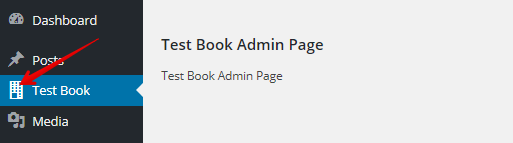
Apparently this code is working for me :
add_menu_page(
    __( 'Test Book', 'testbook' ),
    'Test Book',
    'manage_options',
    'includes/admin-options.php',
    'test_book_menu_page',
    'dashicons-building',
   7
);
I simply added ‘dashicons-building’ as shown in the code above.
Method 3
When you call the screen_icon function, put the page id from which you want to get the icon. For instance, if you want posts icon, use either screen_icon('edit'); or screen_icon('post');
About here, you can leave it to false or null or maybe put “div” here. I read somewhere in the codex that “div” should be used whenever there’s supposed to be some custom CSS
All methods was sourced from stackoverflow.com or stackexchange.com, is licensed under cc by-sa 2.5, cc by-sa 3.0 and cc by-sa 4.0