I want to use MySQL with my Asp.Net application and would like to know how. I am going to use MySQL for the first time. The most important thing I would like to know is how to connect to a MySQL database.
Answers:
Thank you for visiting the Q&A section on Magenaut. Please note that all the answers may not help you solve the issue immediately. So please treat them as advisements. If you found the post helpful (or not), leave a comment & I’ll get back to you as soon as possible.
Method 1
You can use the following connectionstring in your web.config to connect to mysql database:
<connectionStrings>
  <add name="MySQLConnStr" connectionString="DRIVER={MySQL ODBC 3.51 Driver};Database=YourDatabase;Server=localhost;UID=YourUsername;PWD=YourPassword;"/>
</connectionStrings>
You need to do the following before attempting to connect from ASP.NET to MySQL database:
- Make sure you have installed the .Net Framework on your server
- Download the ODBC .Net data provider and install it on your development machine or your server. You can download it here: http://www.microsoft.com/downloads/details.aspx?FamilyID=6ccd8427-1017-4f33-a062-d165078e32b1&DisplayLang=en
- install MySQL ODBC Driver-MyODBC 3.51. You can download it here: http://dev.mysql.com/downloads/connector/odbc/3.51.html
The following will perfectly explain to you the architecture of ODBC:
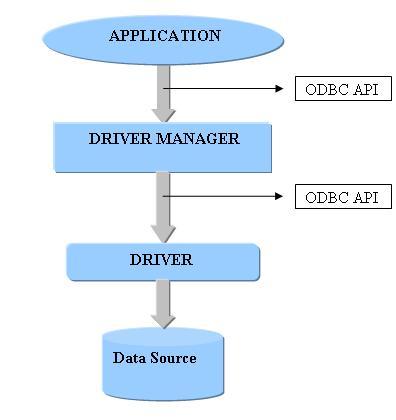
And for more details go through following referenced articles:
Connect to MySQL database from ASP.NET
An ASP.NET Application Using a MySQL Database (Sample Application)
ASP.NET with MySQL – Getting started
Hope this helps.
Method 2
You have to use MySql connector API to establish the connection, execute queries and retrieving results. Take a look at tutorials.
Method 3
try downloading this
http://www.devart.com/dotconnect/mysql/
this is a great tool and easy to connect mysql to ASP.net
but t his is trail version
and then
jst drop the components on the form/page
sample code

 using Devart.Data.MySql;

  MySqlConnection conOne = new MySqlConnection("user id=root;password=root;host=localhost;database=studentDB");
string quePrvLT = "select rollna from studentTAble where rollna =" +res;
MySqlCommand cmdPLT = new MySqlCommand(quePrvLT, con);
int leaPLdB = (float)cmdPLT.ExecuteScalar();
All methods was sourced from stackoverflow.com or stackexchange.com, is licensed under cc by-sa 2.5, cc by-sa 3.0 and cc by-sa 4.0