I am trying to create a scroll area with a vertical layout using pyqt5, and I am putting inside some labels. I know that even if it is a vertical layout it is supposed to scroll horizontally if the text does not fit. But no matter what I try it does not let me scroll.
This is the code I am using:
class window(QMainWindow):
    def __init__(self):
        super(window, self).__init__()
        self.setGeometry(300, 300, 803, 520)
        self.init_ui()

    def init_ui(self):
        self.teacher_box = QScrollArea(self)
        self.teacher_box.setGeometry(360, 10, 420, 181)
        self.teacher_box.setWidgetResizable(True)
        self.teacher_box.setObjectName("teacher_box")
        self.teacher_box_widget = QWidget()
        self.teacher_box_widget.setGeometry(QtCore.QRect(0, 0, 420, 181))
        self.teacher_box_widget.setObjectName("teacher_box_widget")
        self.verticalLayout = QVBoxLayout(self.teacher_box_widget)
        self.verticalLayout.setObjectName("verticalLayout")
        self.teacher_box.setWidget(self.teacher_box_widget)
        self.teacher_label = QtWidgets.QLabel(self.teacher_box_widget)
        self.teacher_label.setText("This is a new text label that i created using pyqt5's qscrollarea and now the label is going to get outside the boundaries")
        self.teacher_label.adjustSize()
        self.teacher_label.move(10, 10)


if __name__ == "__main__":
    app = QApplication(sys.argv)
    win = window()
    win.show()
    sys.exit(app.exec_())
Here is how it should look:
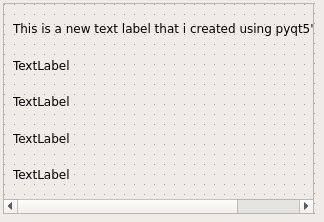
Here is how it looks:
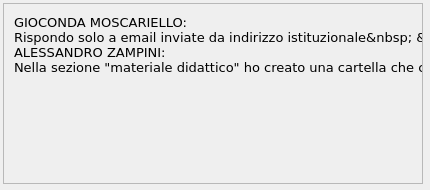
I hope my question is clear
Answers:
Thank you for visiting the Q&A section on Magenaut. Please note that all the answers may not help you solve the issue immediately. So please treat them as advisements. If you found the post helpful (or not), leave a comment & I’ll get back to you as soon as possible.
Method 1
Since many questions wonder how to use a QScrollArea that many widgets have, I will take the license to explain the various forms in detail and use them as a canonical answer for future readers.
QScrollArea only allows placing a container widget so the other widgets must be placed as children of the container widget.
And to place the widgets as children of another there are 2 possibilities:
1. Use a QLayout:
QLayouts allow you to automate the geometry of the widgets based on the QSizePolicy, strecth, sizeHint, etc. So in that case it’s simple: Just set the widgetResizable property to True.
import sys
from PyQt5 import QtWidgets


class Window(QtWidgets.QMainWindow):
    def __init__(self, parent=None):
        super(Window, self).__init__(parent)

        central_widget = QtWidgets.QWidget()
        self.setCentralWidget(central_widget)

        scroll_area = QtWidgets.QScrollArea(central_widget)
        scroll_area.setGeometry(360, 10, 420, 180)
        scroll_area.setWidgetResizable(True)

        container = QtWidgets.QWidget()
        scroll_area.setWidget(container)

        # Set widgets via layout
        lay = QtWidgets.QVBoxLayout(container)
        lay.setContentsMargins(10, 10, 0, 0)
        for letter in "ABCDE":
            text = letter * 100
            label = QtWidgets.QLabel(text)
            lay.addWidget(label)
        lay.addStretch()

        self.setGeometry(300, 300, 803, 520)


if __name__ == "__main__":
    app = QtWidgets.QApplication(sys.argv)
    win = Window()
    win.show()
    sys.exit(app.exec_())
2. Set the widgets directly without layouts:
In this case you must calculate the minimum geometry that contains the internal widgets and set the size in the container, also you must set the widgetResizable property to False:
import sys
from PyQt5 import QtCore, QtWidgets


class Window(QtWidgets.QMainWindow):
    def __init__(self, parent=None):
        super(Window, self).__init__(parent)

        central_widget = QtWidgets.QWidget()
        self.setCentralWidget(central_widget)

        scroll_area = QtWidgets.QScrollArea(central_widget)
        scroll_area.setGeometry(360, 10, 420, 180)
        scroll_area.setWidgetResizable(False)

        container = QtWidgets.QWidget()
        scroll_area.setWidget(container)

        # calculate geometry
        geometry = QtCore.QRect(10, 10, 0, 0)
        for letter in "ABCDE":
            text = letter * 100
            label = QtWidgets.QLabel(text, container)
            label.adjustSize()
            label.move(geometry.bottomLeft())
            geometry |= label.geometry()

        geometry.setTopLeft(QtCore.QPoint(0, 0))
        container.resize(geometry.size())

        self.setGeometry(300, 300, 803, 520)


if __name__ == "__main__":
    app = QtWidgets.QApplication(sys.argv)
    win = Window()
    win.show()
    sys.exit(app.exec_())
All methods was sourced from stackoverflow.com or stackexchange.com, is licensed under cc by-sa 2.5, cc by-sa 3.0 and cc by-sa 4.0