Need help to resolve a issue related with Gridview layout. I am trying to implement custome Gridview with Itemtemplate Columns using C#.Net language and want to include view using RowSpan property.
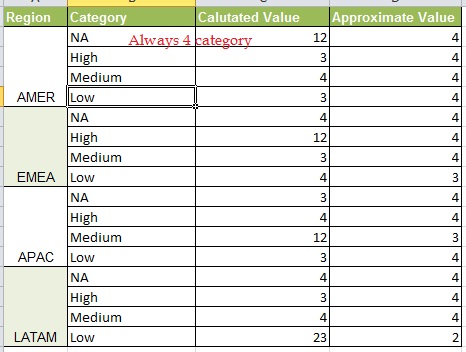
I tried to use below code but didn’t work for me Here
Please check the code which i used:
 protected void GridView31_DataBound1(object sender, EventArgs e)
{
    for (int rowIndex = grdView31.Rows.Count - 2; rowIndex >= 0; rowIndex--)
    {
        GridViewRow gvRow = grdView31.Rows[rowIndex];
        GridViewRow gvPreviousRow = grdView31.Rows[rowIndex + 1];
        for (int cellCount = 0; cellCount < gvRow.Cells.Count; cellCount++)
        {
            if (gvRow.Cells[cellCount].Text == gvPreviousRow.Cells[cellCount].Text)
            {
                if (gvPreviousRow.Cells[cellCount].RowSpan < 2)
                {
                    gvRow.Cells[cellCount].RowSpan = 2;
                }
                else
                {
                    gvRow.Cells[cellCount].RowSpan =
                        gvPreviousRow.Cells[cellCount].RowSpan + 1;
                }
                gvPreviousRow.Cells[cellCount].Visible = false;
            }
        }
    }

}
But every time the gvRow.Cells[cellCount].Text == gvPreviousRow.Cells[cellCount].Text is blank.
Hence the grid is taking weird shapes. Don’t know what is happening here.
Can anyone help?
Answers:
Thank you for visiting the Q&A section on Magenaut. Please note that all the answers may not help you solve the issue immediately. So please treat them as advisements. If you found the post helpful (or not), leave a comment & I’ll get back to you as soon as possible.
Method 1
Use RowDataBound event instead:
void GridView31_RowDataBound(object sender, GridViewRowEventArgs e)
{
    if (e.Row.RowType == DataControlRowType.DataRow )
    {
        if (e.Row.RowIndex % 4 == 0)
        {
            e.Row.Cells[0].Attributes.Add("rowspan", "4");
        }
        else
        {
            e.Row.Cells[0].Visible = false;
        }
    }
}
Method 2
 protected void GridView31_DataBound1(object sender, EventArgs e)
{
    int i = 1;
    for (int rowIndex = grdView31.Rows.Count - 2; rowIndex >= 0; rowIndex--)
    {
        GridViewRow gvRow = grdView31.Rows[rowIndex];
        GridViewRow gvPreviousRow = grdView31.Rows[rowIndex + 1];

        if (i % 4 !=0)
        {
            if (gvPreviousRow.Cells[0].RowSpan < 2)
            {
                gvRow.Cells[0].RowSpan = 2;
            }
            else
            {
                gvRow.Cells[0].RowSpan = gvPreviousRow.Cells[0].RowSpan + 1;
            }
            gvPreviousRow.Cells[0].Visible = false;
        }
        i++;
    }
This worked our for me. Trial & error 🙂
Method 3
    'VB.NET Code


Private Sub DG_Data_RowDataBound(sender As Object, e As System.Web.UI.WebControls.GridViewRowEventArgs) Handles DG_Data.RowDataBound
            Try

                'fusion , rowspan , colspan ,
                If e.Row.RowType = DataControlRowType.DataRow Then
                    If e.Row.RowIndex Mod 4 = 0 Then
                        e.Row.Cells(0).Attributes.Add("rowspan", "4")
                    Else
                        e.Row.Cells(0).Visible = False
                    End If
                End If


            Catch ex As Exception
                jq.msgErrorLog(ex)
            End Try
        End Sub
All methods was sourced from stackoverflow.com or stackexchange.com, is licensed under cc by-sa 2.5, cc by-sa 3.0 and cc by-sa 4.0