http://wordpress.org/extend/plugins/wp-firephp/
I’m simply supposed to call fb('Error message','Lable') but it doesn’t work all the time. I can’t figure out when and where the relevant files are being included and classes defined in order to make the call to the said method/function.
For example it doesn’t work even when I call fb() from wp-contentpluginswp-firephpFirePHPCorefb.php itself and open up http://localhost/wordpress (maybe because the file never gets included) but it works on http://localhost/wordpress/wp-admin. Does that mean wp-firephp plugin only works for /wp-admin and related pages? Because I wanted to use its functionality on non-admin related pages like /footer.php and such. Am I doing it wrong?
Answers:
Thank you for visiting the Q&A section on Magenaut. Please note that all the answers may not help you solve the issue immediately. So please treat them as advisements. If you found the post helpful (or not), leave a comment & I’ll get back to you as soon as possible.
Method 1
I gave up on using the plugin and use FirePHP straight as a mu-plugin:
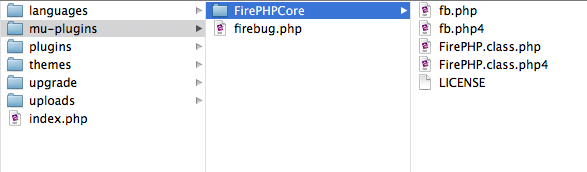
And firebug.php file consists of:
<?php
/*
    Plugin Name: FirePHP
    Version: 0.1
*/

require_once( 'FirePHPCore/FirePHP.class.php' );
ob_start();
$firephp = FirePHP::getInstance( true );

function logit( $var, $title='From FirePHP:' )
{
    global $firephp;
    $firephp->log( $var, $title );
}
Then I call it from anywhere (theme, plugin, core) using the function:
logit( $var_to_debug, 'The var contains:' );
Method 2
I’ve had rotten luck and performance with the different FirePHP pluings except for the ‘Yet Another Logger’ one, but have to admit I didn’t look at this one. Eventually I simply setup PEAR on my dev boxes and installed FirePHP.
/**
 * FirePHP simple examples
 */

// For FirePHP Object Oriented API
require_once('FirePHPCore/FirePHP.class.php');
$firephp = FirePHP::getInstance(true);
or
// Procedureal API
require_once('FirePHPCore/fb.php');
The above code is from the wp-config.php file of one of my development sites. It shows the two different methods of invoking FirePHP. Remember use one or the other, not both.
You call FirePHP by different methods depending upon how you invoke it.
For the Object Oriented API:
global $firephp;
$firephp->log( $var, "Label" );
For the Procedural API:
FB::log( $var, "Label" );
So after a slightly off topic answer:
Double check the documentation for the plugin and make sure you’re not supposed to be using the procedural API style call. A procedural call will not work with the object oriented API and vice versa.
Another option would be to try the ‘Yet Another Logger’ plugin.
All methods was sourced from stackoverflow.com or stackexchange.com, is licensed under cc by-sa 2.5, cc by-sa 3.0 and cc by-sa 4.0