Usually using Visual Studio’s debugger is a breeze. Scanning through Locals quickly shows the values of variables, etc. However, I’m at a loss how to find out the values contained in session state variables? Can anyone give me a hand?
Let’s say I put a breakpoint right after:
Session["first_name"] = "Rob Roy";
How do I view the value contained in Session["first_name"] from locals?
Answers:
Thank you for visiting the Q&A section on Magenaut. Please note that all the answers may not help you solve the issue immediately. So please treat them as advisements. If you found the post helpful (or not), leave a comment & I’ll get back to you as soon as possible.
Method 1
It’s pretty simple to inspect the session during debug. Just put a breakpoint in your code and just highlight your Session code (eg. highlight: Session["first_name"]) then right click and select QuickWatch....
This will setup up a watch on your Session for the value you had defined. You can also inspect other Session elements by adjusting the Expression field in the QuickWatch window and clicking the Reevaluate button.
Method 2
In VS you can just put ‘Session[“first_name”]’ in the Immediate Window and execute while the code is running. That will return the value that it holds.
If you can’t find it go to: View > Other Windows > Command Window, or press Ctrl+W, A
It will look like this:
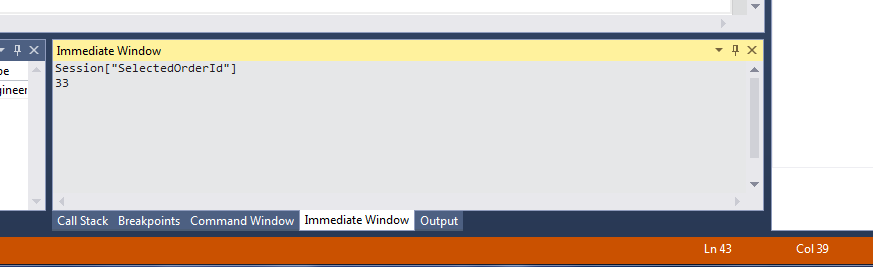
I know its a bit of a late reply but for anyone else who is interested, I hope this helps!
Method 3
Isn’t it HttpContext.Current.Session("..."), I ask as I haven’t used ASP.NET for a long time.
All methods was sourced from stackoverflow.com or stackexchange.com, is licensed under cc by-sa 2.5, cc by-sa 3.0 and cc by-sa 4.0