I have two update panels on a page. And I want to update both of them conditions at different-2 conditions. But I don’t know why this is not happening. I have specified triggers for both but not helpful, below is my code.
Please let me know Where I am wrong.
Actually there are three dropdown lists in first update panel when their selectedindexchange is fired then the second update panel’s content also updates.
<asp:UpdatePanel ID="upSearch" runat="server" ChildrenAsTriggers="true" UpdateMode="Conditional">
<ContentTemplate>
<div style="float: left; width: auto;">
<asp:DropDownList ID="ddlLocation" runat="server" Width="206px" DataTextField="LocationName"
DataValueField="Locationid" AutoPostBack="true" OnSelectedIndexChanged="ddlLocation_SelectedIndexChanged">
</asp:DropDownList>
<asp:DropDownList ID="ddlArea" runat="server" Width="200px" DataTextField="AreaName"
DataValueField="Areaid" AutoPostBack="true" OnSelectedIndexChanged="ddlArea_SelectedIndexChanged">
</asp:DropDownList>
<asp:DropDownList ID="ddlRoom" runat="server" Width="200px" DataTextField="RoomName"
DataValueField="Roomid">
</asp:DropDownList>
</div>
<div style="float: left; width: 80px;">
<asp:Button ID="btnSearch" runat="server" Text="Search" ValidationGroup="vgSearch"
CssClass="bluebtn" UseSubmitBehavior="false" OnClick="btnSearch_Click" />
</div>
<div style="float: left; width: 99%; padding: 5px 0px;">
</div>
</ContentTemplate>
</asp:UpdatePanel>
And the second one is as follow:-
<asp:UpdatePanel ID="UpdatePanel1" runat="server" ChildrenAsTriggers="true" UpdateMode="Conditional">
<ContentTemplate>
    <asp:Calendar ID="calSchedule" runat="server" NextPrevFormat="FullMonth" OnDayRender="calSchedule_DayRender"
        OnVisibleMonthChanged="calSchedule_VisibleMonthChanged">
        <DayHeaderStyle CssClass="dayheaderStyle" />
        <NextPrevStyle />
        <OtherMonthDayStyle BackColor="#ffffff" />
        <SelectedDayStyle />
        <TitleStyle CssClass="titleStyle" />
        <TodayDayStyle BackColor="#ffffa0" ForeColor="#6699cc" />
        <WeekendDayStyle />
        <DayStyle CssClass="dayStyle" />
    </asp:Calendar>
</ContentTemplate>
<Triggers>
    <asp:AsyncPostBackTrigger ControlID="btnSearch" EventName="Click" />
</Triggers>
</asp:UpdatePanel>
Answers:
Thank you for visiting the Q&A section on Magenaut. Please note that all the answers may not help you solve the issue immediately. So please treat them as advisements. If you found the post helpful (or not), leave a comment & I’ll get back to you as soon as possible.
Method 1
First of all I would like to recall the use of UpdateMode
-
AlwaysThe panel will update its content on every post on the page, they can be partial rendering posts or full posts, in both cases the content of the panel will be updated -
ConditionalThe content of the panel will only be updated when different conditions are met:-
By default the events triggered by its child objects will trigger an update, you can change this behavior setting
ChildrenAsTriggers="false" -
When you declare a trigger in the
Triggerssection of theUpdatePanel -
When you explicitly call the
UpdatePanel.Update()method - Full page posts will trigger the update
-
By default the events triggered by its child objects will trigger an update, you can change this behavior setting
The following code does the following:
- Each UpdatePanel is updated when its child controls raise an event
-
The UpdatePanel 1 named:
up1will be updated only when its child controls raise an event -
The UpdatePanel 2 named
up2will be updated when its child controls raise an event -
The UpdatePanel 2 named
up2will also be updated when the triggers defined are fired, in this case, when theDropDownListnamedddl1OnPanel1on the UpdatePanel 1 fires itsSelectedIndexChanged -
The UpdatePanel 2 named
up2will also be updated when theDropDownListnamedddl2OnPanel1on the UpdatePanel 1 raises itsSelectedIndexChanged, because in code it explicitly calls:this.up2.Update();
I think that tweaking this code, you could achieve your desired goal, just copy paste it on a new page and run it
Check the following code (see how the labels showing the date are affected in different ways depending on the events raised):
Code Behind
    protected void ddl1OnPanel1_SelectedIndexChanged(object sender, EventArgs e)
    {
        this.lblMessageOnPanel1.Text = "From ddl1 " + DateTime.Now.ToString();
        this.calendarOnPanel2.SelectedDate = DateTime.Today.AddDays(1);
        this.lblMessageOnPanel2.Text = "From ddl1 " + DateTime.Now.ToString();
    }

    protected void ddl2OnPanel1_SelectedIndexChanged(object sender, EventArgs e)
    {
        this.lblMessageOnPanel1.Text = "From ddl2 " + DateTime.Now.ToString();
        this.calendarOnPanel2.SelectedDate = DateTime.Today.AddDays(2);
        this.lblMessageOnPanel2.Text = "From ddl2 " + DateTime.Now.ToString();
        this.up2.Update();
    }
ASPX
    <asp:ScriptManager runat="server" ID="scriptManager" />
    <asp:Button Text="Full Post" runat="server" />
    <br />
    <asp:UpdatePanel runat="server" ID="up1" UpdateMode="Conditional">
        <ContentTemplate>
            <asp:DropDownList runat="server" ID="ddl1OnPanel1" AutoPostBack="true" OnSelectedIndexChanged="ddl1OnPanel1_SelectedIndexChanged">
                <asp:ListItem Text="text1" />
                <asp:ListItem Text="text2" />
            </asp:DropDownList>
            <br />
            <asp:DropDownList runat="server" ID="ddl2OnPanel1" AutoPostBack="true" OnSelectedIndexChanged="ddl2OnPanel1_SelectedIndexChanged">
                <asp:ListItem Text="text3" />
                <asp:ListItem Text="text4" />
            </asp:DropDownList>
            <br />
            <asp:Label runat="server" ID="lblMessageOnPanel1" />
            <br />
            <asp:Button ID="Button1" Text="text" runat="server" />
            <br />
            On every post on Panel 1: <%:DateTime.Now %>
        </ContentTemplate>
    </asp:UpdatePanel>

    <br />
    <br />
    <asp:UpdatePanel runat="server" ID="up2" UpdateMode="Conditional">
        <ContentTemplate>
            <asp:Calendar ID="calendarOnPanel2" runat="server" >
                <DayHeaderStyle CssClass="dayheaderStyle" />
                <NextPrevStyle />
                <OtherMonthDayStyle BackColor="#ffffff" />
                <SelectedDayStyle />
                <TitleStyle CssClass="titleStyle" />
                <TodayDayStyle BackColor="#ffffa0" ForeColor="#6699cc" />
                <WeekendDayStyle />
                <DayStyle CssClass="dayStyle" />
            </asp:Calendar>
            <br />
            <asp:Label ID="lblMessageOnPanel2" runat="server" />
            <br />
            On every post On Panel 2: <%:DateTime.Now %>
        </ContentTemplate>
        <Triggers>
            <asp:AsyncPostBackTrigger ControlID="ddl1OnPanel1" EventName="SelectedIndexChanged" />
        </Triggers>
    </asp:UpdatePanel>
Simple Output
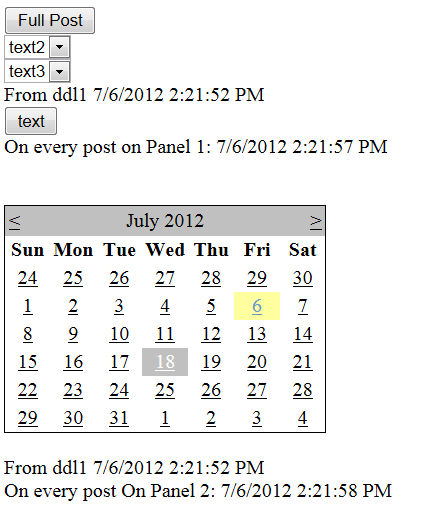
You could change the UpdateMode="Always" on the UpdatePanel 2, to see the difference, if you do it, this panel will be updated on every post, either full posts or posts coming from the UpdatePanel1
Method 2
I used this successfully for 4 updatepanel.
<%@ Register Assembly="AjaxControlToolkit" Namespace="AjaxControlToolkit" TagPrefix="asp" %>

<asp:ToolkitScriptManager ID="ToolkitScriptManager1" runat="server" EnableScriptGlobalization="true" CombineScripts="false" ScriptMode="Release">
</asp:ToolkitScriptManager>
Method 3
Remove the Autopostback=”True” from the DropdownLists if you want an asyncpostback to happen.
Also, what exactly is wrong at the moment? The updatepanels don’t update at all?
EDIT. Also remove childrenAsTriggers as it is not needed at this occasion
Method 4
If you are using nested update panels refer below sample code:
<asp:UpdatePanel id="UpdatePanel1" UpdateMode="Conditional" runat="server">
            <ContentTemplate>
                <fieldset>
                <legend>Parent UpdatePanel</legend>
                Last refresh <%=DateTime.Now.ToString() %> <br />
                <asp:Button ID="Button1" runat="server" Text="Refresh Outer Panel" />
                <asp:UpdatePanel ID="UpdatePanel2" runat="server">
                    <ContentTemplate>
                        <fieldset>
                        <legend>Nested UpdatePanel</legend>
                         Last refresh <%=DateTime.Now.ToString() %> <br />
                        <asp:Calendar ID="Calendar1" runat="server"></asp:Calendar>
                        </fieldset>
                    </ContentTemplate>
                </asp:UpdatePanel>
                </fieldset>
            </ContentTemplate>
        </asp:UpdatePanel>
If not using nested update panels then remove “UpdateMode” conditions from both Updatepanels of your code.
All methods was sourced from stackoverflow.com or stackexchange.com, is licensed under cc by-sa 2.5, cc by-sa 3.0 and cc by-sa 4.0