Hi I am trying to assign an ID to an HTML5 input so that i can access its value from the code behind in the web form. However with the this code:
<input type="email" required autofocus placeholder="Email Address" class="txt-input txt-input-username" ID="myTextBox" runat="server" />
Visual Studio 2010 is telling me that it cannot resolve the symbol ID=”myTextBox”.
Any ideas on how i can fix this because i have been searching for an answer for nearly a day? thanks
Answers:
Thank you for visiting the Q&A section on Magenaut. Please note that all the answers may not help you solve the issue immediately. So please treat them as advisements. If you found the post helpful (or not), leave a comment & I’ll get back to you as soon as possible.
Method 1
Use this code to use HTML5 input type:
-
Use this in
.aspxfile:<input type="text" required autofocus placeholder="Email Address" class="txt-input txt-input-username" ID="myTextBox" runat="server"/> -
Use this in
.csfile:myTextBox.Attributes["type"] = "email";
Method 2
ASP.Net 4.0 HtmlGenericControl does not support the “Type” attribute as defined in your code, the error explains that, Parser Error Message: ’email’ is not a valid type for an input tag., this is a arguably a “well known” or easily discovered bug in the ASP.Net framework.
There are several solutions that are outlined here:
http://msdn.microsoft.com/en-us/magazine/hh547102.aspxre
Update the framework and use the Asp.Net TextBox control Scott Hunter – HTML 5 Updates for .NET 4
Use a 3rd party ASP.Net Html5 UI control such as the one available from Codeplex.
A similar question is asked, and answered on the following SO posts:
How can I use HTML5 email input type with server-side .NET – This is the same issue as for the HtmlGenericControl however it is not addressed in the update
input types on server side controls
My personal preference ended up being to move to ASP.Net MVC 3, its quite a steep learning curve and a big change from the “Web Forms” style of ASP.Net web development however its soon forgotten once you get used to the symantics and coding styles.
Method 3
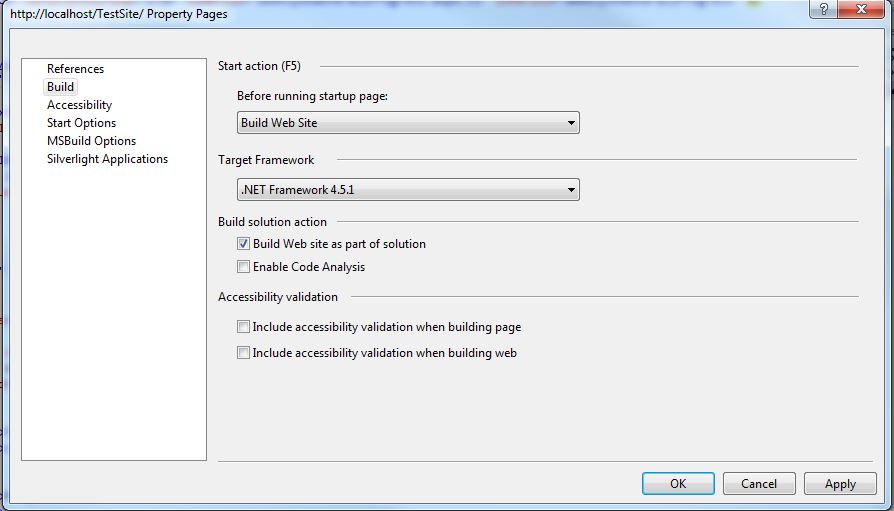
Beside the solutions given in above answers you can use the Microsoft.net framework 4.5 or above which wont complaint for the ’email’ is not a valid type for an input.
To change the framework of website take properties of the website by right clicking the project in solution explorer and clicking properties. In properties window select the build from the menu at left and then select framework 4.5 or above.
Method 4
If you are using vb.net :
In .aspx page
<input id="myTextBox" runat="server"/>
Avoid type=”email/date/mob” in input tag, it may produce parse error
In .vb page, in PageLoad()
myTextBox.Attributes.Add("type","email")
All methods was sourced from stackoverflow.com or stackexchange.com, is licensed under cc by-sa 2.5, cc by-sa 3.0 and cc by-sa 4.0