I’m working on a console app that take a list of endpoints to video data, makes an HTTP request, and saves the result to a file. These are relatively small videos. Because of an issue outside of my control, one of the videos is very large (145 minutes instead of a few seconds).
The problem I’m seeing is that my memory usage spikes to ~1 GB after that request is called, and I eventually get a “Task was cancelled” error (presumably because the client timed out). This is fine, I don’t want this video, but what is concerning is that my allocated memory stays high no matter what I do. I want to be able to release the memory. It seems concerning that Task Manager shows ~14 MB memory usage until this call, then trickles up continuously afterwards. In the VS debugger I just see a spike.
I tried throwing everything in a using statement, re-initializing the HttpClient on exception, manually invoking GC.Collect() with no luck. The code I’m working with looks something like this:
consumer.Received += async (model, ea) =>
{
    InitializeHttpClient(source);
    ...
    foreach(var item in queue)
    {
        await SaveFileFromEndpoint(url, fileName);
        ...
    }
}
and the methods:
public void InitializeHttpClient(string source)
{
    ...
    _client = new HttpClient();
    ...
}

public async Task SaveFileFromEndpoint(string endpoint, string fileName)
{
    try
    {
        using (HttpResponseMessage response = await _client.GetAsync(endpoint))
        {
            if (response.IsSuccessStatusCode)
            {
                using(var content = await response.Content.ReadAsStreamAsync())
                using (var fileStream = File.Create($"{fileName}"))
                {
                    await response.Content.CopyToAsync(fileStream);
                }
            }
        }
    }
    catch (Exception ex)
    {

    }
}
Here is a look at my debugger output:
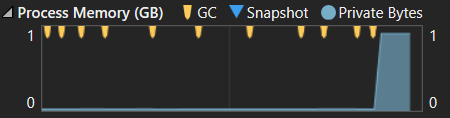
I guess I have a few questions about what I’m seeing:
- Is the memory usage I’m seeing actually an issue?
- Is there any way I can release the memory being allocated by a large HTTP request?
- Is there any way I can see the content length of the request before the call is made and memory is allocated? So far I haven’t been able to find a way to find out before the actual memory is allocated.
Thanks in advance for your help!
Answers:
Thank you for visiting the Q&A section on Magenaut. Please note that all the answers may not help you solve the issue immediately. So please treat them as advisements. If you found the post helpful (or not), leave a comment & I’ll get back to you as soon as possible.
Method 1
If you use HttpClient.SendAsync(HttpRequestMessage, HttpCompletionOption) instead of GetAsync, you can supply HttpCompletionOption.ResponseHeadersRead, (as opposed to the default ResponseContentRead). This means that the response stream will be handed back to you before the response body has downloaded (rather than after it), and will require significantly less buffer to operate.
Method 2
In addition to @spender’s answers (which is on point), you need to also make sure that you dispose the response when you are done with it. You can find more information about this on “Efficiently Streaming Large HTTP Responses With HttpClient” article.
Here is a code sample:
using (HttpClient client = new HttpClient())
{
    const string url = "https://github.com/tugberkugurlu/ASPNETWebAPISamples/archive/master.zip";
    using (HttpResponseMessage response = await client.GetAsync(url, HttpCompletionOption.ResponseHeadersRead))
    using (Stream streamToReadFrom = await response.Content.ReadAsStreamAsync())
    {
        string fileToWriteTo = Path.GetTempFileName();
        using (Stream streamToWriteTo = File.Open(fileToWriteTo, FileMode.Create))
        {
            await streamToReadFrom.CopyToAsync(streamToWriteTo);
        }
    }
}
You also need to take into account that you should not be creating an HttpClient instance per operation. HttpClientFactory is a very organised way to make sure that you flow the HttpClient within your app safely in a most performant way.
All methods was sourced from stackoverflow.com or stackexchange.com, is licensed under cc by-sa 2.5, cc by-sa 3.0 and cc by-sa 4.0