i got this error Access to the registry key ‘Global’ is denied. when i run ASP web application
here is screenshort https://prnt.sc/uc4mjm
i also add pool on users group Performance Monitor here is screenshort https://prnt.sc/uc4n8a
i read few website post and try still not solved please help me anyone
error logs
`Server Error in '/' Application.
Access to the registry key 'Global' is denied.
Description: An unhandled exception occurred during the execution of the current web request. Please review the stack trace for more information about the error and where it originated in the code.

Exception Details: System.UnauthorizedAccessException: Access to the registry key 'Global' is denied.

ASP.NET is not authorized to access the requested resource. Consider granting access rights to the resource to the ASP.NET request identity. ASP.NET has a base process identity (typically {MACHINE}ASPNET on IIS 5 or Network Service on IIS 6 and IIS 7, and the configured application pool identity on IIS 7.5) that is used if the application is not impersonating. If the application is impersonating via <identity impersonate="true"/>, the identity will be the anonymous user (typically IUSR_MACHINENAME) or the authenticated request user.

To grant ASP.NET access to a file, right-click the file in File Explorer, choose "Properties" and select the Security tab. Click "Add" to add the appropriate user or group. Highlight the ASP.NET account, and check the boxes for the desired access.

Source Error:

The source code that generated this unhandled exception can only be shown when compiled in debug mode. To enable this, please follow one of the below steps, then request the URL:

1. Add a "Debug=true" directive at the top of the file that generated the error. Example:

  <%@ Page Language="C#" Debug="true" %>

or:

2) Add the following section to the configuration file of your application:

<configuration>
   <system.web>
       <compilation debug="true"/>
   </system.web>
</configuration>

Note that this second technique will cause all files within a given application to be compiled in debug mode. The first technique will cause only that particular file to be compiled in debug mode.

Important: Running applications in debug mode does incur a memory/performance overhead. You should make sure that an application has debugging disabled before deploying into production scenario.

Stack Trace:


[UnauthorizedAccessException: Access to the registry key 'Global' is denied.]
   Microsoft.Win32.RegistryKey.Win32Error(Int32 errorCode, String str) +5990557
   Microsoft.Win32.RegistryKey.InternalGetValue(String name, Object defaultValue, Boolean doNotExpand, Boolean checkSecurity) +361
   Microsoft.Win32.RegistryKey.GetValue(String name) +62
   System.Diagnostics.PerformanceMonitor.GetData(String item) +148
   System.Diagnostics.PerformanceCounterLib.GetPerformanceData(String item) +255
   System.Diagnostics.PerformanceCounterLib.get_CategoryTable() +172
   System.Diagnostics.PerformanceCounterLib.CounterExists(String category, String counter, Boolean& categoryExists) +35
   System.Diagnostics.PerformanceCounterLib.CounterExists(String machine, String category, String counter) +95
   System.Diagnostics.PerformanceCounter.InitializeImpl() +392
   System.Diagnostics.PerformanceCounter..ctor(String categoryName, String counterName, String instanceName, Boolean readOnly) +373
   System.Diagnostics.PerformanceCounter..ctor(String categoryName, String counterName, String instanceName) +14
   Web_AutoSeeding3.index..ctor() in D:ProjectWeb_AutoSeeding3Web_AutoSeeding3index.aspx.vb:129
   ASP.index_aspx..ctor() +50
   __ASP.FastObjectFactory_app_web_hbzqzngk.Create_ASP_index_aspx() +72
   System.Web.Compilation.BuildManager.CreateInstanceFromVirtualPath(VirtualPath virtualPath, Type requiredBaseType, HttpContext context, Boolean allowCrossApp) +174
   System.Web.UI.PageHandlerFactory.GetHandlerHelper(HttpContext context, String requestType, VirtualPath virtualPath, String physicalPath) +42
   System.Web.MaterializeHandlerExecutionStep.System.Web.HttpApplication.IExecutionStep.Execute() +516
   System.Web.HttpApplication.ExecuteStep(IExecutionStep step, Boolean& completedSynchronously) +288
`
thanks
juwel
Answers:
Thank you for visiting the Q&A section on Magenaut. Please note that all the answers may not help you solve the issue immediately. So please treat them as advisements. If you found the post helpful (or not), leave a comment & I’ll get back to you as soon as possible.
Method 1
You are receiving System.UnauthorizedAccessException because the application pool does not have access to the folder where your website files are kept.
To grant ASP.NET access to a file,
- Right-click the folder in File Explorer,
- Select
Propertiesand select theSecuritytab. - Click
Edit - Click
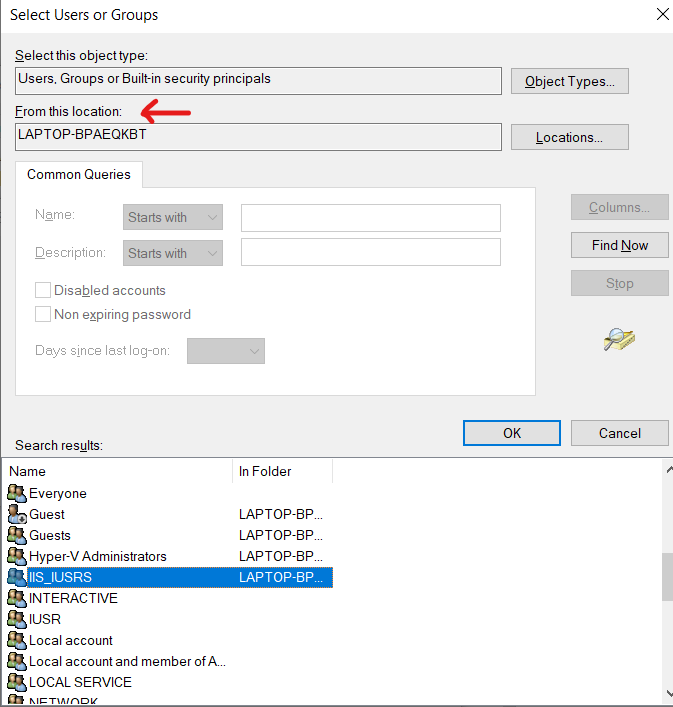
Addand thenAdvanced... - Check if
Locationfield is showing correct system name and then clickFind Now - Select
IIS_IUSERS(check the image) (As mentioned, (typically {MACHINE}ASPNET on IIS 5 or Network Service on IIS 6 and IIS 7, and the configured application pool identity on IIS 7.5) that is used if the application is not impersonating. If the application is impersonating via , the identity will be the anonymous user (typically IUSR_MACHINENAME) or the authenticated request user.)
All methods was sourced from stackoverflow.com or stackexchange.com, is licensed under cc by-sa 2.5, cc by-sa 3.0 and cc by-sa 4.0