This question is related to this question: How to remove convexity defects in sudoku square
I was trying to implement nikie's answer in Mathematica to OpenCV-Python. But i am stuck at the final step of procedure.
ie I got the all intersection points in square like below:
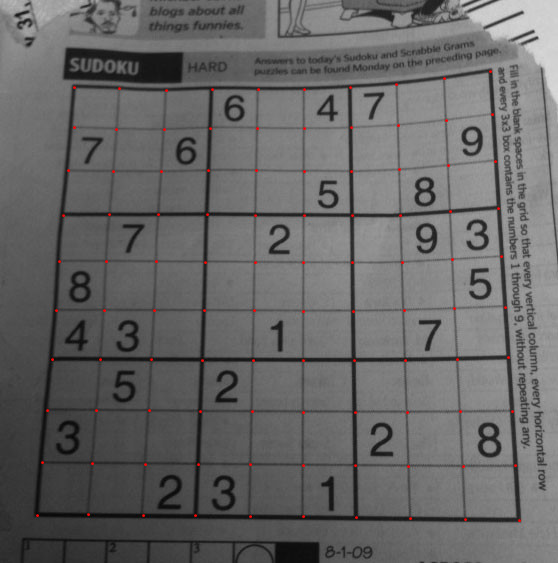
Now, i want to transform this into a perfect square of size (450,450) as given below:
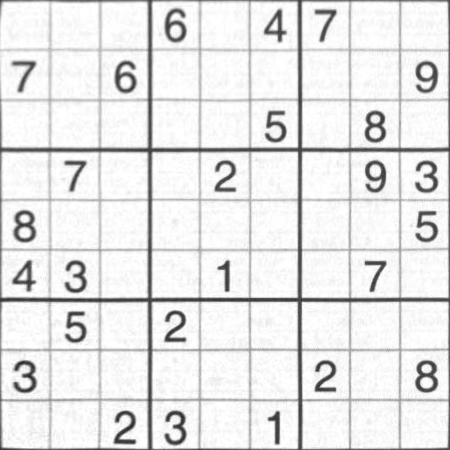
(Never mind the brightness difference of two images).
Question:
How can i do this in OpenCV-Python? I am using cv2 version.
Answers:
Thank you for visiting the Q&A section on Magenaut. Please note that all the answers may not help you solve the issue immediately. So please treat them as advisements. If you found the post helpful (or not), leave a comment & I’ll get back to you as soon as possible.
Method 1
Apart from etarion’s suggestion, you could also use the remap function. I wrote a quick script to show how you can do this. As you see coding this is really easy in Python. This is the test image:
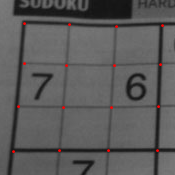
and this is the result after warping:
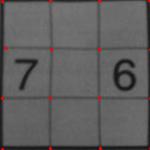
And here is the code:
import cv2
from scipy.interpolate import griddata
import numpy as np

grid_x, grid_y = np.mgrid[0:149:150j, 0:149:150j]
destination = np.array([[0,0], [0,49], [0,99], [0,149],
                  [49,0],[49,49],[49,99],[49,149],
                  [99,0],[99,49],[99,99],[99,149],
                  [149,0],[149,49],[149,99],[149,149]])
source = np.array([[22,22], [24,68], [26,116], [25,162],
                  [64,19],[65,64],[65,114],[64,159],
                  [107,16],[108,62],[108,111],[107,157],
                  [151,11],[151,58],[151,107],[151,156]])
grid_z = griddata(destination, source, (grid_x, grid_y), method='cubic')
map_x = np.append([], [ar[:,1] for ar in grid_z]).reshape(150,150)
map_y = np.append([], [ar[:,0] for ar in grid_z]).reshape(150,150)
map_x_32 = map_x.astype('float32')
map_y_32 = map_y.astype('float32')

orig = cv2.imread("tmp.png")
warped = cv2.remap(orig, map_x_32, map_y_32, cv2.INTER_CUBIC)
cv2.imwrite("warped.png", warped)
I suppose you can google and find what griddata does. In short, it does interpolation and here we use it to convert sparse mappings to dense mappings as cv2.remap requires dense mappings. We just need to convert to the values to float32 as OpenCV complains about the float64 type. Please let me know how it goes.
Update: If you don’t want to rely on Scipy, one way is to implement the 2d interpolation function in your code, for example, see the source code of griddata in Scipy or a simpler one like this http://inasafe.readthedocs.org/en/latest/_modules/engine/interpolation2d.html which depends only on numpy. Though, I’d suggest to use Scipy or another library for this, though I see why requiring only CV2 and numpy may be better for a case like this. I’d like to hear how your final code solves Sudokus.
Method 2
if you have source points and end points (you only need 4), you can plug them into cv2.getPerspectiveTransform, and use that result in cv2.warpPerspective. Gives you a nice flat result.
All methods was sourced from stackoverflow.com or stackexchange.com, is licensed under cc by-sa 2.5, cc by-sa 3.0 and cc by-sa 4.0