I’m working on a documentation (personal) for nested matplotlib (MPL) library, which differs from MPL own provided, by interested submodule packages. I’m writing Python script which I hope will automate document generation from future MPL releases.
I selected interested submodules/packages and want to list their main classes from which I’ll generate list and process it with pydoc
Problem is that I can’t find a way to instruct Python to load submodule from string. Here is example of what I tried:
import matplotlib.text as text
x = dir(text)
.
i = __import__('matplotlib.text')
y = dir(i)
.
j = __import__('matplotlib')
z = dir(j)
And here is 3 way comparison of above lists through pprint:
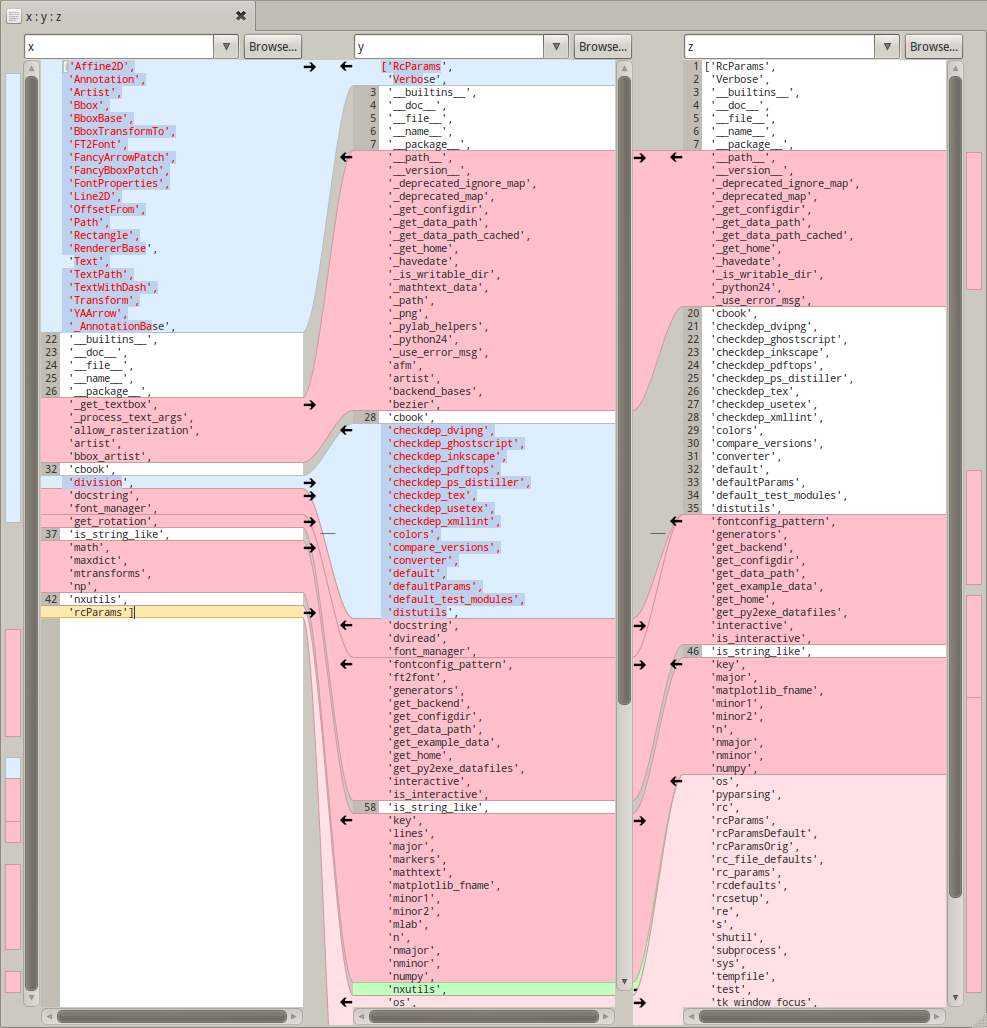
I don’t understand what’s loaded in y object – it’s base matplotlib plus something else, but it lack information that I wanted and that is main classes from matplotlib.text package. It’s top blue coloured part on screenshot (x list)
Please don’t suggest Sphinx as different approach.
Answers:
Thank you for visiting the Q&A section on Magenaut. Please note that all the answers may not help you solve the issue immediately. So please treat them as advisements. If you found the post helpful (or not), leave a comment & I’ll get back to you as soon as possible.
Method 1
The __import__ function can be a bit hard to understand.
If you change
i = __import__('matplotlib.text')
to
i = __import__('matplotlib.text', fromlist=[''])
then i will refer to matplotlib.text.
In Python 2.7 and Python 3.1 or later, you can use importlib:
import importlib

i = importlib.import_module("matplotlib.text")
Some notes
-
If you’re trying to import something from a sub-folder e.g.
./feature/email.py, the code will look likeimportlib.import_module("feature.email") -
You can’t import anything if there is no
__init__.pyin the folder with file you are trying to import
Method 2
importlib.import_module is what you are looking for. It returns the imported module.
import importlib

mymodule = importlib.import_module('matplotlib.text')
You can thereafter access anything in the module as mymodule.myclass, mymodule.myfunction, etc.
Method 3
spent some time trying to import modules from a list, and this is the thread that got me most of the way there – but I didnt grasp the use of ___import____ –
so here’s how to import a module from a string, and get the same behavior as just import. And try/except the error case, too. 🙂
  pipmodules = ['pycurl', 'ansible', 'bad_module_no_beer']
  for module in pipmodules:
      try:
          # because we want to import using a variable, do it this way
          module_obj = __import__(module)
          # create a global object containging our module
          globals()[module] = module_obj
      except ImportError:
          sys.stderr.write("ERROR: missing python module: " + module + "n")
          sys.exit(1)
and yes, for python 2.7> you have other options – but for 2.6<, this works.
Method 4
Apart from using the importlib one can also use exec method to import a module from a string variable.
Here I am showing an example of importing the combinations method from itertools package using the exec method:
MODULES = [
    ['itertools','combinations'],
]

for ITEM in MODULES:
    import_str = "from {0} import {1}".format(ITEM[0],', '.join(str(i) for i in ITEM[1:]))
    exec(import_str)

ar = list(combinations([1, 2, 3, 4], 2))
for elements in ar:
    print(elements)
Output:
(1, 2)
(1, 3)
(1, 4)
(2, 3)
(2, 4)
(3, 4)
Method 5
I developed these 3 useful functions:
def loadModule(moduleName):
    module = None
    try:
        import sys
        del sys.modules[moduleName]
    except BaseException as err:
        pass
    try:
        import importlib
        module = importlib.import_module(moduleName)
    except BaseException as err:
        serr = str(err)
        print("Error to load the module '" + moduleName + "': " + serr)
    return module

def reloadModule(moduleName):
    module = loadModule(moduleName)
    moduleName, modulePath = str(module).replace("' from '", "||").replace("<module '", '').replace("'>", '').split("||")
    if (modulePath.endswith(".pyc")):
        import os
        os.remove(modulePath)
        module = loadModule(moduleName)
    return module

def getInstance(moduleName, param1, param2, param3):
    module = reloadModule(moduleName)
    instance = eval("module." + moduleName + "(param1, param2, param3)")
    return instance
And everytime I want to reload a new instance I just have to call getInstance() like this:
myInstance = getInstance("MyModule", myParam1, myParam2, myParam3)
Finally I can call all the functions inside the new Instance:
myInstance.aFunction()
The only specificity here is to customize the params list (param1, param2, param3) of your instance.
All methods was sourced from stackoverflow.com or stackexchange.com, is licensed under cc by-sa 2.5, cc by-sa 3.0 and cc by-sa 4.0