Trying to remove “/index.php/” from URL,
The .htaccess file location is
./var/www/html/.htaccess
and the content
<IfModule mod_rewrite.c>
  RewriteEngine On
  RewriteCond %{REQUEST_FILENAME} !-f
  RewriteCond %{REQUEST_FILENAME} !-d
  RewriteRule (.*) /index.php/$1 [L]
</IfModule>
however it doesn’t work, accessing a web page is possible only with “/index.php/”.
Answers:
Thank you for visiting the Q&A section on Magenaut. Please note that all the answers may not help you solve the issue immediately. So please treat them as advisements. If you found the post helpful (or not), leave a comment & I’ll get back to you as soon as possible.
Method 1
Go to Settings >Permalink Settings.
Check Post name
Click on Save Change button.
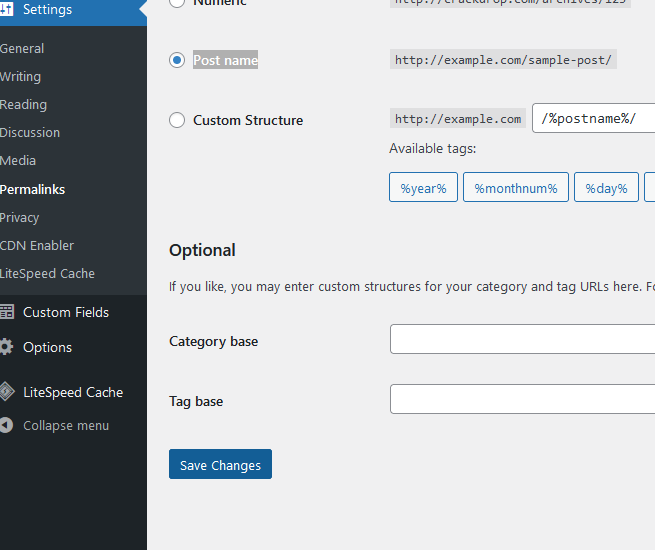
And this should be the default htaccess. WordPress can manage it’s own htaccess so no need to manually add htaccess rules. I would delete your htaccess file and then save permalink settings.
# BEGIN WordPress

RewriteEngine On
RewriteRule .* - [E=HTTP_AUTHORIZATION:%{HTTP:Authorization}]
RewriteBase /
RewriteRule ^index.php$ - [L]
RewriteCond %{REQUEST_FILENAME} !-f
RewriteCond %{REQUEST_FILENAME} !-d
RewriteRule . /index.php [L]

# END WordPress
Method 2
Problem is solved by changing the following line inside “httpd.conf” file:
AllowOverride None
to
AllowOverride All
All methods was sourced from stackoverflow.com or stackexchange.com, is licensed under cc by-sa 2.5, cc by-sa 3.0 and cc by-sa 4.0