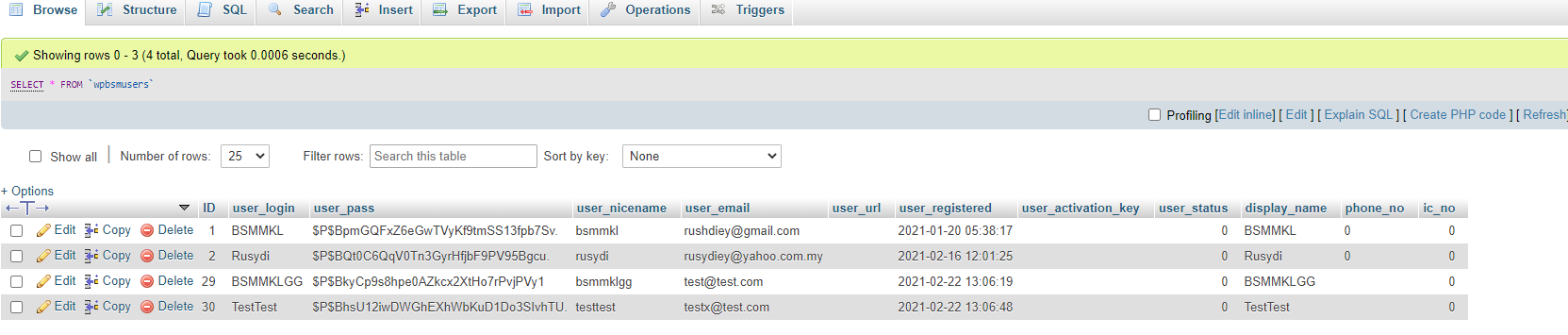
I add custom row at my wp_users table but the data in the row such as phone_no and ic_no. But when i try to add data, the data not pass in my table
This is my code
<?php
/*
Template Name: Register
*/
get_header();
// Exit if accessed directly
if ( !defined('ABSPATH')) exit;
?>
<html>


<body id="login-page" <?php body_class(); ?>>
<div class="container">
<div class="row register-page-container p-3 p-lg-5 mt-5 d-flex justify-content-center w-75 mx-auto">
<?php
global $wpdb, $user_ID;

//Check whether the user is already logged in
if (!$user_ID) {
// Default page shows register form.
// To show Login form set query variable action=login
$action = (isset($_GET['action']) ) ? $_GET['action'] : 0;
// Login Page
if ($action === "login") { ?>
<?php
$login = (isset($_GET['login']) ) ? $_GET['login'] : 0;
if ( $login === "failed" ) {
echo '<div class="col-12 register-error"><strong>ERROR:</strong> Invalid username and/or password.</div>';
} elseif ( $login === "empty" ) {
echo '<div class="col-12 register-error"><strong>ERROR:</strong> Username and/or Password is empty.</div>';
} elseif ( $login === "false" ) {
echo '<div class="col-12 register-error"><strong>ERROR:</strong> You are logged out.</div>';
}
?>
<div class="col-md-5">
<?php
$args = array(
'redirect' => home_url().'/login/',
);
wp_login_form($args); ?>
<p class="text-center"><a class="mr-2" href="<?php echo wp_registration_url(); ?>">Register Now</a>
<span clas="mx-2">·</span><a class="ml-2" href="<?php echo wp_lostpassword_url( ); ?>" title="Lost Password">Lost Password?</a></p>
</div>
<?php
} else { // Register Page ?>
<?php
if ( $_POST ) {
$error = 0;

$username = esc_sql($_REQUEST['username']);
if ( empty($username) ) {
echo '<div class="col-12 register-error">User name should not be empty.</div>';
$error = 1;
}

$email = esc_sql($_REQUEST['email']);
if ( !preg_match("/^[_a-z0-9-]+(.[_a-z0-9-]+)*@[a-z0-9-]+(.[a-z0-9-]+)*(.[a-z]{2,4})$/", $email) ) {
echo '<div class="col-12 register-error">Please enter a valid email.</div>';
$error = 1;
}

$phone = esc_sql($_REQUEST['phone']);
if ( empty($phone) ) {
echo '<div class="col-12 register-error">Please enter a valid phone.</div>';
$error = 1;
}

$error = 0;
$icno = esc_sql($_REQUEST['icno']);
if ( empty($icno) ) {
echo '<div class="col-12 register-error">Please enter a valid IC No.</div>';
$error = 1;
}

if ( $error == 0 ) {
$password = esc_sql($_REQUEST['password']);
if ( empty($password) ) {
echo '<div class="col-12 register-error">Password should not be empty.</div>';
$error = 1;
}

$username  = $_POST['username'];
$password  = $_POST['password'];
$email   = $_POST['email'];
$phone   = $_POST['phone'];
$icno   = $_POST['icno'];
$user_data = [
    'user_login' => $username,
    'user_pass'  => $password,
    'user_email'   => $email,
    'phone_no'   => $phone,
    'ic_no'   => $icno,
];

$user_id = wp_insert_user( $user_data );

// success
if ( ! is_wp_error( $user_id ) ) {
    echo 'User created: ';
}

 else {
 echo 'Registration error';
}
}
}
if ( $error != 2 ) { ?>
<?php if(get_option('users_can_register')) { ?>
<div class="col-md-5 manual-register-form">
<form action="" method="post">
<p>
<label for="user_login">Username</label>
<input type="text" name="username" placeholder="Type your Username Here" class="register-input mb-4" value="<?php if( ! empty($username) ) echo $username; ?>" /><br />
</p>
<p>
<label for="user_password">Password</label>
<input type="password" name="password" placeholder="Type your Password Here" class="register-input mb-4" value="<?php if( ! empty($password) ) echo $password; ?>" /><br />
</p>
<p>
<label for="user_email">Email</label>
<input type="text" name="email" placeholder="Type your Email Here" class="register-input mb-4" value="<?php if( ! empty($email) ) echo $email; ?>" /> <br />
</p>
<p>
<label for="phone_no">Phone</label>
<input type="text" name="phone" placeholder="Type your Phone Here" class="register-input mb-4" value="<?php if( ! empty($phone) ) echo $phone; ?>" /> <br />
</p>
<p>
<label for="ic_no">IC No</label>
<input type="text" name="icno" placeholder="Type your IC No Here" class="register-input mb-4" value="<?php if( ! empty($icno) ) echo $icno; ?>" /> <br />
</p>
<input type="submit" id="register-submit-btn" class="mb-4" name="submit" value="SignUp" />
</form>
<p>Already have an account? <a href="/login">Login Here</a></p>
</div>
<?php } else {
echo "Registration is currently disabled. Please try again later.";
}
} ?>
<?php }
} else { ?>
<p>You are logged in. Click <a href="<?php bloginfo('wpurl'); ?>">here to go home</a></p>
<?php } ?>
</div>
</div>
<?php get_footer();
?>
</body>
</html>
https://codepen.io/rusydi-hakim/pen/GRNMxKY
Answers:
Thank you for visiting the Q&A section on Magenaut. Please note that all the answers may not help you solve the issue immediately. So please treat them as advisements. If you found the post helpful (or not), leave a comment & I’ll get back to you as soon as possible.
Method 1
Never modify the WordPress core table schemas, such as wp_users etc under any circumstances.
The next time WordPress changes its tables, your custom columns will be destroyed, and all the data will be deleted. This is unavoidable.
Instead, use the User Meta API and table:
Retrieving a user meta:
$phone = get_user_meta( $user_id, 'phone_number', true );
Adding/updating a user meta:
update_user_meta( $user_id, 'phone_number', '0123-456-7890' );
Where $user_id is the ID of the user
Never modify the tables, store the data in the meta tables instead using the functions.
All methods was sourced from stackoverflow.com or stackexchange.com, is licensed under cc by-sa 2.5, cc by-sa 3.0 and cc by-sa 4.0