I have following code on page load event:
 Protected Sub Page_Load(ByVal sender As Object, ByVal e As System.EventArgs) Handles Me.Load

        con = New SqlConnection("Data Source=14GRAFICALI\SQLEXPRESS;Initial Catalog=sagar;Integrated Security=True")
        '-----------------------fill name ddl------------------------------'

        Try

            da = New SqlDataAdapter("select EmpName from empMaster_VB", con)
            ds = New DataSet()
            da.Fill(ds)
            For i As Integer = 0 To ds.Tables(0).Rows.Count

                ddlName.Items.Add(ds.Tables(0).Rows(i)(0).ToString())

            Next


        Catch ex As Exception

        End Try

        '--------------------------------------------------------------------'


        '----------------fill expence-------------------------------------'

        Try

            da = New SqlDataAdapter("select ExpName from expenceType_VB", con)
            ds = New DataSet()
            da.Fill(ds)
            For i As Integer = 0 To ds.Tables(0).Rows.Count

                ddlExpence.Items.Add(ds.Tables(0).Rows(i)(0).ToString())

            Next


        Catch ex As Exception

        End Try


        '---------------------------------------------------------------'


    End Sub
This code is to fill drop downs with names and expence values in database tables.
I am getting ‘instance failure‘ error while executing the code.
I checked one of the answers on stack and checked my connection string. But, my connection string is also correct.
Please help me if anything else is missing in this code.
Answers:
Thank you for visiting the Q&A section on Magenaut. Please note that all the answers may not help you solve the issue immediately. So please treat them as advisements. If you found the post helpful (or not), leave a comment & I’ll get back to you as soon as possible.
Method 1
As you got the error “instance failure”, that might be the error with your SQL Server instance..
Make sure your SQL Server instance(MSSQLSERVER) is running, where you can check in: Services list. TO get into services list: open run dialog box and type: “services.msc” (without quotes) and hit Enter. That takes you to services management console, where you can check whether your instance in running or not..
If the problem still persists, then try using: Data Source=.SQLEXPRESS instead.. 🙂
Happy Coding… 🙂
Method 2
I have connection:
Data Source=MyComputerNameSQL2012ENTERPRS;Initial Catalog=RESTFUL; User Id=myuser; Password=mypass123;
My server is : MyComputerNameSQL2012ENTERPRS
But since I use string, I add more so, at my code It will be:
public string connectionString = "Data Source=DAFWKN409C67Q\SQL2012ENTERPRS;Initial Catalog=RESTFUL; User Id=rest_user; Password=rest_pwd_01;";
I have forgoten that I must remove one of since I am not use default string block, I use XML file to save my connection string. Then everything is ok. So, my suggestion is your instance name is not correct.
This is my connection string sample it I use local pc using SQL express:
string servername = @"Data Source=.SQLExpress;Initial Catalog=Workshop;Integrated Security=True";
You should modify with your server name, and instance name by yourself, make sure it correct.
Method 3
I had this issue because I got the connection string from appsettings.Development.json:
"Server=msi\DataBaseName;Database=Super25;Trusted_Connection=True;"
but when I changed to
"Data Source=msiDataBaseName;Initial Catalog=Super25;Integrated Security=True;"
solved!
Method 4
in my case just kick up the double \ to one slush
:=)
Method 5
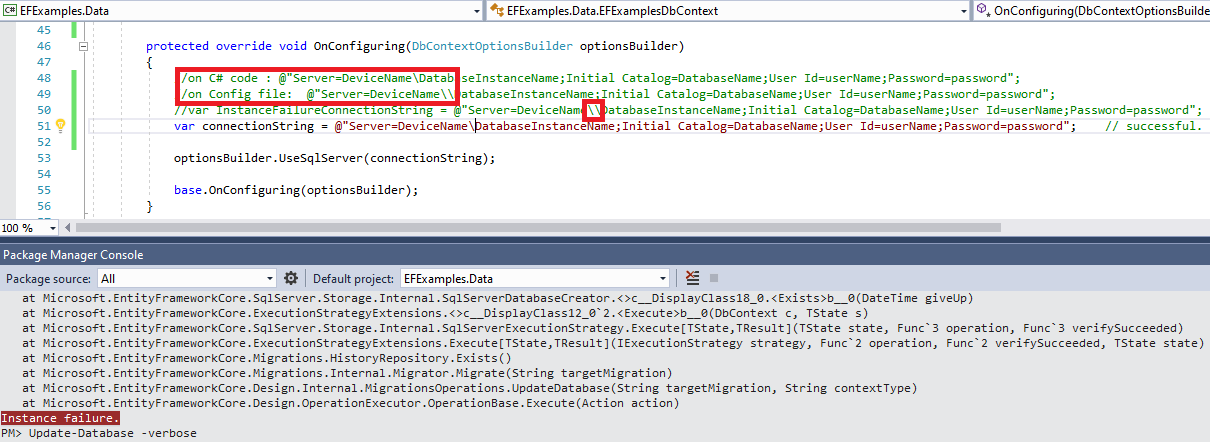
The root cause is Regular literal (“Backslash: ”) and Verbatim literal (“@”Backslash: ””) .
Reference https://csharpindepth.com/Articles/Strings
Method 6
Use the wildcard “@” before “Data Source” declaration. someting like this:
connetionString = @”Data Source=…
So you’ll be able to use only a back slash. Like this: @”Data Source=.SQLEXPRESS;AttachDbFilename=C:Usersjcabarros…
Method 7
I know this is an old thread, but perhaps a good update. I couldn’t find a good answer on the web search.
I got the same ‘Instance Failed’ error when trying to reference a DbContext from another project in the same solution. The 1st project had a DbContext and the connection string, and the 2nd project in the solution was trying to reference it. The 1st app ran ok on its own, issue only occurred when running the 2nd app.
The issue was that the app.config file that had the connection string from the 1st project was not in view/scope of the 2nd project. So the connection string wasn’t assembled.
My solution was to copy the app.config from the first project to the second project.
This was on VS 2019.
Hope this helps
All methods was sourced from stackoverflow.com or stackexchange.com, is licensed under cc by-sa 2.5, cc by-sa 3.0 and cc by-sa 4.0