I have implimented the Iris color picker on my theme options page, but clicking ‘Save’ does not save the selected value, it just resets to blank (or the pre-set value). What am I missing here?
functions.php:
function accelerator_admin_scripts(){

    wp_enqueue_script( 'custom-js', get_template_directory_uri() . '/js/custom.js', array('jquery'), '1.0.0', true );
    wp_enqueue_style( 'wp-color-picker' );
    wp_enqueue_script( 'iris', admin_url( 'js/iris.min.js' ), array( 'jquery-ui-draggable', 'jquery-ui-slider', 'jquery-touch-punch' ), false, 1 );
    wp_enqueue_script('wp-color-picker', admin_url( 'js/color-picker.min.js' ), array( 'iris' ), false, 1 );
}

add_action('admin_enqueue_scripts','accelerator_admin_scripts');
options.php:
function add_theme_menu_item()
{
    add_menu_page("Theme Options", "Theme Options", "manage_options", "theme-options", "theme_settings_page", null, 99);
}

add_action("admin_menu", "add_theme_menu_item");


function theme_settings_page(){
    ?>
        <div class="wrap">
        <h1>Theme Options</h1>
        <form method="post" action="options.php">
            <?php
                settings_fields("section");
                do_settings_sections("theme-options");
                submit_button();
            ?>
        </form>
        </div>
    <?php
}

function display_color_option()
{

        echo '<div id="color-box" style="width:50px; height:30px;margin:2px 20px 5px 0;"></div>';
        ?>
        <input type="text" class="color-picker" name="primary_color" id='color-picker' value="#000000" />
        <?php
}
function display_theme_panel_fields()
{
  add_settings_field("primary_color", "Primary Theme Color", "display_color_option", "theme-options", "section");
  register_setting("section", "primary_color");
}

add_action("admin_init", "display_theme_panel_fields");
custom.js:
jQuery(document).ready(function($){
    $('#color-picker').iris({
        hide: true,
        palettes: true,
        change: function(event, ui) {
        // event = standard jQuery event, produced by whichever control was changed.
        // ui = standard jQuery UI object, with a color member containing a Color.js object

        // change the preview box color
        $("#color-box").css( 'background-color', ui.color.toString());
    }
    });
});
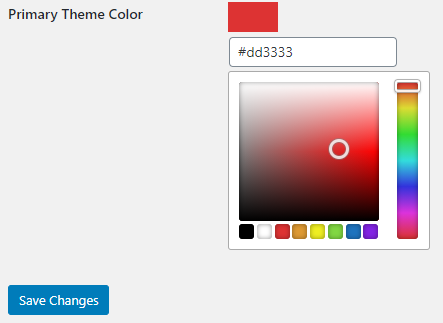
After save:

in header.php:
$main_color = get_option('primary_color');
returns blank.
Answers:
Thank you for visiting the Q&A section on Magenaut. Please note that all the answers may not help you solve the issue immediately. So please treat them as advisements. If you found the post helpful (or not), leave a comment & I’ll get back to you as soon as possible.
Method 1
So you’ve already corrected it, but as pointed in the comments, the main issue in your code was that the color input is not using the correct name as defined when you call register_setting().
I.e. The second parameter (the database option name) is the name that should be used in the input’s name attribute.
// The option name is primary_color:
register_setting("section", "primary_color"); // BTW, "section" is a too generic name..

// So use that in the <input> name:
<input type="text" class="color-picker" name="primary_color" id='color-picker' value="#000000" />
And there’s actually another issue: the color input’s value is always #000000 because it’s statically set so in the HTML, or that you didn’t display the one saved in the database.
So to fix that, you can use get_option() to get the saved value and echo it in the input. E.g.
<input type="text" class="color-picker" name="primary_color" id='color-picker'
    value="<?php echo esc_attr( get_option( 'primary_color', '#000000' ) ); ?>" />
Additional Notes
-
If you want to use Iris and not the enhanced WordPress color picker /
wp-color-picker, then you just need to setirisas a dependency for your custom JS script — no need to enqueue thewp-color-pickerstyle:function accelerator_admin_scripts() { wp_enqueue_script( 'custom-js', get_template_directory_uri() . '/js/custom.js', // Add iris as a dependency for custom.js. array( 'jquery', 'iris' ), '1.0.0', true ); } -
If you want to use the enhanced color picker instead, then make sure to enqueue the
wp-color-pickerstyle and setwp-color-pickeras a dependency for your script:function accelerator_admin_scripts() { wp_enqueue_style( 'wp-color-picker' ); wp_enqueue_script( 'custom-js', get_template_directory_uri() . '/js/custom.js', // Add wp-color-picker as a dependency for custom.js. array( 'jquery', 'wp-color-picker' ), '1.0.0', true ); }Then in your JS script, use
$( '#color-picker' ).wpColorPicker()in place of$( '#color-picker' ).iris(). -
Your code is missing the call to
add_settings_section(), but I assumed your actual code has that call?And generally, it’s a best practice to call
register_setting()first, followed byadd_settings_section()and thenadd_settings_field(). 🙂
All methods was sourced from stackoverflow.com or stackexchange.com, is licensed under cc by-sa 2.5, cc by-sa 3.0 and cc by-sa 4.0