I am currently learning Asp.net core Mvc (with vs 2019) and I have a question. I know I can create a model and with help of Scaffold create a local database through the program but I if I have already my own sample database, how I can insert it and show some details to web?
I’ve read about .Net framework and ADO.NET Entity Framework but this isnt working on Core version.
Followed Microsoft guides but they had only the “Seed Data” but i can’t make it work with my db Table.
Is there any way I can achive it? Or i have to recreate the project on .Net Framework ?
Answers:
Thank you for visiting the Q&A section on Magenaut. Please note that all the answers may not help you solve the issue immediately. So please treat them as advisements. If you found the post helpful (or not), leave a comment & I’ll get back to you as soon as possible.
Method 1
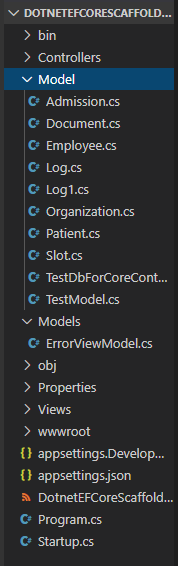
As far as I know, we could use EF command line tool to scaffold existing sql database and generate the model folder according to the database’s table.
More details, you could refer to below steps:
I created a new MVC application to test, you could also add the package and run the ef scaffold.
1.Open CMD in your application
2.Run below command
mkdir DotnetEFCoreScaffoldMVC

cd DotnetEFCoreScaffoldMVC

dotnet new MVC

dotnet add package Microsoft.EntityFrameworkCore.SqlServer

dotnet add package Microsoft.EntityFrameworkCore.Design

dotnet ef dbcontext scaffold "the connection string" Microsoft.EntityFrameworkCore.SqlServer -o Model
Result:
All methods was sourced from stackoverflow.com or stackexchange.com, is licensed under cc by-sa 2.5, cc by-sa 3.0 and cc by-sa 4.0