When I’m creating a new post, just after clicking “Add New”, when the post editor shows, instead of having to use the dropdown and choose a custom field to use, I’d like to have some default custom field inputs already openend.
Visually, instead of :
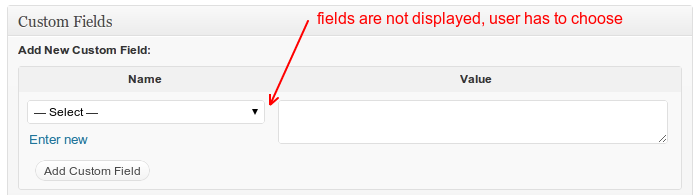
I’d like to have something like :
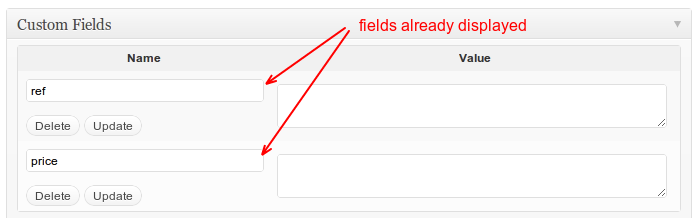
I know there are plugins for that (CPT, More fields, etc.) but I’d like a simple way to do it with a basic function.
I tried something like this (I’m using a custom post type ‘product’ ) :
function register_custom_fields( $post_ID ) {

    global $wpdb;

        if( !wp_is_post_revision( $post_ID ) ) {

            add_post_meta( $post_ID, 'reference', '', true);
            add_post_meta( $post_ID, 'price', '', true);

        }

}

add_action('edit_product', 'register_custom_fields');
But that doesn’t seem to work. I think that the hook is probably wrong (because edit_post comes after an update), but I don’t see any hook for “new post” (right after user clicks on “new post” in wp admin). Is there any ?
Or maybe the whole idea is wrong and there’s another way?
Answers:
Thank you for visiting the Q&A section on Magenaut. Please note that all the answers may not help you solve the issue immediately. So please treat them as advisements. If you found the post helpful (or not), leave a comment & I’ll get back to you as soon as possible.
Method 1
The action hook save_post is called on save, but i don’t know if you can add metadata at this time. But it should be possible to create/update your meta data after the post was saved with the action hook updated_post_meta.
EDIT
To pre-select some meta fields (custom fields) on the post creation screen, you have to add these meta values first with an empty value.
If you look at the post_custom_meta_box() function (which is the callback for the used metabox postcustom) in the file wp-admin/includes/meta-boxes.php, you can see that the function is using list_meta() to create the pre-selected meta fields.
Now lets take a look at the program flow until this metabox is displayed (We’re looking for a action/filter hook we can use here):
- WordPress loads the file
post-new.php - This file generates a default post in the database on line
39with the functionget_default_post_to_edit(). Thats nice. Basically the post is already in the database as an auto-draft. Unfortunately there isn’t any hook at this time to alter these data or add something new. - As a next step, the file
edit-form-advaned.phpis included. This file will generate the hole admin page and includes all required metaboxes based on thesupportsparameter of the post type. - On line
136the custom fields metaboxpostcustomis included and the above function is called. Again, no action hook which we could use.
Conclusion
I think the only way you can do is to use jQuery or overload the postcustom metabox and add the meta values before you run the list_meta() function.
E.g.
add_action('admin_menu', 'wpse29358_replaceMetaBoxes'); // maybe add_meta_boxes hook
function wpse29358_replaceMetaBoxes() {
    remove_meta_box('postcustom', {POST_TYPE}, 'normal');
    add_meta_box('postcustom', __('Custom Fields'), 'wpse29358_postcustomMetabox', {POST_TYPE}, 'normal', 'core');
}

function wpse29358_postcustomMetabox($post) {
    // Add your meta data to the post with the ID $post->ID
    add_post_meta($post->ID, 'key', 'value');

    // and then copy&past the metabox content from the function post_custom_meta_box()
}
Method 2
This is the proper method to add custom fields support (you don’t get the blank fields when edit posts)
function set_default_meta($post_ID){
    $current_field_value = get_post_meta($post_ID,'Sort Order',true);
    $default_meta = '100'; // value
    if ($current_field_value == '' && !wp_is_post_revision($post_ID)){
            add_post_meta($post_ID,'Sort Order',$default_meta,true);
    }
    return $post_ID;
}
add_action('wp_insert_post','set_default_meta');
Method 3
I’m looking to have a unique meta description for each custom post on a WP site I’m developing. So I was also looking for a default custom field and landed here.
I know this is a pretty old post, but I thought I’d post the simple answer I found at mariokostelac.com.
kg is my namespace, you can name the function what you like. I’m pretty new to hooks and WP customizing in general, but I believe wp_insert_post is the hook you’re looking for.
add_action('wp_insert_post', 'kg_set_default_custom_fields');

function kg_set_default_custom_fields($post_id)
{
    if ( $_GET['post_type'] != 'page' ) {
        add_post_meta($post_id, 'meta-description', '', true);
    }

    return true;
}
Method 4
You should use the save_post action and isolate your operation by checking the post type as this runs on all post types. There is obviously some more logic you will have to build into this to make it work for you. You should probably set a post meta field that checks if you’ve set the defaults once so your users won’t be frustrated if they wish to leave a post meta field blank.
If you wish the defaults to be null (as seen in your code example), then don’t create a function because this just adds overhead and post meta fields are not populated with values by default.
function register_custom_fields( $post_ID ) {
    //Do nonce checking here
    if( !wp_is_post_revision( $post_ID ) ) {
        if('product' === $_REQUEST['post_type']){
            $reference = $_REQUEST['reference'] ? esc_html($_REQUEST['reference']) : 'default_value';
            $price = $_REQUEST['price'] ? esc_html($_REQUEST['price']) : 'default_value';
            update_post_meta( $post_ID, 'reference', $reference);
            update_post_meta( $post_ID, 'price', $price);
        }
    }
}
add_action('save_post', 'register_custom_fields');
Method 5
if some one need take custom field by post type i leave the code below of the way I did and work fine for me 🙂
function awh_field_type($post_id){
$awh_f_post = get_post_type($post_id);
$meta_value = '';
$meta_name = 'custom';
    if($awh_f_post == 'product'){
        add_post_meta($post_id,$meta_name,$meta_value,true);
    }
return $awh_f_post;
}
add_action(‘wp_insert_post’,’awh_field_type’);
All methods was sourced from stackoverflow.com or stackexchange.com, is licensed under cc by-sa 2.5, cc by-sa 3.0 and cc by-sa 4.0