I have this json file and i want to work with each object.
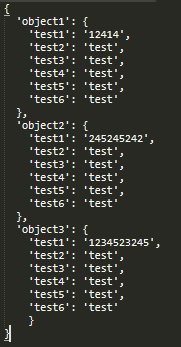
So foreach is on way but tried many of them even from stack and it doesn’t fetch these objects to i.
Any ideas what went wrong?
I inspired by this thread
dynamic stuff = JsonConvert.DeserializeObject(File.ReadAllText(@"C:UsersPaysamiDesktopccctest.json"));
foreach (var i in stuff)
{
    //Console.WriteLine("{0} {1} {2} {3} {4} {5}n", i.test1, i.test2, i.test3, i.test4, i.test5, i.test6);
    List<string> projectList = new List<string> { i.test1, i.test2, i.test3, i.test4, i.test5, i.test6 };
    foreach (var x in projectList)
    {
        Debug.WriteLine(x.ToString());
    }
}
Answers:
Thank you for visiting the Q&A section on Magenaut. Please note that all the answers may not help you solve the issue immediately. So please treat them as advisements. If you found the post helpful (or not), leave a comment & I’ll get back to you as soon as possible.
Method 1
Your json doesn’t contain any array and you can’t use foreach to read that.
You should first deserialize your json to a class and then use deserialized data.
public class Json
{
    public JsonObject Object1 { get; set; }

    public JsonObject Object2 { get; set; }

    public JsonObject Object3 { get; set; }
}

public class JsonObject
{
    public string Test1 { get; set; }
    public string Test2 { get; set; }
    public string Test3 { get; set; }
    public string Test4 { get; set; }
    public string Test5 { get; set; }
    public string Test6 { get; set; }
}

internal class Program
{
    private static void Main(string[] args)
    {
        var staff = JsonConvert.DeserializeObject<Json>(File.ReadAllText(@"jsonPath"));

        var jsonObjects = new List<JsonObject> { staff.Object1, staff.Object2, staff.Object3 };
        jsonObjects.ForEach(jsonObject => Console.WriteLine($"{jsonObject.Test1} {jsonObject.Test2}"));

        Console.ReadKey();
    }
}
Method 2
You can also use First:
dynamic stuff = JsonConvert.DeserializeObject(File.ReadAllText(@"C:.json"));
foreach (var i in stuff)
{
   List<string> projectList = new List<string> { (string)i.First.t1, (string)i.First.t2, (string)i.First.t3, (string)i.First.t4, (string)i.First.t5};
   foreach (var x in projectList)
   {
      Debug.WriteLine(x.ToString());
   }
}
Method 3
Create a model/dto class with properties match with JSON and do the serialize/deserialize based on your request so that your data will be parsed correctly.
All methods was sourced from stackoverflow.com or stackexchange.com, is licensed under cc by-sa 2.5, cc by-sa 3.0 and cc by-sa 4.0