To implement custom user login functionality outside of the wp-admin area, wp_signon() function is the way to go. This function accepts an array which may contain the “remember” key with a boolean value to determine if the user shall stay logged in or not during the following 14 days.
I am using wp_signon() with remember set to true in a custom login implementation, as follows:
// $args['...'] = ...

$args['remember'] = true;
$user = wp_signon($args, is_ssl());

if(is_wp_error($user)){
    // ...
    return;
}else{
    wp_set_current_user($user->ID);
    wp_set_auth_cookie($user->ID);
    // ...
}
The sign-on process itself is working perfectly fine, but once I close the browser and open it again, there is no “remember” going on anywhere, the user appears as unauthenticated.
I did not find any documentation related with how this remember session feature is supposed to work from a developers point of view.
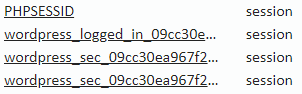
The generated cookies are:

From the docs: (see docs)
On login, WordPress uses the wordpress_[hash] cookie to store your
authentication details. Its use is limited to the Administration
Screen area, /wp-admin/
I do not understand this. Can someone provide a more detailed explanation please? The last part makes me think that this remember-me feature has been designed with the wp-admin area in mind, not the front. And maybe that’s why it’s not working.
After login, WordPress sets the wordpress_logged_in_[hash] cookie,
which indicates when you’re logged in, and who you are, for most
interface use.
This is quite understandable. But I am still confused anyways.
I noted that the expiration date does not contain a date. It says: “session”. Should it not contain a future date instead?
So my question would be:
How can I handle autologin if the remember key was provided with wp_signon()? Do I need to check for it manually if I want to use it out of the wp-admin area or is this supposed to work out of the box thanks to wp-load.php?
What have I done to try to solve the mystery:
Extend the cookie lifetime:
function long_live_the_auth_cookie($expirein){
    return 31556926; // 1 year in seconds
}
add_filter('auth_cookie_expiration', 'long_live_the_auth_cookie');
Test in multiple browsers and devices to make sure it’s not a browser or device specific issue.
Did I think of my own solution?:
Yes. To implement the remember-me functionality with custom code and just ignore the WP way, since WP user features seem to be only focused on the back-end. But I think this is too extreme, and the thing is that I am just missing what is really going on with those cookies and how to use them for my purpose.
Answers:
Thank you for visiting the Q&A section on Magenaut. Please note that all the answers may not help you solve the issue immediately. So please treat them as advisements. If you found the post helpful (or not), leave a comment & I’ll get back to you as soon as possible.
Method 1
wp_signon() actually already calls wp_set_auth_cookie() which is the function that sets the “remember me” cookie, hence you don’t need to manually call that function.
And that (wp_set_auth_cookie($user->ID)) is actually the problem in your code, because it’s overwriting the “remember me” cookie that was already set.
All methods was sourced from stackoverflow.com or stackexchange.com, is licensed under cc by-sa 2.5, cc by-sa 3.0 and cc by-sa 4.0