I’m trying to make a chart using the ASP.Net Chart control that has specific numerical values on the X axis and their frequency count on the Y axis. Here is an example of what I want from the charting framework I am replacing:
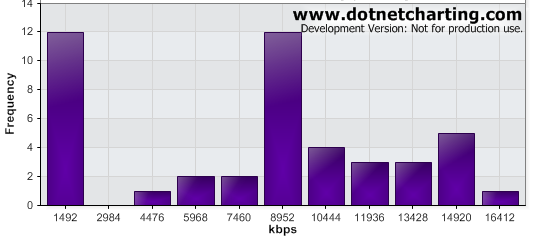
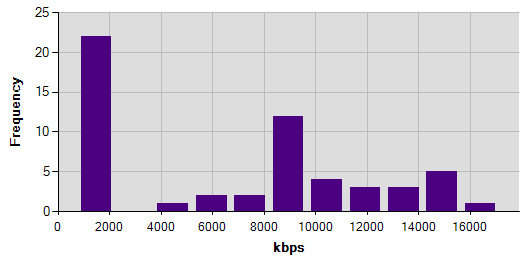
In the above example, the X axis labels line up with the columns. But, with the ASP.Net Chart control, instead of labeling the columns which represent these specific values (e.g. 1492, 2984), the control is labeling at rounded intervals and not lining up with the columns (e.g. 2000, 4000) as you can see below:
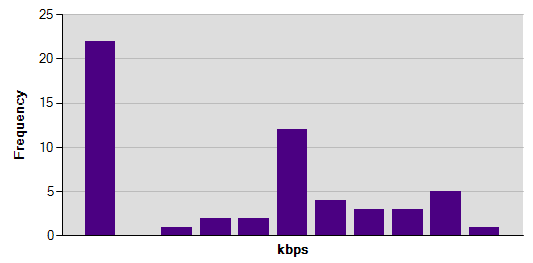
I found other similar postings that recommended setting the ChartArea.AxisX.Interval to 1. I tried that, but then the X axis label disappears for some reason as you can see below:
Here is the code I’m using to create and populate the chart (minus setting various color attributes):
DataTable newDt = GetChartDataTable();
chart.DataSource = newDt;
chart.Series.Add("Series1");
chart.Series["Series1"].YValueMembers = "Frequency";
chart.Series["Series1"].XValueMember = "RoundedValue";
chart.ChartAreas["ChartArea1"].AxisX.Title = "kbps";
chart.ChartAreas["ChartArea1"].AxisX.TitleFont = new Font("Sans Serif", 10, FontStyle.Bold);
chart.ChartAreas["ChartArea1"].AxisY.Title = "Frequency";
chart.ChartAreas["ChartArea1"].AxisY.TitleFont = new Font("Sans Serif", 10, FontStyle.Bold);
chart.Titles["Title1"].Text = chartTitle;
chart.Titles["Title1"].Font = new Font("Sans Serif", 10, FontStyle.Bold);
chart.Series["Series1"].ChartType = System.Web.UI.DataVisualization.Charting.SeriesChartType.Column;
chart.Series["Series1"]["ShowMarkerLines"] = "True";
chart.DataBind();
Answers:
Thank you for visiting the Q&A section on Magenaut. Please note that all the answers may not help you solve the issue immediately. So please treat them as advisements. If you found the post helpful (or not), leave a comment & I’ll get back to you as soon as possible.
Method 1
You should set IsXValueIndex to true.
Like this:
chart.Series["Series1"].IsXValueIndexed = true;
Example:
// Creating the series
Series series1 = new Series("Series1");

// Setting the Chart Types
series1.ChartType = SeriesChartType.Column;

// Adding some points
series1.Points.AddXY(1492, 12);
series1.Points.AddXY(2984, 0);
series1.Points.AddXY(4476, 1);
series1.Points.AddXY(5968, 2);
series1.Points.AddXY(7460, 2);
series1.Points.AddXY(8952, 12);
series1.Points.AddXY(10444, 4);
series1.Points.AddXY(11936, 3);
series1.Points.AddXY(13428, 3);
series1.Points.AddXY(14920, 5);
series1.Points.AddXY(16412, 1);

Chart1.Series.Add(series1);

Chart1.Width = 600;
Chart1.Height = 600;

// Series visual
series1.YValueMembers = "Frequency";
series1.XValueMember = "RoundedValue";
series1.BorderWidth = 1;
series1.ShadowOffset = 0;
series1.Color = Drawing.Color.Red;
series1.IsXValueIndexed = true;

// Setting the X Axis
Chart1.ChartAreas("ChartArea1").AxisX.IsMarginVisible = true;
Chart1.ChartAreas("ChartArea1").AxisX.Interval = 1;
Chart1.ChartAreas("ChartArea1").AxisX.Maximum = Double.NaN;
Chart1.ChartAreas("ChartArea1").AxisX.Title = "kbps";
Chart1.ChartAreas("ChartArea1").AxisX.TitleFont = new Font("Sans Serif", 10, FontStyle.Bold);

// Setting the Y Axis
Chart1.ChartAreas("ChartArea1").AxisY.Interval = 2;
Chart1.ChartAreas("ChartArea1").AxisY.Maximum = Double.NaN;
Chart1.ChartAreas("ChartArea1").AxisY.Title = "Frequency";
Chart1.ChartAreas("ChartArea1").AxisY.TitleFont = new Font("Sans Serif", 10, FontStyle.Bold);
All methods was sourced from stackoverflow.com or stackexchange.com, is licensed under cc by-sa 2.5, cc by-sa 3.0 and cc by-sa 4.0