I need to recreate a chart similar to the one below created in Excel. I was hoping to use matplotlib, but can’t seem to find any examples or reference for how to do a chart like this. I need to have bars colored based on a performance threshold, and also display the threshold. Can anyone point me in the right direction? I do need to be able to do this with Python, though.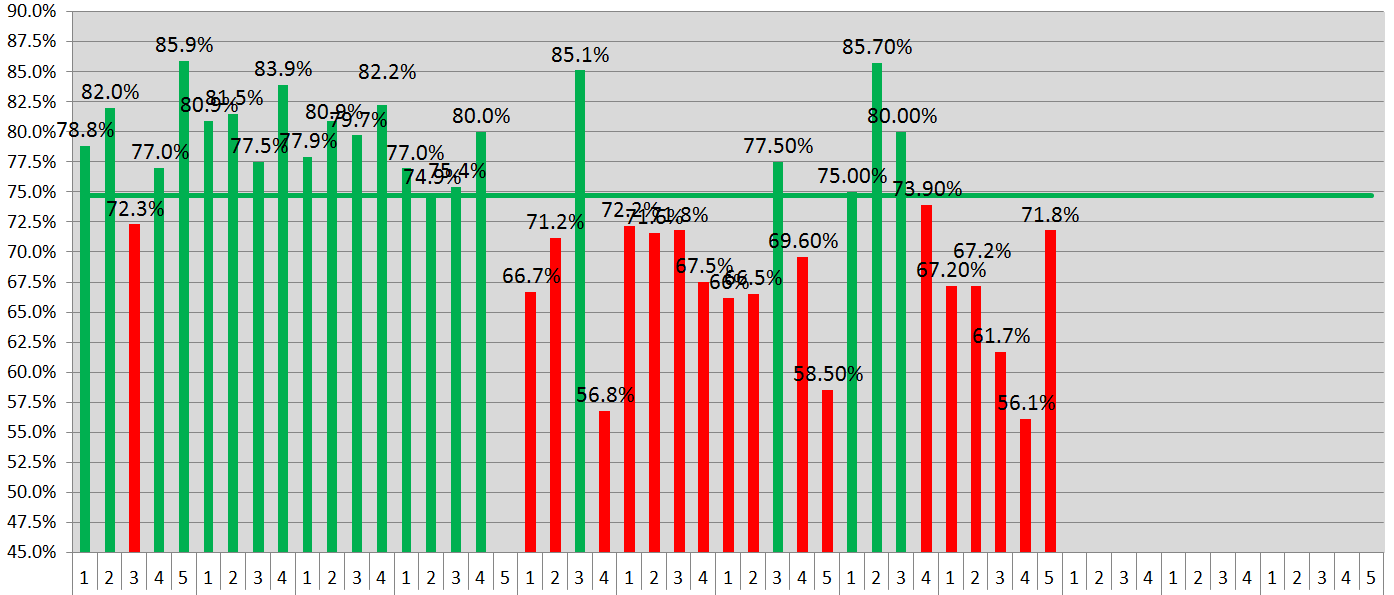
Answers:
Thank you for visiting the Q&A section on Magenaut. Please note that all the answers may not help you solve the issue immediately. So please treat them as advisements. If you found the post helpful (or not), leave a comment & I’ll get back to you as soon as possible.
Method 1
I gotta run, but here’s something to get you started:
import numpy as np
import matplotlib
matplotlib.rcParams['text.usetex'] = False
import matplotlib.pyplot as plt
import pandas

df = pandas.DataFrame(np.random.uniform(size=37)*100, columns=['A'])
threshold = 75
fig, ax = plt.subplots(figsize=(8,3))

good = df['A'][df['A'] >= threshold]
bad = df['A'][df['A'] < threshold]

ax.bar(left=good.index, height=good, align='center', color='ForestGreen', zorder=5)
ax.bar(left=bad.index, height=bad, align='center', color='Firebrick', zorder=5)

ax.axhline(y=threshold, linewidth=2, color='ForestGreen', zorder=0)

ax.set_xticks(df.index)
ax.set_xlim(left=df.index[0]-0.75, right=df.index[-1]+0.75)

def annotateBars(row, ax=ax):
    if row['A'] < 20:
        color = 'black'
        vertalign = 'bottom'
        vertpad = 2
    else:
        color = 'white'
        vertalign = 'top'
        vertpad = -2

    ax.text(row.name, row['A'] + vertpad, "{:.1f}%".format(row['A']),
            zorder=10, rotation=90, color=color,
            horizontalalignment='center',
            verticalalignment=vertalign,
            fontsize=8, weight='heavy')

junk = df.apply(annotateBars, ax=ax, axis=1)
And that gives me:
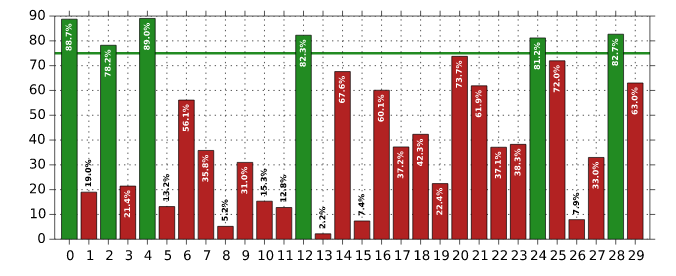
Method 2
This can now be plotted much more concisely:
Axes.bar_labelautomatically labels bars (requires matplotlib 3.4.0+)Axes.barhas acolorparam that can accept an array of colors (e.g. vianumpy.where)
So now it only takes a handful of lines, e.g. using Paul’s sample df = pd.DataFrame({'A': np.random.uniform(size=35) * 100}):
fig, ax = plt.subplots(figsize=(9, 3))
threshold = 75

# plot bars as blue if A > threshold, else red
color = np.where(df.A > threshold, 'blue', 'red')
ax.bar(x=df.index, height=df.A, color=color)

# add bar labels
ax.bar_label(ax.containers[0], fmt='%.1f%%')

# add threshold line
ax.axhline(threshold, alpha=0.5, zorder=0)
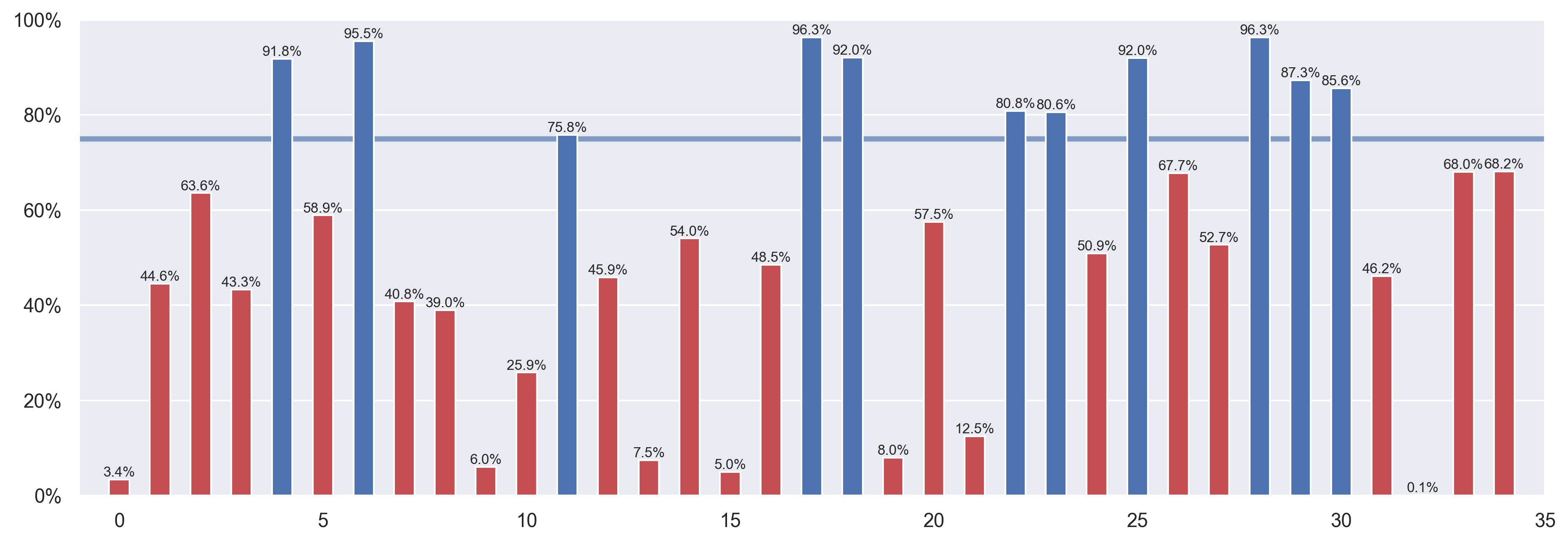
Or for multiple thresholds, just update color as desired (e.g. via numpy.select):
upper, lower = 75, 25
color = np.select([df.A > upper, df.A < lower], ['blue', 'red'], default='gray')
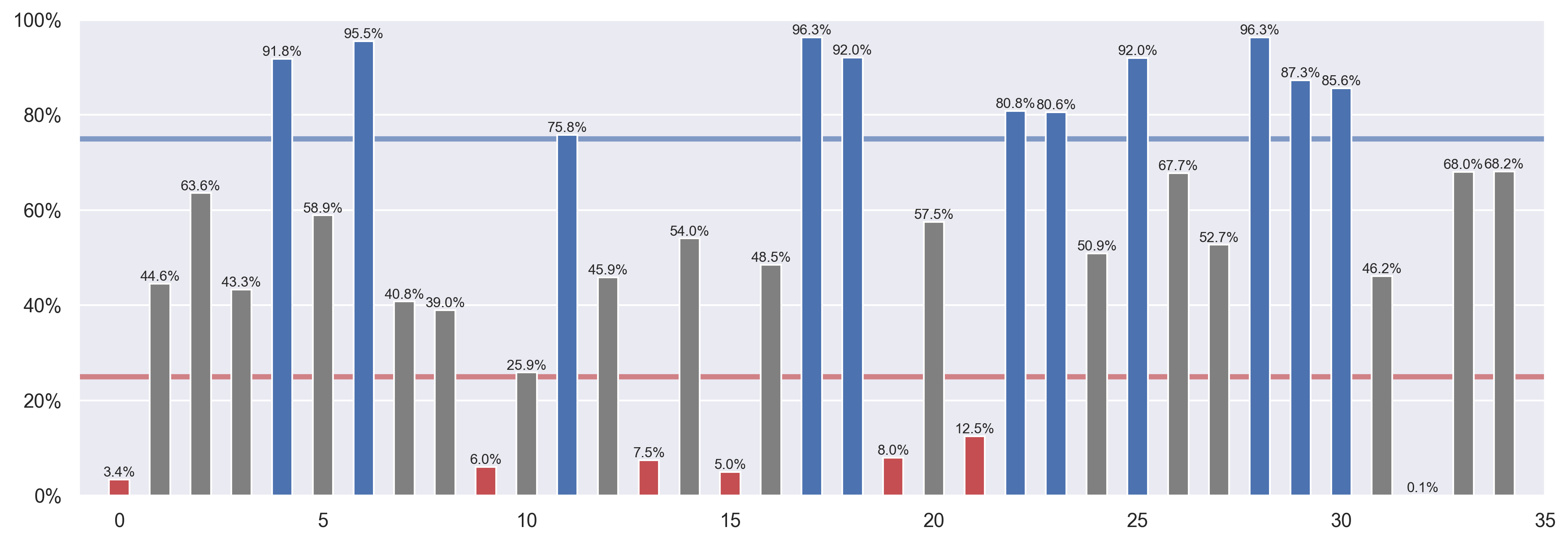
Note that a color array can also be passed into other bar plot helpers:
-
DataFrame.plot.bar:df.plot.bar(y='A', color=color, ax=ax) -
Series.plot.bar:df.A.plot.bar(color=color, ax=ax) -
seaborn.barplot(aspalette):sns.barplot(x=df.index, y=df.A, palette=color, ax=ax)
All methods was sourced from stackoverflow.com or stackexchange.com, is licensed under cc by-sa 2.5, cc by-sa 3.0 and cc by-sa 4.0