I know about plot_date() but is there a bar_date() out there?
The general method would be to use set_xticks and set_xticklabels, but I’d like something that can handle time scales from a few hours out to a few years (this means involving the major and minor ticks to make things readable I think).
Edit: I realized that I am plotting values associated with a specific time interval (that the bar spans). I updated below with the basic solution I used:
import matplotlib.pyplot as plt
import datetime
t=[datetime.datetime(2010, 12, 2, 22, 0),datetime.datetime(2010, 12, 2, 23, 0),         datetime.datetime(2010, 12, 10, 0, 0),datetime.datetime(2010, 12, 10, 6, 0)]
y=[4,6,9,3]
interval=1.0/24.0  #1hr intervals, but maplotlib dates have base of 1 day
ax = plt.subplot(111)
ax.bar(t, y, width=interval)
ax.xaxis_date()
plt.show()
Answers:
Thank you for visiting the Q&A section on Magenaut. Please note that all the answers may not help you solve the issue immediately. So please treat them as advisements. If you found the post helpful (or not), leave a comment & I’ll get back to you as soon as possible.
Method 1
All plot_date does is plot the function and the call ax.xaxis_date().
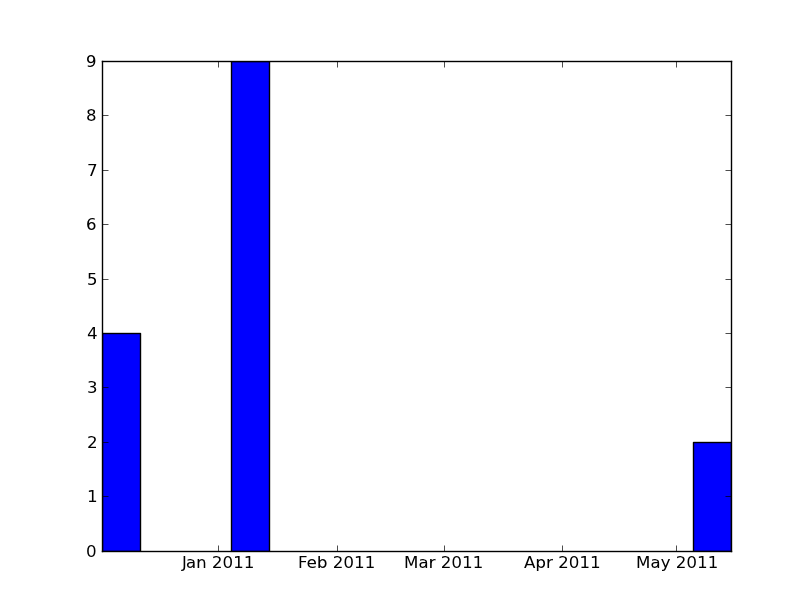
All you should need to do is this:
import numpy as np
import matplotlib.pyplot as plt
import datetime

x = [datetime.datetime(2010, 12, 1, 10, 0),
    datetime.datetime(2011, 1, 4, 9, 0),
    datetime.datetime(2011, 5, 5, 9, 0)]
y = [4, 9, 2]

ax = plt.subplot(111)
ax.bar(x, y, width=10)
ax.xaxis_date()

plt.show()
All methods was sourced from stackoverflow.com or stackexchange.com, is licensed under cc by-sa 2.5, cc by-sa 3.0 and cc by-sa 4.0