I’m working with data that has the data has 3 plotting parameters: x,y,c. How do you create a custom color value for a scatter plot?
Extending this example I’m trying to do:
import matplotlib
import matplotlib.pyplot as plt
cm = matplotlib.cm.get_cmap('RdYlBu')
colors=[cm(1.*i/20) for i in range(20)]
xy = range(20)
plt.subplot(111)
colorlist=[colors[x/2] for x in xy] #actually some other non-linear relationship
plt.scatter(xy, xy, c=colorlist, s=35, vmin=0, vmax=20)
plt.colorbar()
plt.show()
but the result is TypeError: You must first set_array for mappable
Answers:
Thank you for visiting the Q&A section on Magenaut. Please note that all the answers may not help you solve the issue immediately. So please treat them as advisements. If you found the post helpful (or not), leave a comment & I’ll get back to you as soon as possible.
Method 1
From the matplotlib docs on scatter 1:
cmap is only used if c is an array of floats
So colorlist needs to be a list of floats rather than a list of tuples as you have it now.
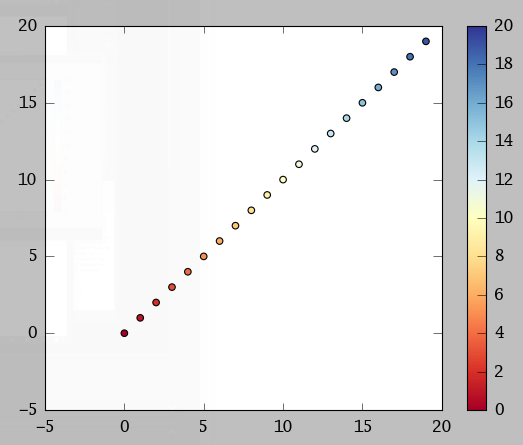
plt.colorbar() wants a mappable object, like the CircleCollection that plt.scatter() returns.
vmin and vmax can then control the limits of your colorbar. Things outside vmin/vmax get the colors of the endpoints.
How does this work for you?
import matplotlib.pyplot as plt
cm = plt.cm.get_cmap('RdYlBu')
xy = range(20)
z = xy
sc = plt.scatter(xy, xy, c=z, vmin=0, vmax=20, s=35, cmap=cm)
plt.colorbar(sc)
plt.show()
Method 2
Here is the OOP way of adding a colorbar:
fig, ax = plt.subplots()
im = ax.scatter(x, y, c=c)
fig.colorbar(im, ax=ax)
Method 3
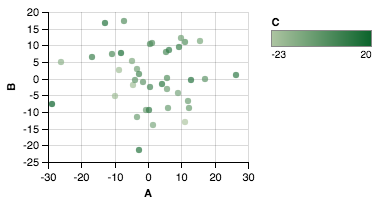
If you’re looking to scatter by two variables and color by the third, Altair can be a great choice.
Creating the dataset
import matplotlib.pyplot as plt
import numpy as np
import pandas as pd

df = pd.DataFrame(40*np.random.randn(10, 3), columns=['A', 'B','C'])
Altair plot
from altair import *
Chart(df).mark_circle().encode(x='A',y='B', color='C').configure_cell(width=200, height=150)
Plot
All methods was sourced from stackoverflow.com or stackexchange.com, is licensed under cc by-sa 2.5, cc by-sa 3.0 and cc by-sa 4.0