My python script uses matplotlib to plot a 2D “heat map” of an x, y, z dataset. My x- and y-values represent amino acid residues in a protein and can therefore only be integers. When I zoom into the plot, it looks like this:
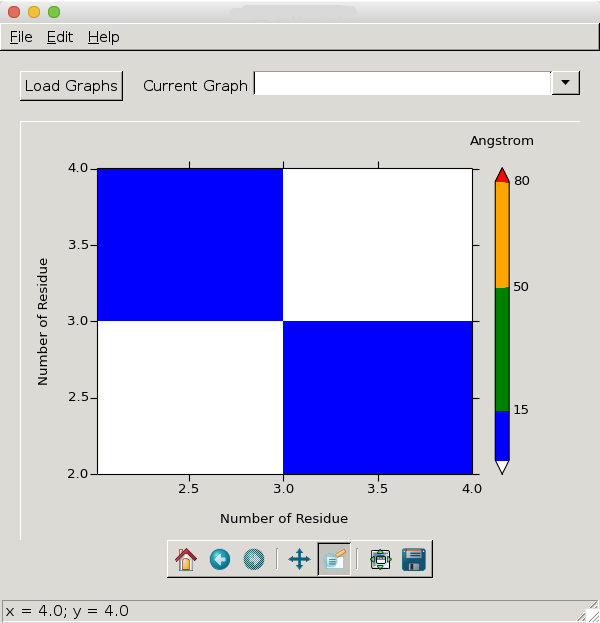
As I said, float values on the x-y axes do not make sense with my data and I therefore want it to look like this:
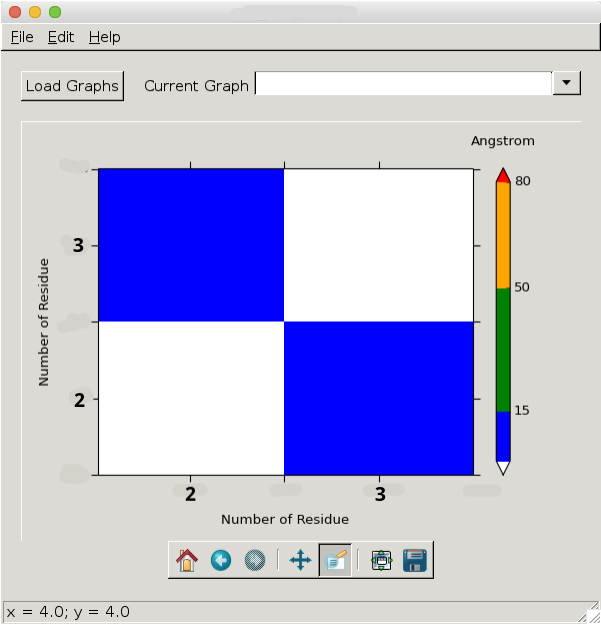
Any ideas how to achieve this?
This is the code that generates the plot:
def plotDistanceMap(self):
    # Read on x,y,z
    x = self.currentGraph['xData']
    y = self.currentGraph['yData']
    X, Y = numpy.meshgrid(x, y)
    Z = self.currentGraph['zData']
    # Define colormap
    cmap = colors.ListedColormap(['blue', 'green', 'orange', 'red'])
    cmap.set_under('white')
    cmap.set_over('white')
    bounds = [1,15,50,80,100]
    norm = colors.BoundaryNorm(bounds, cmap.N)
    # Draw surface plot
    img = self.axes.pcolor(X, Y, Z, cmap=cmap, norm=norm)
    self.axes.set_xlim(x.min(), x.max())
    self.axes.set_ylim(y.min(), y.max())
    self.axes.set_xlabel(self.currentGraph['xTitle'])
    self.axes.set_ylabel(self.currentGraph['yTitle'])
    # Cosmetics
    #matplotlib.rcParams.update({'font.size': 12})
    xminorLocator = MultipleLocator(10)
    yminorLocator = MultipleLocator(10)
    self.axes.xaxis.set_minor_locator(xminorLocator)
    self.axes.yaxis.set_minor_locator(yminorLocator)
    self.axes.tick_params(direction='out', length=6, width=1)
    self.axes.tick_params(which='minor', direction='out', length=3, width=1)
    self.axes.xaxis.labelpad = 15
    self.axes.yaxis.labelpad = 15
    # Draw colorbar
    colorbar = self.figure.colorbar(img, boundaries = [0,1,15,50,80,100],
                                    spacing = 'proportional',
                                    ticks = [15,50,80,100],
                                    extend = 'both')
    colorbar.ax.set_xlabel('Angstrom')
    colorbar.ax.xaxis.set_label_position('top')
    colorbar.ax.xaxis.labelpad = 20
    self.figure.tight_layout()
    self.canvas.draw()
Answers:
Thank you for visiting the Q&A section on Magenaut. Please note that all the answers may not help you solve the issue immediately. So please treat them as advisements. If you found the post helpful (or not), leave a comment & I’ll get back to you as soon as possible.
Method 1
This should be simpler:
(from https://scivision.co/matplotlib-force-integer-labeling-of-axis/)
import matplotlib.pyplot as plt
from matplotlib.ticker import MaxNLocator
#...
ax = plt.figure().gca()
#...
ax.xaxis.set_major_locator(MaxNLocator(integer=True))
Method 2
The following solution by simply casting the index i to string worked for me:
    import matplotlib.pyplot as plt
    import time

    datay = [1,6,8,4] # Just an example
    datax = []

    # In the following for loop datax in the end will have the same size of datay,
    # can be changed by replacing the range with wathever you need
    for i in range(len(datay)):
        # In the following assignment statement every value in the datax
        # list will be set as a string, this solves the floating point issue
        datax += [str(1 + i)]

    a = plt

    # The plot function sets the datax content as the x ticks, the datay values
    # are used as the actual values to plot
    a.plot(datax, datay)

    a.show()
Method 3
ax.set_xticks([2,3])
ax.set_yticks([2,3])
Method 4
Based on an answer for modifying tick labels I came up with a solution, don’t know whether it will work in your case as your code snippet can’t be executed in itself.
The idea is to force the tick labels to a .5 spacing, then replace every .5 tick with its integer counterpart, and others with an empty string.
import numpy
import matplotlib.pyplot as plt

fig, (ax1, ax2) = plt.subplots(1,2)

x1, x2 = 1, 5
y1, y2 = 3, 7

# first axis: ticks spaced at 0.5
ax1.plot([x1, x2], [y1, y2])
ax1.set_xticks(numpy.arange(x1-1, x2+1, 0.5))
ax1.set_yticks(numpy.arange(y1-1, y2+1, 0.5))

# second axis: tick labels will be replaced
ax2.plot([x1, x2], [y1, y2])
ax2.set_xticks(numpy.arange(x1-1, x2+1, 0.5))
ax2.set_yticks(numpy.arange(y1-1, y2+1, 0.5))

# We need to draw the canvas, otherwise the labels won't be positioned and
# won't have values yet.
fig.canvas.draw()

# new x ticks  '1'->'', '1.5'->'1', '2'->'', '2.5'->'2' etc.
labels = [item.get_text() for item in ax2.get_xticklabels()]
new_labels = [ "%d" % int(float(l)) if '.5' in l else '' for l in labels]
ax2.set_xticklabels(new_labels)

# new y ticks
labels = [item.get_text() for item in ax2.get_yticklabels()]
new_labels = [ "%d" % int(float(l)) if '.5' in l else '' for l in labels]
ax2.set_yticklabels(new_labels)

fig.canvas.draw()
plt.show()
If you want to zoom out a lot, that will need some extra care, as this one produces a very dense set of tick labels then.
All methods was sourced from stackoverflow.com or stackexchange.com, is licensed under cc by-sa 2.5, cc by-sa 3.0 and cc by-sa 4.0