When you want to plot a numpy array with imshow, this is what you normally do:
import numpy as np
import matplotlib.pyplot as plt

A=np.array([[3,2,5],[8,1,2],[6,6,7],[3,5,1]]) #The array to plot

im=plt.imshow(A,origin="upper",interpolation="nearest",cmap=plt.cm.gray_r)
plt.colorbar(im)
Which gives us this simple image:
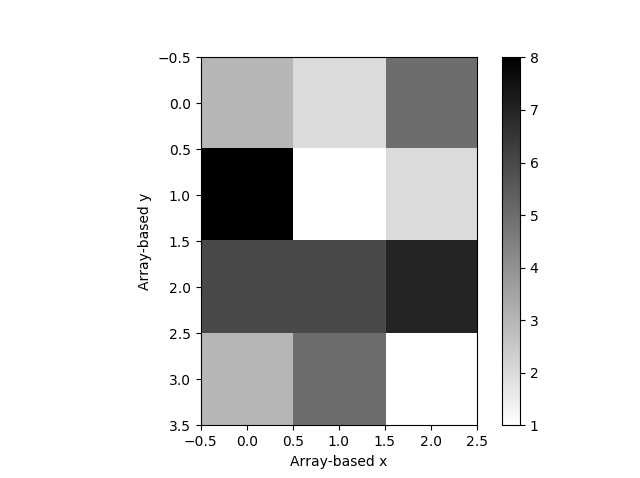
In this image, the x and y coordinates are simply extracted from the position of each value in the array. Now, let’s say that A is an array of values that refer to some specific coordinates:
real_x=np.array([[15,16,17],[15,16,17],[15,16,17],[15,16,17]])
real_y=np.array([[20,21,22,23],[20,21,22,23],[20,21,22,23]])
These values are made-up to just make my case. Is there a way to force imshow to assign each value in A the corresponding pair of coordinates (real_x,real_y)?
PS: I am not looking for adding or subtracting something to the array-based x and y to make them match real_x and real_y, but for something that reads these values from the real_x and real_y arrays. The intended outcome is then an image with the real_x values on the x-axis and the real_y values on the y-axis.
Answers:
Thank you for visiting the Q&A section on Magenaut. Please note that all the answers may not help you solve the issue immediately. So please treat them as advisements. If you found the post helpful (or not), leave a comment & I’ll get back to you as soon as possible.
Method 1
Setting the extent
Assuming you have
real_x=np.array([15,16,17])
real_y=np.array([20,21,22,23])
you would set the image extent as
dx = (real_x[1]-real_x[0])/2.
dy = (real_y[1]-real_y[0])/2.
extent = [real_x[0]-dx, real_x[-1]+dx, real_y[0]-dy, real_y[-1]+dy]
plt.imshow(data, extent=extent)
Changing ticklabels
An alternative would be to just change the ticklabels
real_x=np.array([15,16,17])
real_y=np.array([20,21,22,23])
plt.imshow(data)
plt.gca().set_xticks(range(len(real_x)))
plt.gca().set_yticks(range(len(real_x)))
plt.gca().set_xticklabels(real_x)
plt.gca().set_yticklabels(real_y)
Method 2
If I understand correctly, this is about producing a raster for imshow, that is, given X – image coordinates and y – values, produce input matrix for imshow. I am not aware of a standard function for that, so implemented it
import numpy as np

def to_raster(X, y):
"""
:param X: 2D image coordinates for values y
:param y: vector of scalar or vector values
:return: A, extent
"""
    def deduce_raster_params():
        """
        Computes raster dimensions based on min/max coordinates in X
        sample step computed from 2nd - smallest coordinate values
        """
        unique_sorted = np.vstack((np.unique(v) for v in X.T)).T
        d_min = unique_sorted[0] # x min, y min
        d_max = unique_sorted[-1] # x max, y max
        d_step = unique_sorted[1]-unique_sorted[0] # x, y step
        nsamples = (np.round((d_max - d_min) / d_step) + 1).astype(int)
        return d_min, d_max, d_step, nsamples

    d_min, d_max, d_step, nsamples = deduce_raster_params()
    # Allocate matrix / tensor for raster. Allow y to be vector (e.g. RGB triplets)
    A = np.full((*nsamples, 1 if y.ndim==1 else y.shape[-1]), np.NaN)
    # Compute index for each point in X
    ind = np.round((X - d_min) / d_step).T.astype(int)
    # Scalar/vector values assigned over outer dimension
    A[list(ind)] = y  # cell id
    # Prepare extent in imshow format
    extent = np.vstack((d_min, d_max)).T.ravel()
    return A, extent
This can then be used with imshow as:
import matplotlib.pyplot as plt
A, extent = to_raster(X, y)
plt.imshow(A, extent=extent)
Note that deduce_raster_params() works in O(n*log(n)) instead of O(n) because of the sort in np.unique() – this simplifies the code and probably shouldn’t be a problem with things sent to imshow
Method 3
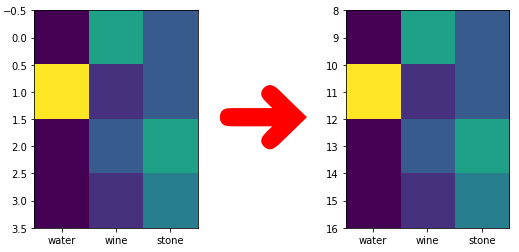
Here is a minimal example how to re-scale the y axes to another range:
import matplotlib.pyplot as plt
import numpy as np

def yaxes_rerange(row_count, new_y_range):
    scale = (new_y_range[1] - new_y_range[0]) / row_count
    y_range = np.array([1, row_count - 1]) * scale

    dy = (y_range[1] - y_range[0]) / 2 - (new_y_range[1] - new_y_range[0])
    ext_y_range = y_range + new_y_range[0] + np.array([-dy, dy])
    extent = [-0.5, data.shape[1] - 0.5, ext_y_range[0], ext_y_range[1]]

    aspect = 1 / scale

    return extent, aspect


data = np.array([[1, 5, 3], [8, 2, 3], [1, 3, 5], [1, 2, 4]])

row_count = data.shape[0]
new_range = [8, 16]

extent, aspect = yaxes_rerange(row_count, new_range)

img = plt.imshow(data, extent=extent, aspect=aspect)
img.axes.set_xticks(range(data.shape[1]))
img.axes.set_xticklabels(["water", "wine", "stone"])
Method 4
For the extent method, to make it work, the argument aspect of imshow() needs to be “auto”.
All methods was sourced from stackoverflow.com or stackexchange.com, is licensed under cc by-sa 2.5, cc by-sa 3.0 and cc by-sa 4.0