I am using the following code to plot a bar-chart:
import matplotlib.pyplot as pls
my_df.plot(x='my_timestampe', y='col_A', kind='bar')
plt.show()
The plot works fine. However, I want to improve the graph by having 3 columns: ‘col_A’, ‘col_B’, and ‘col_C’ all on the plot. Like in the example figure below:
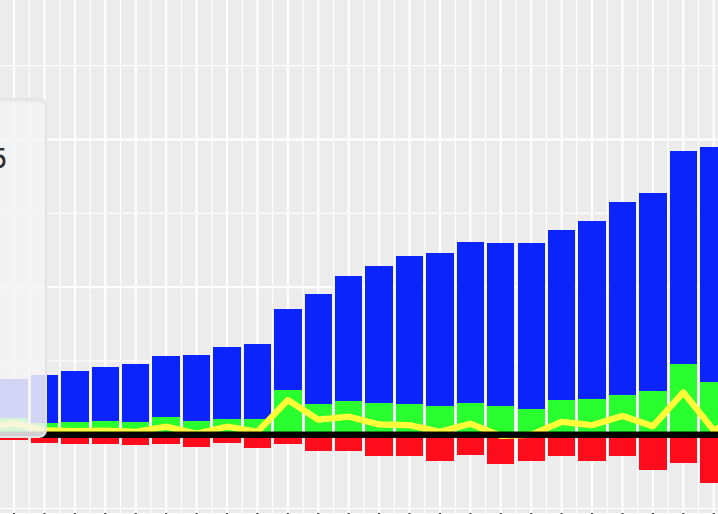
I would like the col_A displayed in blue above x-axis, col_B in red below x-axis, and col_C in green above x-axis. Is this something possible in matplotlib? How do I make changes to plot all the three columns? Thanks!
Answers:
Thank you for visiting the Q&A section on Magenaut. Please note that all the answers may not help you solve the issue immediately. So please treat them as advisements. If you found the post helpful (or not), leave a comment & I’ll get back to you as soon as possible.
Method 1
You can plot several columns at once by supplying a list of column names to the plot‘s y argument.
df.plot(x="X", y=["A", "B", "C"], kind="bar")
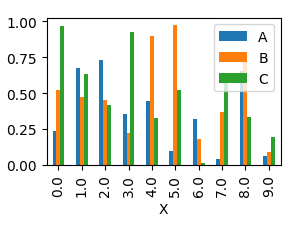
This will produce a graph where bars are sitting next to each other.
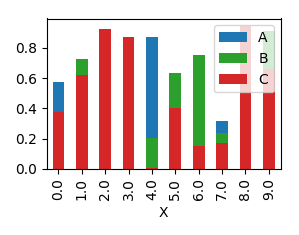
In order to have them overlapping, you would need to call plot several times, and supplying the axes to plot to as an argument ax to the plot.
import pandas as pd
import matplotlib.pyplot as plt
import numpy as np

y = np.random.rand(10,4)
y[:,0]= np.arange(10)
df = pd.DataFrame(y, columns=["X", "A", "B", "C"])

ax = df.plot(x="X", y="A", kind="bar")
df.plot(x="X", y="B", kind="bar", ax=ax, color="C2")
df.plot(x="X", y="C", kind="bar", ax=ax, color="C3")

plt.show()
Method 2
Although the accepted answer works fine, since v0.21.0rc1 it gives a warning
UserWarning: Pandas doesn’t allow columns to be created via a new attribute name
Instead, one can do
df[["X", "A", "B", "C"]].plot(x="X", kind="bar")
All methods was sourced from stackoverflow.com or stackexchange.com, is licensed under cc by-sa 2.5, cc by-sa 3.0 and cc by-sa 4.0