When plotting heatmaps with seaborn (and correlation matrices with matplotlib) the first and the last row is cut in halve.
This happens also when I run this minimal code example which I found online.
import pandas as pd
import seaborn as sns
import matplotlib.pyplot as plt

data = pd.read_csv('https://raw.githubusercontent.com/resbaz/r-novice-gapminder-files/master/data/gapminder-FiveYearData.csv')
plt.figure(figsize=(10,5))
sns.heatmap(data.corr())
plt.show()
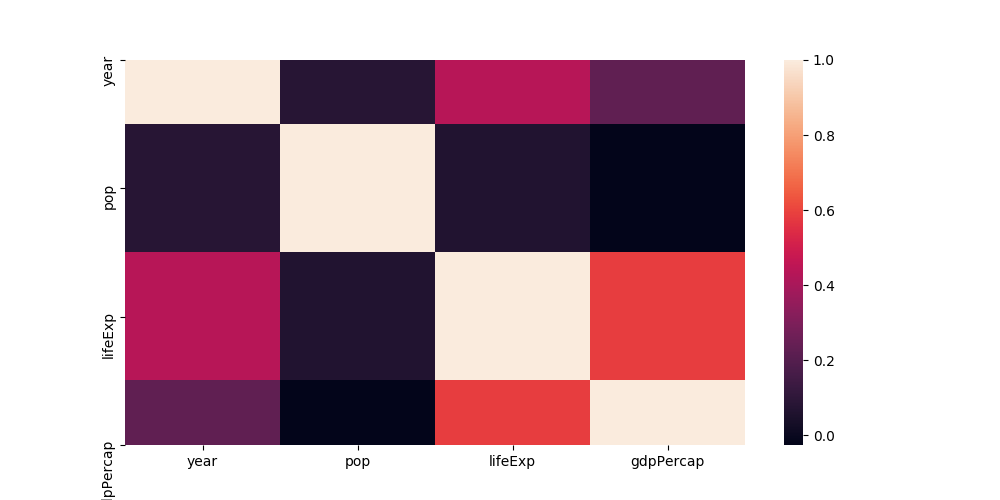
The labels at the y axis are on the correct spot, but the rows aren’t completely there.
A few days ago, it work as intended. Since then, I installed texlive-xetex so I removed it again but it didn’t solve my problem.
Any ideas what I could be missing?
Answers:
Thank you for visiting the Q&A section on Magenaut. Please note that all the answers may not help you solve the issue immediately. So please treat them as advisements. If you found the post helpful (or not), leave a comment & I’ll get back to you as soon as possible.
Method 1
Unfortunately matplotlib 3.1.1 broke seaborn heatmaps; and in general inverted axes with fixed ticks.
This is fixed in the current development version; you may hence
- revert to matplotlib 3.1.0
- use matplotlib 3.1.2 or higher
- set the heatmap limits manually (
ax.set_ylim(bottom, top) # set the ylim to bottom, top)
Method 2
Its a bug in the matplotlib regression between 3.1.0 and 3.1.1
You can correct this by:
import seaborn as sns
df_corr = someDataFrame.corr()
ax = sns.heatmap(df_corr, annot=True) #notation: "annot" not "annote"
bottom, top = ax.get_ylim()
ax.set_ylim(bottom + 0.5, top - 0.5)
Method 3
Fixed using the above and setting the heatmap limits manually.
First
ax = sns.heatmap(...
checked the current axes with
ax.get_ylim()
(5.5, 0.5)
Fixed with
ax.set_ylim(6.0, 0)
Method 4
I solved it by adding this line in my code, with matplotlib==3.1.1:
ax.set_ylim(sorted(ax.get_xlim(), reverse=True))
NB. The only reason this works is because the x-axis isn’t changed, so use at your own risk with future mpl versions
Method 5
matplotlib 3.1.2 is out –
It is available in the Anaconda cloud via conda-forge but I was not able to install it via conda install.
The manual alternative worked:
Download matplotlib 3.1.2 from github and install via pip
 % curl https://codeload.github.com/matplotlib/matplotlib/tar.gz/v3.1.2 --output matplotlib-3.1.2.tar.gz
 % pip install matplotlib-3.1.2.tar.gz
Method 6
It happens with matplotlib version 3.1.1 as suggested by importanceofbeingernest
Following solved my problem
pip install matplotlib==3.1.0
Method 7
rustyDev is right about conda-forge, but I did not need to do a manual pip install from a github download. For me, on Windows, it worked directly. And the plots are all nice again.
https://anaconda.org/conda-forge/matplotlib
conda install -c conda-forge matplotlib
optional points, not needed for the answer:
Afterwards, I tried other steps, but they are not needed: In conda prompt: conda search matplotlib –info showed no new version info, the most recent info was for 3.1.1. Thus I tried pip using pip install matplotlib==3.1.2 But pip says “Requirement already satisfied”
Then getting the version according to medium.com/@rakshithvasudev/… python - import matplotlib - matplotlib.__version__ shows that 3.1.2 was successfully installed
Btw, I had this error directly after updating Spyder to v4.0.0. The error was in a plot of a confusion matrix. This was mentioned already some months ago. stackoverflow.com/questions/57225685/… which is already linked to this seaborn question.
Method 8
Worked for me:
b, t = plt.ylim()
b += 0.5
t -= 0.5
custom_ylim = (b, t)
plt.setp(axes, ylim=custom_ylim)
Method 9
Downgrade your matplotlib
!pip install matplotlib==3.1.0
and add this line to your plot code :
ax[i].set_ylim(sorted(ax[i].get_xlim(), reverse=True))
Method 10
As @ImportanceOfBeingErnest mentioned, this issue is due to broken seaborn heatmaps in a specific version of matplotlib so simple solution to this problem is to upgrade matplotlib as follows:
pip install --upgrade matplotlib
All methods was sourced from stackoverflow.com or stackexchange.com, is licensed under cc by-sa 2.5, cc by-sa 3.0 and cc by-sa 4.0