I installed XAMPP on my Win 10 PC and migrated my wordpress website onto my PC. After migration, only the frontpage works. The other URLs would get a “Not Found”. The frontpage is only partially working but I see a page nevertheless.
I have change required data in wp_options. In wp_posts, I changed the URL in column guid. I have also tinkered with apache configurations but with no success. Setting debug to true in wp-config.php does not reveal anything unusual. May I know if you have any suggestions on what else I should tweak?
wp-admin works only if I do localhost/bs/wp-admin instead of localhost/wp-admin . I tried resaving the permalink but the links remain broken.
Thanks buttered_toast. The htaccess made the files visible. Is there another location where I need to change, I spot :
include(./php/depth2.php) file not found"
I use PHP Code Snippet (Otherwise known as XYZ PHP) plugin. I have marked up your answers. The themes seems to be defaulting to standard Avada themes.
Answers:
Thank you for visiting the Q&A section on Magenaut. Please note that all the answers may not help you solve the issue immediately. So please treat them as advisements. If you found the post helpful (or not), leave a comment & I’ll get back to you as soon as possible.
Method 1
When migrating a live site to local you need to do a couple of thing.
- update the site url, you can do this in wp_options column (phpmyadmin) or in wp-config.php
- You need to find and replace all instances of the old url, you can use better search replace, its a great plugin for exactly that
- update the .htaccess to indicate the correct path of your wordpress
That should be enough for most cases
EDIT
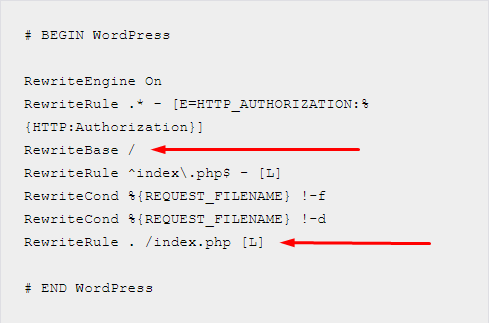
Lets say that your wordpress site is located in htdocs/mysite
The RewriteBase and RewriteRule should be like this
RewriteBase /mysite/
RewriteRule . /mysite/index.php [L]
All methods was sourced from stackoverflow.com or stackexchange.com, is licensed under cc by-sa 2.5, cc by-sa 3.0 and cc by-sa 4.0