I am trying to run a module from the console. The structure of my directory is this:
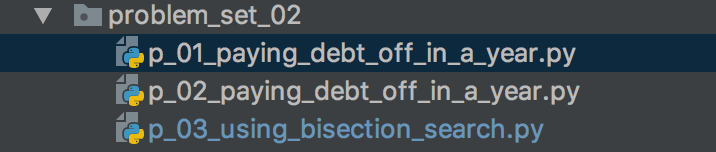
I am trying to run the module p_03_using_bisection_search.py, from the problem_set_02 directory using:
$ python3 p_03_using_bisection_search.py
The code inside p_03_using_bisection_search.pyis:
__author__ = 'm'


from .p_02_paying_debt_off_in_a_year import compute_balance_after


def compute_bounds(balance: float,
                   annual_interest_rate: float) -> (float, float):

    # there is code here, but I have omitted it to save space
    pass


def compute_lowest_payment(balance: float,
                           annual_interest_rate: float) -> float:

    # there is code here, but I have omitted it to save space
    pass

def main():
    balance = eval(input('Enter the initial balance: '))
    annual_interest_rate = eval(input('Enter the annual interest rate: '))

    lowest_payment = compute_lowest_payment(balance, annual_interest_rate)
    print('Lowest Payment: ' + str(lowest_payment))


if __name__ == '__main__':
    main()
I am importing a function that is in p_02_paying_debt_off_in_a_year.py which code is:
__author__ = 'm'


def compute_balance(balance: float,
                    fixed_payment: float,
                    annual_interest_rate: float) -> float:

    # this is code that has been omitted
    pass


def compute_balance_after(balance: float,
                          fixed_payment: float,
                          annual_interest_rate: float,
                          months: int=12) -> float:

    # Omitted code
    pass


def compute_fixed_monthly_payment(balance: float,
                                  annual_interest_rate: float) -> float:

    # omitted code
    pass


def main():
    balance = eval(input('Enter the initial balance: '))
    annual_interest_rate = eval(
        input('Enter the annual interest rate as a decimal: '))
    lowest_payment = compute_fixed_monthly_payment(balance,
                                                   annual_interest_rate)
    print('Lowest Payment: ' + str(lowest_payment))


if __name__ == '__main__':
    main()
I am getting the following error:
ModuleNotFoundError: No module named '__main__.p_02_paying_debt_off_in_a_year'; '__main__' is not a package
I have no idea how to solve this issue. I have tried adding a __init__.py file, but it is still not working.
Answers:
Thank you for visiting the Q&A section on Magenaut. Please note that all the answers may not help you solve the issue immediately. So please treat them as advisements. If you found the post helpful (or not), leave a comment & I’ll get back to you as soon as possible.
Method 1
Simply remove the dot for the relative import and do:
from p_02_paying_debt_off_in_a_year import compute_balance_after
Method 2
I have the same issue as you did. I think the problem is that you used relative import in in-package import. There is no __init__.py in your directory. So just import as Moses answered above.
The core issue I think is when you import with a dot:
from .p_02_paying_debt_off_in_a_year import compute_balance_after
It is equivalent to:
from __main__.p_02_paying_debt_off_in_a_year import compute_balance_after
where __main__ refers to your current module p_03_using_bisection_search.py.
Briefly, the interpreter does not know your directory architecture.
When the interpreter get in p_03.py, the script equals:
from p_03_using_bisection_search.p_02_paying_debt_off_in_a_year import compute_balance_after
and p_03_using_bisection_search does not contain any modules or instances called p_02_paying_debt_off_in_a_year.
So I came up with a cleaner solution without changing python environment valuables (after looking up how requests do in relative import):
The main architecture of the directory is:
main.py
setup.py
problem_set_02/
   __init__.py
   p01.py
   p02.py
   p03.py
Then write in __init__.py:
from .p_02_paying_debt_off_in_a_year import compute_balance_after
Here __main__ is __init__ , it exactly refers to the module problem_set_02.
Then go to main.py:
import problem_set_02
You can also write a setup.py to add specific module to the environment.
Method 3
Try to run it as:
python3 -m p_03_using_bisection_search
Method 4
Just use the name of the main folder which the .py file is in.
from problem_set_02.p_02_paying_debt_off_in_a_year import compute_balance_after
Method 5
Remove the dot and import absolute_import in the beginning of your file
from __future__ import absolute_import

from p_02_paying_debt_off_in_a_year import compute_balance_after
Method 6
If you have created directory and sub-directory, follow the steps below and please keep in mind all directory must have __init__.py to get it recognized as a directory.
-
In your script, include
import sysandsys.path, you will be able to see all the paths available to Python. You must be able to see your current working directory. -
Now import sub-directory and respective module that you want to use using:
import subdir.subdir.modulename as abcand now you can use the methods in that module.
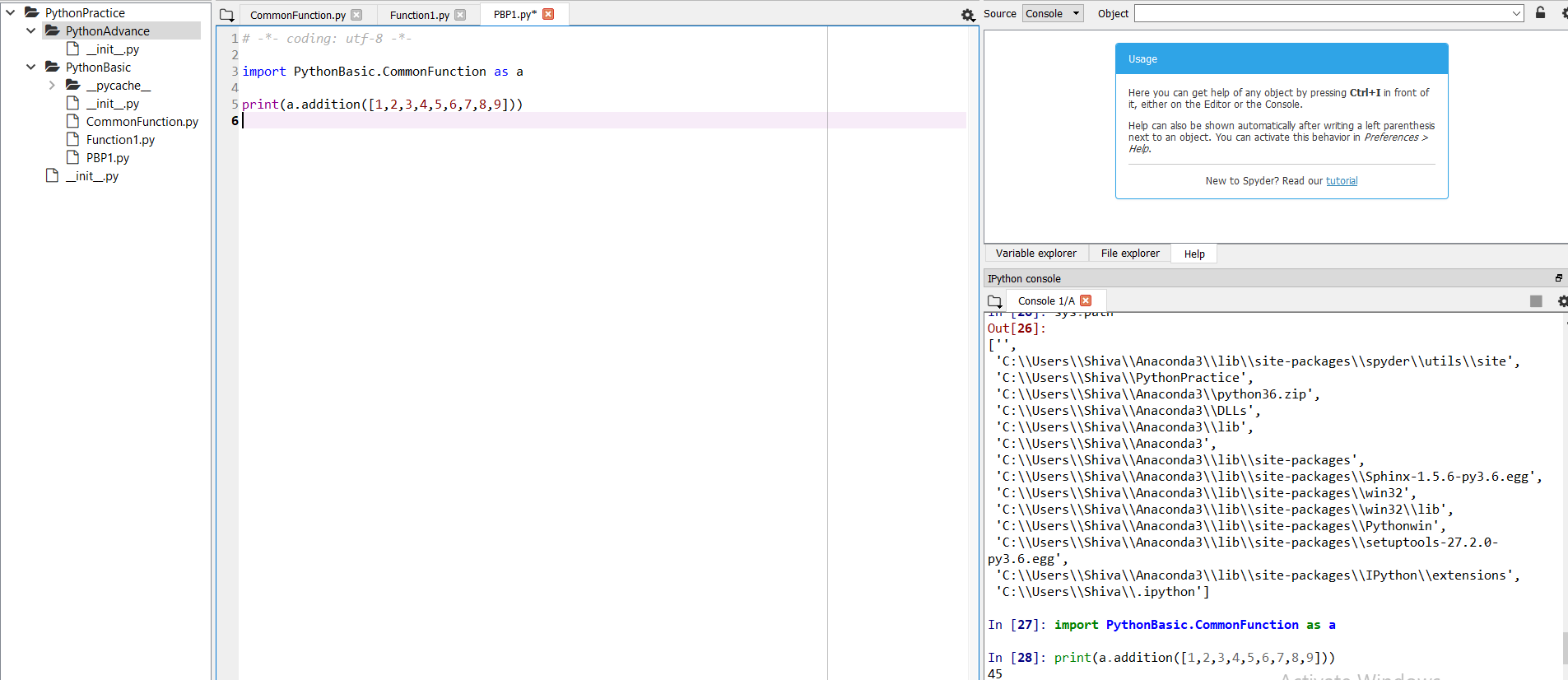
As an example, you can see in this screenshot I have one parent directory and two sub-directories and under second sub-directories I have the module CommonFunction. On the right my console shows that after execution of sys.path, I can see my working directory.
All methods was sourced from stackoverflow.com or stackexchange.com, is licensed under cc by-sa 2.5, cc by-sa 3.0 and cc by-sa 4.0