I am trying to use mplcursors when plotting data from multiple pandas DataFrames (or from multiple subsets of a single DataFrame).
I have read the answers of this question and this one, as well as this one, which is somewhat redundent with the first one.
I am able to adapt the code of the documentation on Extracting data and labels from a DataFrame to using seaborn with a single DataFrame, i.e. the following works fine:
from matplotlib import pyplot as plt
import mplcursors
from pandas import DataFrame
import seaborn as sns
sns.set()

df = DataFrame(
    [("Alice", 163, 54),
     ("Bob", 174, 67),
     ("Charlie", 177, 73),
     ("Diane", 168, 57)],
    columns=["name", "height", "weight"])

fig, ax = plt.subplots()
sns.scatterplot(data=df, x="height", y="weight", ax=ax)

mplcursors.cursor().connect("add", lambda sel: sel.annotation.set_text(df["name"][sel.index]))
The code of the answer to the first question, which is for multiple DataFrames, but without using seaborn, also works fine for me. However, if I try to adapt it to make it work with seaborn, then no cursor is produced. Here is my code:
from matplotlib import pyplot as plt
import mplcursors
from pandas import DataFrame
import seaborn as sns

df = DataFrame([("Alice", 163, 54), ("Bob", 174, 67), ("Charlie", 177, 73), ("Diane", 168, 57)], columns=["name", "height", "weight"])
df1 = DataFrame([("Alice1", 140, 50), ("Bob1", 179, 60), ("Charlie1", 120, 70), ("Diane1", 122, 60)], columns=["name", "height", "weight"])

fig, ax = plt.subplots(1, 1)
# scat = ax.scatter(df["height"], df["weight"])# from the original answer
# scat1 = ax.scatter(df1["height"], df1["weight"])# from the original answer
scat = sns.scatterplot(data=df, x="height", y="weight")# my version
scat1 = sns.scatterplot(data=df1, x="height", y="weight")# my version
scat.annotation_names = [f'{n}nh: {h}' for n, h in zip(df["name"], df["height"])]
scat1.annotation_names = [f'{n}nw: {w}' for n, w in zip(df1["name"], df1["weight"])]

cursor = mplcursors.cursor([scat, scat1], hover=True)
cursor.connect("add", lambda sel: sel.annotation.set_text(sel.artist.annotation_names[sel.target.index]))
I’m using mplcursors version 0.5.1 and seaborn version 0.11.2 in Jupyter, with the %matplotlib notebook backend.
Answers:
Thank you for visiting the Q&A section on Magenaut. Please note that all the answers may not help you solve the issue immediately. So please treat them as advisements. If you found the post helpful (or not), leave a comment & I’ll get back to you as soon as possible.
Method 1
Matplotlib’s ax.scatter returns the graphical elements it created. Seaborn, on the other hand, returns the ax (subplot) on which the plot was created. (Many seaborn functions create a lot of different types of graphical elements).
In this case, the elements are stored in ax.collections[0] for the first call, and ax.collections[1] for the second. Assigning these to the scat and scat1 variables mimics the matplotlib approach.
from matplotlib import pyplot as plt
import mplcursors
from pandas import DataFrame
import seaborn as sns

df = DataFrame([("Alice", 163, 54), ("Bob", 174, 67), ("Charlie", 177, 73), ("Diane", 168, 57)], columns=["name", "height", "weight"])
df1 = DataFrame([("Alice1", 140, 50), ("Bob1", 179, 60), ("Charlie1", 120, 70), ("Diane1", 122, 60)], columns=["name", "height", "weight"])

fig, ax = plt.subplots()
sns.scatterplot(data=df, x="height", y="weight", ax=ax)
sns.scatterplot(data=df1, x="height", y="weight", ax=ax)
scat = ax.collections[0]
scat1 = ax.collections[1]
scat.annotation_names = [f'{n}nh: {h}' for n, h in zip(df["name"], df["height"])]
scat1.annotation_names = [f'{n}nw: {w}' for n, w in zip(df1["name"], df1["weight"])]

cursor = mplcursors.cursor([scat, scat1], hover=True)
cursor.connect("add", lambda sel: sel.annotation.set_text(sel.artist.annotation_names[sel.target.index]))
plt.show()
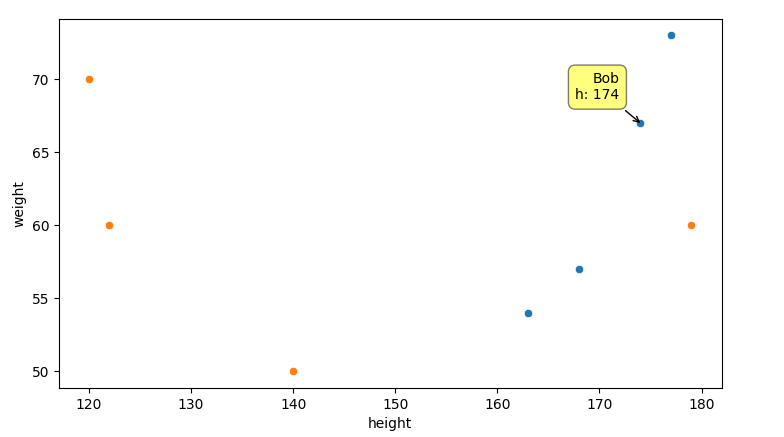
All methods was sourced from stackoverflow.com or stackexchange.com, is licensed under cc by-sa 2.5, cc by-sa 3.0 and cc by-sa 4.0