im trying to upload multiple file and save all the files in a data table.
the data table is storing only one file.
Help me to solve, im having error in the else part. dtupload is highlighted
Below is what I have tried:
Private Sub AjaxFileUpload1_UploadComplete(sender As Object, e As AjaxControlToolkit.AjaxFileUploadEventArgs) Handles AjaxFileUpload1.UploadComplete
        Try


                dt.Rows.Add(UploadDocPath, UploadDoc)
                MsgBox(dt.Rows.Count.ToString)

            Else
                dt.Rows.Add(UploadDocPath, UploadDoc)
            End If


        Catch ex As Exception

        End Try

    End Sub
Answers:
Thank you for visiting the Q&A section on Magenaut. Please note that all the answers may not help you solve the issue immediately. So please treat them as advisements. If you found the post helpful (or not), leave a comment & I’ll get back to you as soon as possible.
Method 1
Well, you in ONE local routine create a table, add a row. And then the routine finishes and all the values, variables now go out of scope. Then that routine will be called again if a 2nd file is up-loaded, and you re-create the table. The variables in that routine (and in fact ANY routine – heck even if this was not asp.net go out of scope when the routine finishes.
At least with a desktop application you could declare the table at the form level (not sub routine level) and then you could add a new row to that temp table variable. But, with asp.net, then your web page is “state less”. That means all variables ONLY have their state when code runs. The instant that code is finished, then all state in the code behind is lost.
But I am somewhat perplexed that you would think the data table would persist for each call? Perhaps you only want the var dtUpload to exist in the lifetime of each separate time that routine is called? But, then again you do nothing with the table????
So, for each file up-loaded? That routine gets called.
So, lets assume 5 files are to be up-loaded.
Taking a really wild guess? I would assume we want that table/array to build up over time.
So, we need to ensure that the dtUpload table can “live” beyond a single page cycle and round trip.
So, lets save/place/put/park the dtUpload table that can live “beyond” that one routine.
It really depends on what you want to do with that list after all is said and done?
Since the table is small? Then you could certainly in the forms on-load event create that table with no rows and shove it into say the Session(). Then as each file up-loads you could shove the file name into that array.
So, your code could work like this:
In on-load event only FIRST time, create the dtUpload table. And then shove/save it into the session().
So, our on-load would look like this:
    If IsPostBack = False Then
        ' fist time page load - create our table
        Dim dtUpload As New DataTable
        dtUpload.Columns.Add("PATH")
        dtUpload.Columns.Add("FILENAME")

        Session("FileList") = dtUpload
    End If
Ok, so when the page loads (first time only), we create the dtTable and THEN save it in the session.
Now, in the file upload done event, grab the table from session, add the row (file + path).
And note HOW we don’t have to shove the dtUpload table BACK into the session! (it is now a persisting object in our session).
Ok, so now our single file load event (when done) can/will look like this:
Protected Sub AjaxFileUpload1_UploadComplete(sender As Object,
   e As AjaxControlToolkit.AjaxFileUploadEventArgs) Handles AjaxFileUpload1.UploadComplete

    Dim dtUpload As DataTable = Session("FileList")

    Dim strPath As String = "c:TestMyUpload"
    Dim strFile As String = e.FileName
    dtUpload.Rows.Add(strPath, strFile)
    AjaxFileUpload1.SaveAs(strPath & strFile)

End Sub
So, note how we add the one row to the table. (and we don’t as noted have to shove the object back into the session – dtUpload in this case is in effect a object pointing to persisting dtUpload table we placed into Session().
Ok, so, now lets say all 5 files are done.
Well, you now have to decide what you want to do with the dtUpload table you have?
Perhaps we want to display all the files?
Well, keep in mind that the web page does not do a post back.
But, lets assume we now want to display all files.
Drag onto the form a datagrid control.
Drag onto the form a button.
So, we now have this:
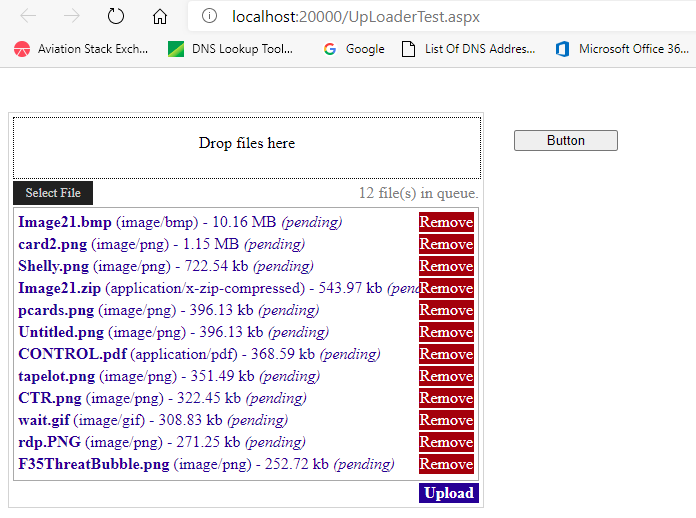
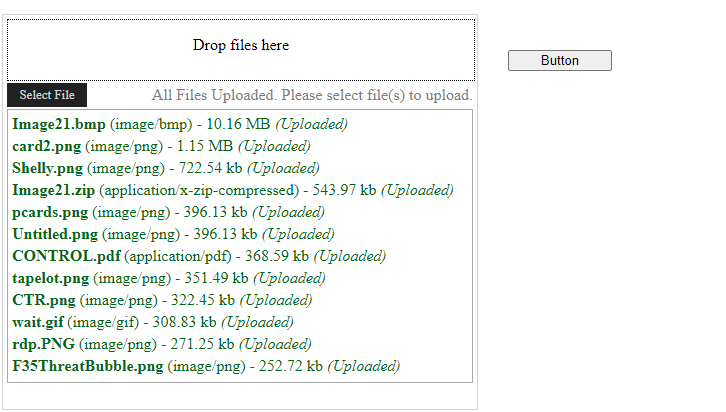
Then hit up-load, you get this:
When you click on the the button, you can run this code:
Protected Sub Button1_Click(sender As Object, e As EventArgs) Handles Button1.Click
    Me.GridView1.DataSource = Session("FileList")
    Me.DataBind()
End Sub
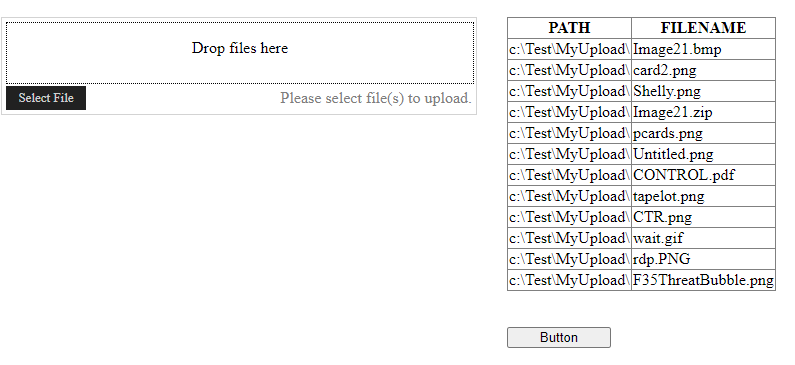
And now click on that button?
And you see this:
Now here is a really huge, large, massive, VERY important reason why placed that button on the form. The reason of course is when the ajax upload is all done?
The web page does NOT do a post back. So, that is where the button above comes into play.
By clicking the button, then our code stub runs, we fill the gridview, and then of course the page makes the round trip and re-displays our file list.
Now, we could have the final CLient side ajaxfileupload event click on that button for us, and thus in place of the user clicking that button to continue?
You can have client side code click on that button for you.
So, set the OnClientUpLoadCompleteAll to the js routine:
    <script>
        function uerror() {
            alert('upload error');
        }

        function myalldone() {
            var btn = document.getElementById('<%=Button1.ClientID%>');
            btn.click();
        }
    </script>
So it will now click that button (you could even set style=”display:none” for the button. So, now you have a final routine server side, but with a full page post back.
All methods was sourced from stackoverflow.com or stackexchange.com, is licensed under cc by-sa 2.5, cc by-sa 3.0 and cc by-sa 4.0