Using the python seaborn package I was trying to plot the nested bar graphs with three different y-axes as shown in the below figure:
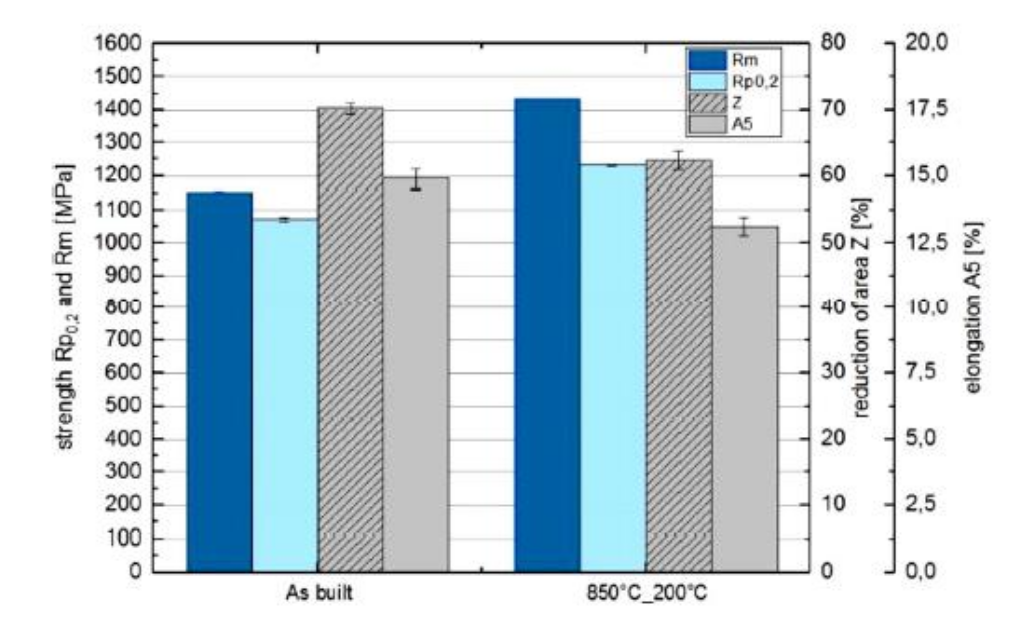
And the code that I have used is :
import matplotlib.pyplot as plt
from matplotlib import rc
import numpy as np
import seaborn as sns
#plt.style.use(['science'])

rc('font', **{'family': 'serif', 'serif': ['Computer Modern']})
rc('text', usetex=True)

HV = [388, 438]
YS = [1070, 1200]
UTS = [1150, 1400]
Z = [15, 12.5]

x = [1, 2]
fig, ax1 = plt.subplots(figsize=(5, 5.5))

colors=sns.color_palette("rocket",4)


ax1 = sns.barplot(x[0],YS[0],color="blue")
ax1 = sns.barplot(x[0],color="blue")

ax1 = sns.barplot(x[1],YS[1],color="blue")
ax1 = sns.barplot(x[1],UTS[1],color="blue")

ax2 = ax1.twinx()
ax2 = sns.barplot(x[0], HV[0],color="green")
ax2 = sns.barplot(x[1], HV[1],color="green")

ax3 = ax1.twinx()
ax3 = sns.barplot(x[0],Z[0],color="red")
ax3 = sns.barplot(x[1],Z[1],color="red")
#ax3.spines['right'].set_position(('outward',60))
ax3.spines['right'].set_position(('axes',1.15))

ax1.set_ylabel("First",color="blue")
ax2.set_ylabel("Second",color="green")
ax3.set_ylabel("Third",color="red")

ax1.tick_params(axis='y',colors="blue")
ax2.tick_params(axis='y',colors="green")
ax3.tick_params(axis='y',colors="red")

ax2.spines['right'].set_color("green")
ax3.spines['right'].set_color("red")
ax3.spines['left'].set_color("blue")

plt.show()
And I’m getting the following error:
Traceback (most recent call last):
  File "/usr/lib/python3/dist-packages/seaborn/utils.py", line 531, in categorical_order
    order = values.cat.categories
AttributeError: 'int' object has no attribute 'cat'

During handling of the above exception, another exception occurred:

Traceback (most recent call last):
  File "/usr/lib/python3/dist-packages/seaborn/utils.py", line 534, in categorical_order
    order = values.unique()
AttributeError: 'int' object has no attribute 'unique'

During handling of the above exception, another exception occurred:

Traceback (most recent call last):
  File "/home/sspenkulinti/these/thesis_E185_fatigue/test_matrix/E185_properties_AB_HT.py", line 21, in <module>
    ax1 = sns.barplot(x[0],YS[0],color="blue")
  File "/usr/lib/python3/dist-packages/seaborn/categorical.py", line 3147, in barplot
    plotter = _BarPlotter(x, y, hue, data, order, hue_order,
  File "/usr/lib/python3/dist-packages/seaborn/categorical.py", line 1614, in __init__
    self.establish_variables(x, y, hue, data, orient,
  File "/usr/lib/python3/dist-packages/seaborn/categorical.py", line 200, in establish_variables
    group_names = categorical_order(groups, order)
  File "/usr/lib/python3/dist-packages/seaborn/utils.py", line 536, in categorical_order
    order = pd.unique(values)
  File "/usr/lib/python3/dist-packages/pandas/core/algorithms.py", line 395, in unique
    values = _ensure_arraylike(values)
  File "/usr/lib/python3/dist-packages/pandas/core/algorithms.py", line 204, in _ensure_arraylike
    inferred = lib.infer_dtype(values, skipna=False)
  File "pandas/_libs/lib.pyx", line 1251, in pandas._libs.lib.infer_dtype
TypeError: 'int' object is not iterable
Answers:
Thank you for visiting the Q&A section on Magenaut. Please note that all the answers may not help you solve the issue immediately. So please treat them as advisements. If you found the post helpful (or not), leave a comment & I’ll get back to you as soon as possible.
Method 1
The error is because you can’t call sns.barplot with a single number as first parameter. The x-values need to be a list.
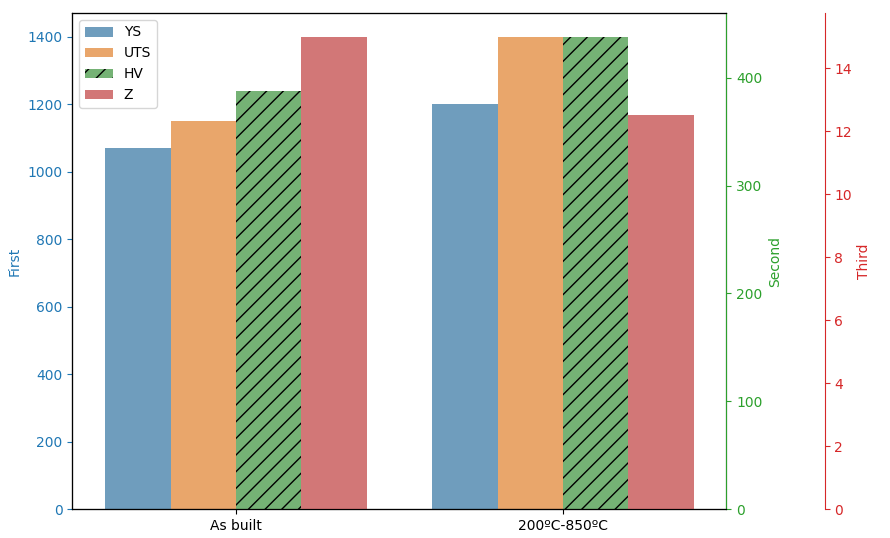
To get want you want using seaborn, the data needs to be presented as if it comes from a dataframe. hue_order is needed to preserve enough space for each of the bars, even when nothing is plotted there.
import matplotlib.pyplot as plt
from matplotlib import rc
import numpy as np
import seaborn as sns

HV = [388, 438]
YS = [1070, 1200]
UTS = [1150, 1400]
Z = [15, 12.5]

x = ["As built", "200ºC-850ºC"]
names = ['YS', 'UTS', 'HV', 'Z']
fig, ax1 = plt.subplots(figsize=(9, 5.5))

colors = sns.color_palette("tab10", len(names))

sns.barplot(x=x + x, y=YS + UTS, hue=[names[0]] * len(x) + [names[1]] * len(x),
            hue_order=names, palette=colors, alpha=0.7, ax=ax1)
# ax1 will already contain the full legend, the third handle needs to
# be updated to show the hatching
ax1.legend_.legendHandles[2].set_hatch('///')

ax2 = ax1.twinx()
sns.barplot(x=x, y=HV, hue=[names[2]] * len(x), hue_order=names, palette=colors, hatch='//', alpha=0.7, ax=ax2)
ax2.legend_.remove() # seaborn automatically creates a new legend

ax3 = ax1.twinx()
sns.barplot(x=x, y=Z, hue=[names[3]] * len(x), hue_order=names, palette=colors, alpha=0.7, ax=ax3)
ax3.legend_.remove()

ax3.spines['right'].set_position(('axes', 1.15))

ax1.set_ylabel("First", color=colors[0])
ax2.set_ylabel("Second", color=colors[2])
ax3.set_ylabel("Third", color=colors[3])

ax1.tick_params(axis='y', colors=colors[0])
ax2.tick_params(axis='y', colors=colors[2])
ax3.tick_params(axis='y', colors=colors[3])

ax2.spines['right'].set_color(colors[2])
ax3.spines['right'].set_color(colors[3])

plt.tight_layout()
plt.show()
All methods was sourced from stackoverflow.com or stackexchange.com, is licensed under cc by-sa 2.5, cc by-sa 3.0 and cc by-sa 4.0