I’ve just migrated a asp.net core project from 1.0.1 to 1.1.0 and when running dotnet run or dotnet restore I get the following message
C:UsersyouDesktopAPIsrcAPIAPI.xproj(7,3): error MSB4019: The imported project "C:Program Filesdotnetsdk1.0.0-preview4-004110ExtensionsMicrosoftVisualStudiov14.0DotNetMicrosoft.DotNet.Props" was not found. Confirm that the path in the <Import> declaration is correct, and that the file exists on disk.
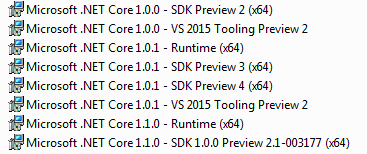
I’ve installed all the SDK and runtimes, but still can’t neither create .Net Core 1.1.0 projects in visual studio nor restore in console my packages.
The project.json is as follows, supposedly the migration is right, but still can’t figure it out.
{
  "version": "1.0.0-*",
  "dependencies": {
       "Microsoft.NETCore.App": {
      "version": "1.1.0",
      "type": "platform"
    },
    "Microsoft.ApplicationInsights.AspNetCore": "1.0.0",
    "Microsoft.AspNetCore.Mvc": "1.0.1",
    "Microsoft.AspNetCore.Routing": "1.0.1",
    "Microsoft.AspNetCore.Server.IISIntegration": "1.0.0",
    "Microsoft.AspNetCore.Server.Kestrel": "1.0.1",
    "Microsoft.Extensions.Configuration.EnvironmentVariables": "1.0.0",
    "Microsoft.Extensions.Configuration.FileExtensions": "1.0.0",
    "Microsoft.Extensions.Configuration.Json": "1.0.0",
    "Microsoft.Extensions.Logging": "1.0.0",
    "Microsoft.Extensions.Logging.Console": "1.0.0",
    "Microsoft.Extensions.Logging.Debug": "1.0.0",
    "Microsoft.Extensions.Options.ConfigurationExtensions": "1.0.0",
    "Business.Handlers": "1.0.0-*",
    "Business.Connectors": "1.0.0-*",
    "Common": "1.0.0-*",
    "DataAccessLayer": "1.0.0-*"
  },

  "tools": {
    "Microsoft.AspNetCore.Server.IISIntegration.Tools": "1.0.0-preview2-final"
  },

  "frameworks": {
    "netcoreapp1.1": {
      "imports": [
        "dotnet5.6",
        "portable-net45+win8"
      ]
    }
  },

  "buildOptions": {
    "emitEntryPoint": true,
    "preserveCompilationContext": true
  },

  "runtimeOptions": {
    "configProperties": {
      "System.GC.Server": true
    }
  },

  "publishOptions": {
    "include": [
      "wwwroot",
      "Views",
      "Areas/**/Views",
      "appsettings.json",
      "web.config"
    ]
  },

  "scripts": {
    "postpublish": [ "dotnet publish-iis --publish-folder %publish:OutputPath% --framework %publish:FullTargetFramework%" ]
  }
}
Answers:
Thank you for visiting the Q&A section on Magenaut. Please note that all the answers may not help you solve the issue immediately. So please treat them as advisements. If you found the post helpful (or not), leave a comment & I’ll get back to you as soon as possible.
Method 1
The problem was in the global.json of my solution the version property, I had it changed to 1.0.0-preview2-1-003177 and it worked.
{
  "projects": [ "src", "test" ],
  "sdk": {
    "version": "1.0.0-preview2-1-003177" //Previously 1.0.0-preview2-003131
  }
}
Method 2
You need to download .NET Core 1.1 SDK – Installer from Microsoft website. If you can download only runtime as well. Below is the url for the same.
https://www.microsoft.com/net/download/core
Please see image below for more details.
Regards,
Sachin Pawar
All methods was sourced from stackoverflow.com or stackexchange.com, is licensed under cc by-sa 2.5, cc by-sa 3.0 and cc by-sa 4.0