I’m loading in a color image in Python OpenCV and plotting the same. However, the image I get has it’s colors all mixed up.
Here is the code:
import cv2
import numpy as np
from numpy import array, arange, uint8
from matplotlib import pyplot as plt


img = cv2.imread('lena_caption.png', cv2.IMREAD_COLOR)
bw_img = cv2.cvtColor(img, cv2.COLOR_BGR2GRAY)

images = []
images.append(img)
images.append(bw_img)

titles = ['Original Image','BW Image']

for i in xrange(len(images)):
    plt.subplot(1,2,i+1),plt.imshow(images[i],'gray')
    plt.title(titles[i])
    plt.xticks([]),plt.yticks([])

plt.show()
Here is the original image:

And here is the plotted image:

Answers:
Thank you for visiting the Q&A section on Magenaut. Please note that all the answers may not help you solve the issue immediately. So please treat them as advisements. If you found the post helpful (or not), leave a comment & I’ll get back to you as soon as possible.
Method 1
OpenCV uses BGR as its default colour order for images, matplotlib uses RGB. When you display an image loaded with OpenCv in matplotlib the channels will be back to front.
The easiest way of fixing this is to use OpenCV to explicitly convert it back to RGB, much like you do when creating the greyscale image.
RGB_img = cv2.cvtColor(img, cv2.COLOR_BGR2RGB)
And then use that in your plot.
Method 2
As an alternative to the previous answer, you can use (slightly faster)
img = cv2.imread('lena_caption.png')[...,::-1]
%timeit [cv2.cvtColor(cv2.imread(f), cv2.COLOR_BGR2RGB) for f in files]
231 ms ± 3.08 ms per loop (mean ± std. dev. of 7 runs, 1 loop each)
%timeit [cv2.imread(f)[...,::-1] for f in files]
220 ms ± 1.81 ms per loop (mean ± std. dev. of 7 runs, 1 loop each)
Method 3
Simple one-line solution
np.flip(img, axis=-1)
This can convert both ways. From RGB to BGR, and from BGR to RGB.
Method 4
If you try to read an image using OpenCV, it will use BGR as the default. So you have to use a different approach to read an Image. I have made the required changes to your code to get the desired output has been given below.
import cv2
import numpy as np
from numpy import array, arange, uint8
from matplotlib import pyplot as plt


img = cv2.cvtColor(cv2.imread('lena_caption.png'), cv2.COLOR_BGR2RGB)
bw_img = cv2.cvtColor(img, cv2.COLOR_BGR2GRAY)

images = []
images.append(img)
images.append(bw_img)

titles = ['Original Image','BW Image']

for i in xrange(len(images)):
    plt.subplot(1,2,i+1),plt.imshow(images[i],'gray')
    plt.title(titles[i])
    plt.xticks([]),plt.yticks([])

plt.show()
Output:
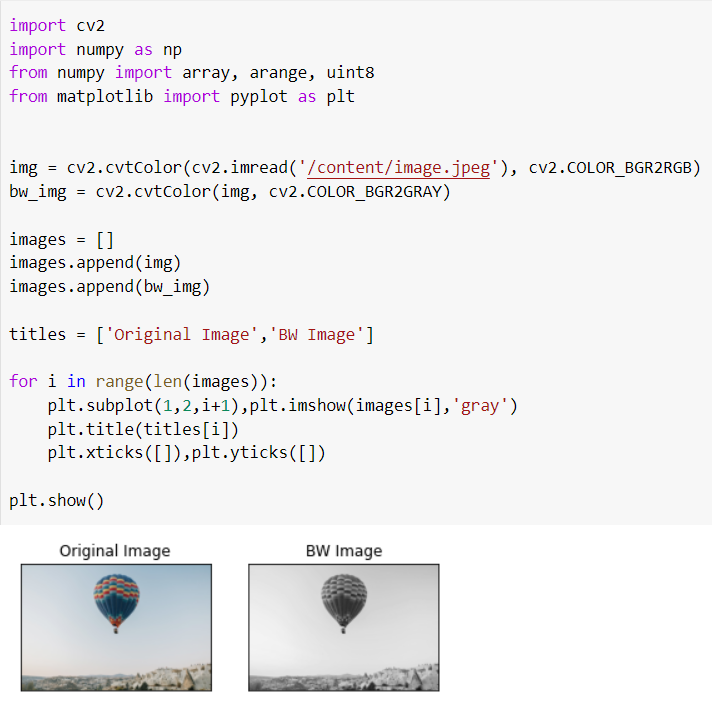
Method 5
You may also want to try cv2.IMREAD_UNCHANGED(). See more here to see how it differs from IMREAD_COLOR:
https://www.geeksforgeeks.org/python-opencv-cv2-imread-method/
Method 6
after reading the image, reverting the order of bgr matrix to rgb by reading the matrix from right to left:
x = cv2.imread('./image.jpg')

x=x[:,:,::-1]

plt.imshow(x)
All methods was sourced from stackoverflow.com or stackexchange.com, is licensed under cc by-sa 2.5, cc by-sa 3.0 and cc by-sa 4.0