I am generating 2D heat map plots of a set of 3D data. I would like to be able to have a mechanism to interactively page through each pane. Below is a simple sample code, I would like to be able to interactively view both panes (ie, z = [0,1]) via a slider bar (or some other means). Is this possible with matplotlib or is this something I’ll need to do post processing after generating the image files?
import numpy as np
from matplotlib import pyplot as plt
data = np.random.randint(10, size=(5, 5, 2))
data_slice = np.zeros((5,5))
for i in range(0, 5):
  for j in range(0, 5):
     data_slice[i][j] = data[i][j][0]
plt.imshow(data_slice, cmap='hot', interpolation='nearest')
plt.show()
Edit : I want to be able to do this interactively and it appears that the possible duplicate is trying to do this automatically.
Answers:
Thank you for visiting the Q&A section on Magenaut. Please note that all the answers may not help you solve the issue immediately. So please treat them as advisements. If you found the post helpful (or not), leave a comment & I’ll get back to you as soon as possible.
Method 1
The solution could indeed be to use a Slider as in the excellent answer by @hashmuke. In his answer he mentioned that
“The slider is continuous while the layer index is a discrete integer […]”
This brought me to think about a solution that wouldn’t have this restriction and have
a more page-like look and feel.
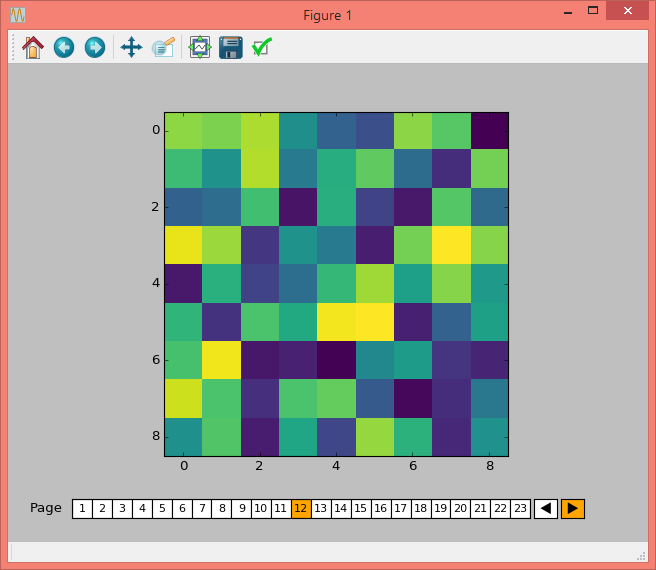
The outcome is PageSlider. Subclassing Slider it makes use of the slider functionality, but displays the slider in integer steps starting at 1. It takes the number of pages numpages as init argument, but except of that works as Slider seen from the outside. Additionally it also provides a back- and forward button.
An example, similar to the one from @hashmuke, is given below the class.
import matplotlib.widgets
import matplotlib.patches
import mpl_toolkits.axes_grid1

class PageSlider(matplotlib.widgets.Slider):

    def __init__(self, ax, label, numpages = 10, valinit=0, valfmt='%1d',
                 closedmin=True, closedmax=True,
                 dragging=True, **kwargs):

        self.facecolor=kwargs.get('facecolor',"w")
        self.activecolor = kwargs.pop('activecolor',"b")
        self.fontsize = kwargs.pop('fontsize', 10)
        self.numpages = numpages

        super(PageSlider, self).__init__(ax, label, 0, numpages,
                            valinit=valinit, valfmt=valfmt, **kwargs)

        self.poly.set_visible(False)
        self.vline.set_visible(False)
        self.pageRects = []
        for i in range(numpages):
            facecolor = self.activecolor if i==valinit else self.facecolor
            r  = matplotlib.patches.Rectangle((float(i)/numpages, 0), 1./numpages, 1,
                                transform=ax.transAxes, facecolor=facecolor)
            ax.add_artist(r)
            self.pageRects.append(r)
            ax.text(float(i)/numpages+0.5/numpages, 0.5, str(i+1),
                    ha="center", va="center", transform=ax.transAxes,
                    fontsize=self.fontsize)
        self.valtext.set_visible(False)

        divider = mpl_toolkits.axes_grid1.make_axes_locatable(ax)
        bax = divider.append_axes("right", size="5%", pad=0.05)
        fax = divider.append_axes("right", size="5%", pad=0.05)
        self.button_back = matplotlib.widgets.Button(bax, label=ur'$u25C0$',
                        color=self.facecolor, hovercolor=self.activecolor)
        self.button_forward = matplotlib.widgets.Button(fax, label=ur'$u25B6$',
                        color=self.facecolor, hovercolor=self.activecolor)
        self.button_back.label.set_fontsize(self.fontsize)
        self.button_forward.label.set_fontsize(self.fontsize)
        self.button_back.on_clicked(self.backward)
        self.button_forward.on_clicked(self.forward)

    def _update(self, event):
        super(PageSlider, self)._update(event)
        i = int(self.val)
        if i >=self.valmax:
            return
        self._colorize(i)

    def _colorize(self, i):
        for j in range(self.numpages):
            self.pageRects[j].set_facecolor(self.facecolor)
        self.pageRects[i].set_facecolor(self.activecolor)

    def forward(self, event):
        current_i = int(self.val)
        i = current_i+1
        if (i < self.valmin) or (i >= self.valmax):
            return
        self.set_val(i)
        self._colorize(i)

    def backward(self, event):
        current_i = int(self.val)
        i = current_i-1
        if (i < self.valmin) or (i >= self.valmax):
            return
        self.set_val(i)
        self._colorize(i)


if __name__ == "__main__":
    import numpy as np
    from matplotlib import pyplot as plt


    num_pages = 23
    data = np.random.rand(9, 9, num_pages)

    fig, ax = plt.subplots()
    fig.subplots_adjust(bottom=0.18)

    im = ax.imshow(data[:, :, 0], cmap='viridis', interpolation='nearest')

    ax_slider = fig.add_axes([0.1, 0.05, 0.8, 0.04])
    slider = PageSlider(ax_slider, 'Page', num_pages, activecolor="orange")

    def update(val):
        i = int(slider.val)
        im.set_data(data[:,:,i])

    slider.on_changed(update)

    plt.show()
Method 2
You can either animate the layers as suggested by Andrew’s comment or you can manually walk through the the layers using a slider as follow:
import numpy as np
from matplotlib import pyplot as plt
from matplotlib.widgets import Slider

# generate a five layer data
data = np.random.randint(10, size=(5, 5, 5))
# current layer index start with the first layer
idx = 0

# figure axis setup
fig, ax = plt.subplots()
fig.subplots_adjust(bottom=0.15)

# display initial image
im_h = ax.imshow(data[:, :, idx], cmap='hot', interpolation='nearest')

# setup a slider axis and the Slider
ax_depth = plt.axes([0.23, 0.02, 0.56, 0.04])
slider_depth = Slider(ax_depth, 'depth', 0, data.shape[2]-1, valinit=idx)

# update the figure with a change on the slider
def update_depth(val):
    idx = int(round(slider_depth.val))
    im_h.set_data(data[:, :, idx])

slider_depth.on_changed(update_depth)

plt.show()
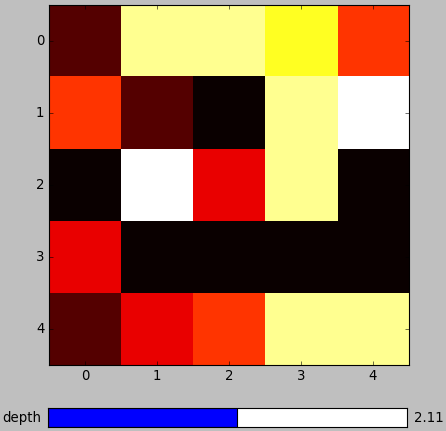
The slider is continues while the layer index is discrete integer, I hope that is not a problem. Here is the resulting figure,
All methods was sourced from stackoverflow.com or stackexchange.com, is licensed under cc by-sa 2.5, cc by-sa 3.0 and cc by-sa 4.0