Thank you for your time. I am not an advanced programmer. I am taking 1 programming course. I understand the basics and an okay amount of Python. Please don’t destroy the little confidence I have in programming. I realize the answer may exist but I haven’t found it yet with my searching skills.
Google Colab Reproducible Environment
Please run each code section until you reach TASK 2
I am trying to understand how to solve this problem. The Dataframe looks like so:

The problem: compute the number of new faculty or staff members for each year in the period of 2010-2020. Create a data frame named NewFacultyStaff including three columns Year, New_Faculty_Num and New_Staff_Num where the column Year takes value from 2010 to 2020. Each row of this data frame records the number of new faculty members and the number of new staff members for one particular year. The first five row of your DataFrame should look like the following:
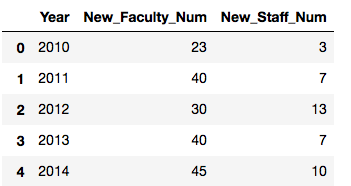
What I can do or have done:
My_list = [*range(2010, 2021, 1)]
df1 = FacultyStaff2020to2021[['Year', 'Faculty or Staff']]
df1 = df1[df1['Year'].isin(My_list)]
df2 = df1.value_counts()
df2
Solved Roundabout Manner
new_faculty = [23,40,30,40,45,71,65,46,31,54,33]
new_staff = [3,7,13,7,10,41,28,44,33,52,11]

df3 = pd.DataFrame(My_list, columns= ['Year'])
df3['New_Facuty_Num'] = new_faculty
df3['New_Staff_Num'] = new_staff
df3
If you look at the “Solved in Roundabout Manner” I could solve it this way by basically manually entering the results of df1.value_counts() into two lists and attaching them separately to the Dataframe I want…but that’s sloppy and further tells me I don’t know how to do it. I want to learn to do it like a programmer would do this.
From my searching on stackoverflow and google I understand that I can get a count by using seriess.value_count or by doing the above. Since I am only interested in dates from 2010-2020 I dropped any year values not in my_list.
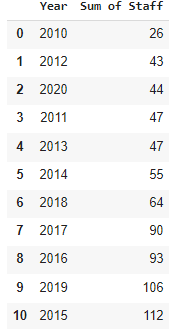
I know I can create a frequency count. I can count the total in each year like so:
I have tried a lot more ways to solve it but I the post is already getting busy and I am unsure cluttering this question with wrong code will be helpful.
What I wish to understand
I don’t know how to programmatically solve this issue the way it should look like (refer to “What it should look like” link). I have googled everything I could think of but either I’m searching incorrectly or I haven’t stumbled on what I need yet.
Researched:
Answers:
Thank you for visiting the Q&A section on Magenaut. Please note that all the answers may not help you solve the issue immediately. So please treat them as advisements. If you found the post helpful (or not), leave a comment & I’ll get back to you as soon as possible.
Method 1
Here is one way how you can do it:
starting with the df provided by you FacultyStaff2020to2021
# groupby year and Faculty or stuff and count all the values.
# now you have multiindex with year(level=0) and Faculty or staff(level=1)
# since you want level=1 as columns, you can use `unstack()`
# rename_axis = None deletes the name of the column level
# rename changes the name of each column to the desired names

tmp = (
    FacultyStaff2020to2021.groupby(["Year", "Faculty or Staff"])["Faculty or Staff"]
    .count()
    .unstack(level=1)
    .rename_axis(columns=None)
    .rename(columns={"Faculty": "New_Faculty_Num", "Staff": "New_Staff_Num"})
)

# Because year is the index of the dataframe you can directly access is by `loc`

result = tmp.loc[2010:2020, :].reset_index()

print(result)

    Year  New_Facuty_Num  New_Staff_Num
0   2010            23.0            3.0
1   2011            40.0            7.0
2   2012            30.0           13.0
3   2013            40.0            7.0
4   2014            45.0           10.0
5   2015            71.0           41.0
6   2016            65.0           28.0
7   2017            46.0           44.0
8   2018            31.0           33.0
9   2019            54.0           52.0
10  2020            33.0           11.0
All methods was sourced from stackoverflow.com or stackexchange.com, is licensed under cc by-sa 2.5, cc by-sa 3.0 and cc by-sa 4.0